Construction equipment inventory management gives rental companies an accurate view of what they control, where it is and whether it can support an upcoming rental. That requires more than counting the machines sitting in the yard.
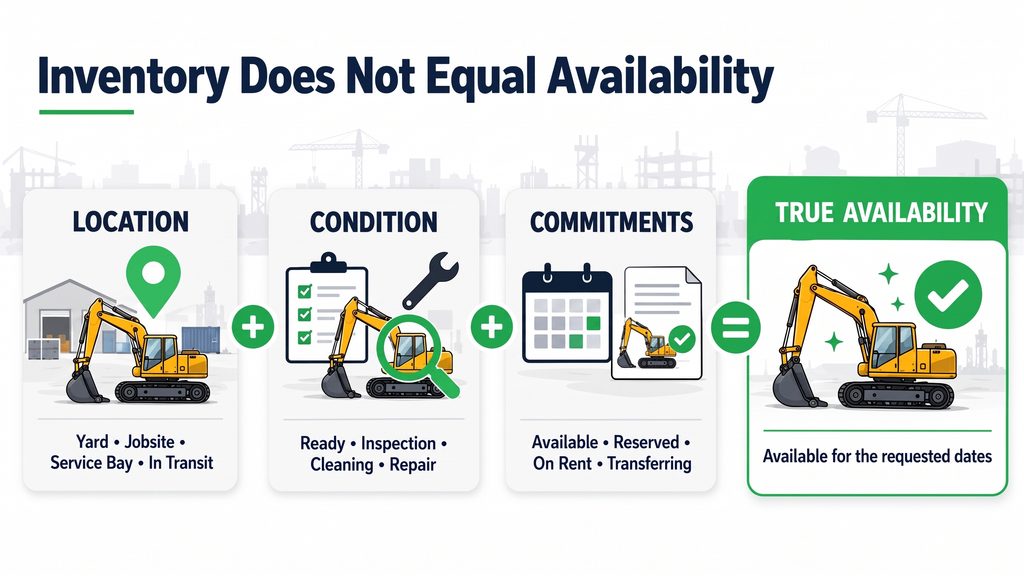
Equipment may be reserved, on rent, in transit, awaiting inspection or moving directly between jobsites. Attachments and quantity-based materials can also become separated from the machines or contracts they support. Physical location alone does not establish availability.
Rental companies need connected records for serialized equipment, attachments, tools, materials and third-party rentals. Those records must reflect location, custody, condition and future commitments as equipment moves through the rental lifecycle.
This guide presents eight steps for managing construction rental inventory, from creating equipment records to reconciling physical counts. It also explains how different tracking technologies and rental asset management software can improve inventory accuracy.
What Is Construction Equipment Inventory Management?
Construction equipment inventory management is the process of recording, locating, reserving and reconciling the assets a rental company owns or controls. It shows what equipment is available, where it is located, who has custody and which commitments affect its use.
The inventory may include serialized machines, attachments, tools, quantity-based materials and third-party equipment. Each category requires controls suited to how it is identified, moved and returned.
Inventory management overlaps with other processes but serves a distinct purpose. Asset tracking monitors location and movement, rental management handles contracts and customer commitments, and maintenance management controls service and equipment condition. Connecting these processes creates a more reliable view of availability.
For a broader explanation of reservations, contracts, dispatch, returns and billing, read our construction equipment rental software guide.

What Counts as Construction Rental Inventory?
Construction rental inventory includes more than the primary machines listed on a contract. It may contain several asset types that must be identified, reserved and returned differently:
- Serialized equipment: Excavators, loaders, skid steers, lifts and generators are managed as individual assets. Each record can connect the machine’s serial number, location, rental status, meter readings, condition and service history.
- Attachments, accessories and tools: Buckets, breakers, forks, blades and supporting accessories may move between machines or be rented independently. Compatibility records help employees match each attachment with the correct equipment.
- Quantity-based rental materials: Scaffolding, shoring, fencing, barriers and mats are often managed by item and quantity. Construction rental material tracking software should show how many units are available, reserved, dispatched, returned, damaged or missing at each location.
- Service parts and consumables: Filters, belts, fluids and replacement parts support equipment readiness but are not normally rentable inventory. Keeping them separate prevents service materials from being confused with equipment available to customers.
- Third-party equipment: Assets sourced from another rental company must remain visible within the rental workflow. Their records should identify the supplier, customer rental, location and return requirement without treating them as company-owned fleet inventory.
Classifying inventory correctly determines how availability, movements, condition and returns should be recorded throughout the rental lifecycle.
Why Equipment Counts Alone Do Not Show Availability
An equipment count shows what a company controls, but it does not show what employees can promise to a customer. A machine may be in the yard while reserved for tomorrow, awaiting inspection or missing a required attachment.
Reliable availability depends on three questions:
- Where is the equipment now?
- Is it ready to rent?
- Is it already committed for the requested period?
All three conditions must be considered before confirming a rental. This also applies to equipment packages and quantity-based materials. A loader cannot fulfil the customer’s request if the correct attachment is unavailable, and a company-wide material count is not useful if too few units are at the required branch.
Future availability introduces additional uncertainty. Equipment expected back before the next reservation may still require transportation, inspection, cleaning or repair. Construction equipment inventory management should account for that turnaround time instead of treating every expected return as immediately rentable.
Microsoft Dynamics 365 Business Central distinguishes between quantity on hand and projected availability based on locations, periods and scheduled inventory activity. Learn more about viewing item availability in Business Central.
The Construction Equipment Inventory Lifecycle
Accurate inventory records must follow equipment from initial setup through reservation, dispatch, field use and return. Each movement or status change should update the same operational record.
1. Create the Equipment Record
Serialized equipment should have a unique asset record containing its serial number, manufacturer, model, category, ownership and home location. Quantity-based materials require an item number, unit of measure and starting quantity by location.
Attachments should include compatibility information so employees know which machines they can support.
2. Assign a Location and Custodian
The record should identify both the equipment’s location and the party responsible for it. Locations may include branches, yards, service bays, delivery vehicles, supplier facilities and customer jobsites.
Recording the responsible customer, employee or driver makes it easier to investigate missing equipment and confirm unreported movements.
3. Reserve Equipment and Complete Packages
A reservation should reduce future availability for the required period. This prevents another employee from promising the same machine or quantity of materials.
Reservations must also include required attachments and accessories. An excavator is not ready for the customer if the specified bucket or hydraulic breaker is unavailable.
4. Confirm Equipment at Dispatch
The original reservation may change during loading. A machine could be substituted, additional accessories added or material quantities adjusted.
Dispatch employees should confirm what actually leaves the yard. Mobile or barcode scanning can capture the asset IDs, quantities, departure time and destination while establishing responsibility for the inventory.
5. Track Equipment in the Field
Equipment may remain at one jobsite, move between customer locations or return in stages. Each confirmed movement should update the asset’s location without removing it from the rental contract or losing its custody history.
GPS and telematics can help locate supported equipment, but they do not replace rental records. Our guide to construction equipment GPS tracking systems explains how tracking technology applies to machines, vehicles, trailers, attachments and tools.
6. Process Returns and Record Condition
Returned inventory should be matched against what was dispatched. Employees need to confirm serialized assets, count quantity-based materials and identify missing, substituted or damaged items.
A returned asset should not automatically become available. Its condition, meter reading and inspection requirements may affect what happens next. Partial returns should reduce what remains on rent without closing the customer’s responsibility for equipment still at the jobsite.
7. Route Equipment to Its Next Status
After return, equipment may become available or move into inspection, cleaning, repair, maintenance or transfer status. That status should immediately affect whether employees can reserve it.
When service is required, the inventory record should connect with the maintenance workflow. Our construction equipment maintenance software guide explains how inspections, meter readings and equipment condition can trigger work and update rental readiness.
8. Reconcile Records With Physical Inventory
Regular yard and cycle counts help identify assets moved without a transaction, returned to the wrong branch or left assigned to a completed rental. Employees should investigate discrepancies instead of changing the system record without determining what happened.
The asset’s last confirmed movement, rental, return or custodian can help locate it. Recurring discrepancies may reveal where additional scanning, training or process controls are needed.
Managing Serialized Equipment Versus Rental Materials
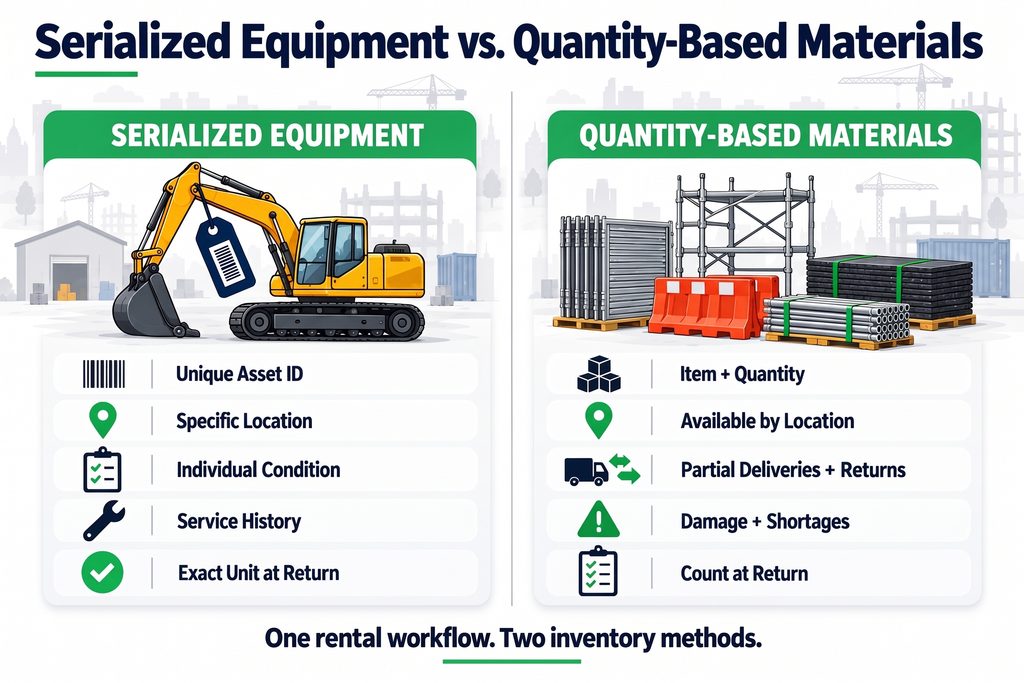
Serialized equipment retains an individual identity, while rental materials are generally controlled through quantities moving between locations and contracts. The tracking method should reflect that difference.
A rental company must know which specific excavator was dispatched, including its serial number, meter reading, condition and service history. For 200 shoring panels, the company primarily needs to know how many were delivered, returned, damaged or remain at the jobsite.
| Requirement | Serialized equipment | Quantity-based materials |
|---|---|---|
| Primary identifier | Asset or serial number | Item number and quantity |
| Availability | Specific available unit | Available quantity by location |
| Reservation | Individual asset or category | Required quantity |
| Movement | Exact asset movement | Quantity transferred |
| Condition | Recorded for each asset | Recorded by item or returned quantity |
| Maintenance | Scheduled for the machine | Inspection or replacement rules |
| Return | Confirm the exact asset | Count and reconcile quantities |
Some inventory requires a combination of both approaches. High-value attachments may be serialized, while common accessories are tracked by quantity.
Construction rental material tracking software should support both models within the same workflow. Serializing every item creates unnecessary administration, while managing high-value equipment only by quantity removes the history needed for maintenance, utilization and cost analysis.
Tracking Equipment Across Yards, Jobsites and Customers
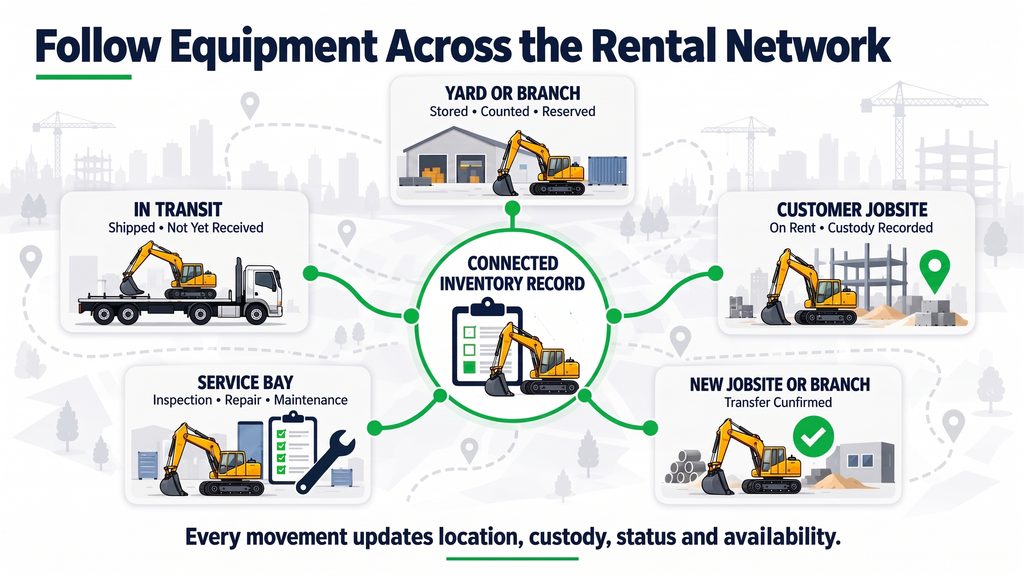
Construction equipment moves between branches, yards, delivery vehicles, service facilities and customer sites. Each movement should preserve the previous location instead of simply replacing it, creating a traceable history of where the equipment has been.
Common movements include:
- Branch-to-branch transfers
- Yard-to-jobsite deliveries
- Direct jobsite transfers
- Equipment exchanges
- Partial returns
- Temporary service movements
Each record should identify what moved, its previous location, destination, date and responsible person. It should also distinguish between a requested transfer and confirmed receipt. Equipment that has left one location but has not arrived at the next should remain in transit.
Business Central transfer orders can record inventory as it is shipped, held in transit and received at another location. Microsoft explains how to transfer inventory between locations.
Direct jobsite transfers require particular care because the asset never returns to the yard. Its location, customer custody and rental assignment must still be updated. Quantity-based materials also require the system to preserve how many units remain at each site when only part of the inventory moves.
Drivers and field employees should be able to confirm movements as they occur. If a transfer cannot be verified, the equipment should remain unconfirmed rather than being treated as available at its expected destination.
Barcode, RFID, GPS or Telematics: Which Technology Fits?
No single tracking technology fits every type of construction inventory. The right choice depends on the asset’s value, mobility, power source and the information the company needs.
| Technology | Best suited for | What it provides | Primary limitation |
|---|---|---|---|
| Barcodes and QR codes | Equipment, attachments and materials | Confirmation during picks, transfers, counts and returns | Requires employees to scan each item |
| RFID | Groups of tagged components or materials | Faster identification without direct visual scanning | Requires tags, readers and defined processes |
| GPS | Vehicles, trailers and mobile equipment | Geographic location and movement history | Does not provide complete rental context |
| Telematics | Supported powered equipment | Usage, meter and available condition data | Information varies by machine and connection |
Barcodes and RFID are most useful during controlled inventory transactions. GPS and telematics extend visibility to equipment operating away from the yard. Some fleets may use several technologies because a hardwired device suited to an excavator will not fit an unpowered attachment or quantity-based rental material.
The technology should update the company’s central inventory and rental records. Otherwise, employees may know where equipment is while still lacking reliable information about its availability, custody and future commitments.
What to Look for in Construction Equipment Inventory Software
Construction equipment inventory rental management software should connect asset records with reservations, movements, returns and future availability. A list of equipment and last-known locations is not enough.
Prioritize software that can:
- Support different inventory types: Manage serialized machines, quantity-based materials, attachments, service parts and third-party equipment.
- Show current and future availability: Account for rentals, reservations, transfers, inspections and service requirements.
- Track location and custody: Preserve movements between yards, vehicles, jobsites, customers and service facilities.
- Manage equipment packages: Connect machines with compatible attachments, accessories and supporting materials.
- Control dispatch and returns: Confirm what left the yard, process partial returns and identify missing or substituted items.
- Connect wider processes: Link rental inventory with purchasing, maintenance, accounting and reporting.
The software should distinguish planned activity from confirmed activity. A transfer request does not prove that equipment arrived, and an expected return should not make an asset immediately available.
Ask potential providers to demonstrate realistic exceptions such as a partial return, equipment exchange, direct jobsite transfer and missing attachment. These scenarios reveal more about rental asset management software for construction than a standard reservation and return.
Companies evaluating a broader platform can also compare five rental software ERP systems based on their rental, inventory, service and financial capabilities.
Inventory Management KPIs for Construction Rental Companies
Inventory reporting should reveal whether system records match physical equipment and whether available assets are supporting customer demand. Useful KPIs include:
- Inventory record accuracy: Percentage of checked assets or quantities that match their recorded location, status and count.
- Unconfirmed equipment movements: Transfers, deliveries and returns that have started but have not been acknowledged at their destination.
- Equipment availability: Percentage of the fleet ready to rent compared with equipment reserved, rented, in transit or awaiting service.
- Utilization by asset and category: How frequently equipment is rented compared with the time it remains idle.
- Return-to-ready time: Time between equipment return and release for the next rental, including inspection, cleaning and repair.
- Inventory losses and shortages: Missing assets, damaged materials, attachment shortages and quantity differences found during returns or physical counts.
Rental companies can also monitor how frequently they source third-party equipment because their fleet cannot meet demand. Increasing re-rentals may indicate insufficient inventory, poor distribution between branches or unreliable availability records.
These measurements should be reviewed as trends rather than against a universal benchmark. Fleet composition, rental duration, equipment value and operating model all affect the expected results.
How Service Dynamics Connects Rental Assets and Inventory
Construction equipment inventory management works best when rental activity, inventory records, service work and financial information remain connected. Service Dynamics brings these processes together using RUX Rentals, Microsoft Dynamics 365 Business Central and ExpandIT.
Learn how Service Dynamics supports construction equipment rental companies that need to connect inventory, rentals, service and financial reporting.
RUX Rentals Manages Rental Availability
RUX Rentals connects equipment with reservations, contracts, future commitments, sub-rentals and fleet activity. Its availability calendar helps employees see what is available, reserved or already rented.
Business Central Connects Inventory and Financial Records
Business Central supports inventory items, physical counts, availability by location, transfers, reservations and serial-number tracking. Microsoft provides an overview of these capabilities in its official guide to managing inventory in Business Central.
It also connects inventory transactions with purchasing, accounting and financial reporting. This gives rental, inventory and accounting teams access to the same underlying records.
ExpandIT Supports Field Service Activity
ExpandIT Field Service supports mobile work orders, technician scheduling, inspections, parts usage and service documentation. Field updates help the office understand whether returned equipment requires inspection or repair before its next rental.
Together, these applications connect rental availability with the inventory, service and financial activity behind each asset. Service Dynamics helps configure the platform around the company’s equipment, locations and operating processes.
Frequently Asked Questions About Construction Equipment Inventory Management
What Is Construction Equipment Inventory Management?
Construction equipment inventory management records the location, availability, custody and status of rental assets. It can cover serialized machines, attachments, tools, quantity-based materials and third-party equipment.
How Do Rental Companies Track Construction Equipment?
Rental companies use asset records, rental contracts, transfer transactions, mobile scanning, GPS devices and telematics. The appropriate method depends on the equipment type and the information required.
What Is the Difference Between Equipment Inventory and Asset Tracking?
Inventory management connects equipment with quantities, reservations, condition and availability. Asset tracking focuses primarily on an asset’s location and movement.
Can Rental Software Track Attachments and Accessories?
Rental software can maintain separate records for attachments and connect them with compatible machines or rental packages. This helps employees confirm that every required component is available for the same period.
How Do You Track Rental Materials by Quantity?
Materials should be tracked by item, quantity, location and status. Construction rental material tracking software should update records when materials are reserved, dispatched, transferred, returned, damaged or reported missing.
Can GPS Data Update Rental Inventory Records?
GPS and telematics data may be shared with rental software through an available integration. The information and update frequency depend on the equipment, device, tracking provider and connected system.
How Should Direct Jobsite Transfers Be Recorded?
The transfer should identify the equipment, previous location, destination, date, customer or contract and responsible person. The equipment should remain in transit until its arrival is confirmed.
What Should Rental Asset Management Software for Construction Include?
Rental asset management software for construction should support serialized equipment, quantity-based materials, locations, reservations, transfers, dispatch, returns and third-party rentals. It should also connect inventory with maintenance, purchasing, accounting and reporting.
Improve Inventory Accuracy Across the Rental Operation
Effective construction equipment inventory management connects asset records with locations, rental commitments, movements, condition and custody. It gives employees a reliable view of what the company controls and whether it can support the next rental.
Start by separating serialized equipment from quantity-based materials. Confirm what leaves and returns, document transfers as they happen and reconcile system records with physical inventory. Tracking technology can support these controls, but it should feed a connected rental and inventory system.
Service Dynamics helps construction rental companies connect RUX Rentals, Microsoft Dynamics 365 Business Central and field-service applications. If spreadsheets or disconnected systems are limiting your inventory visibility, contact Service Dynamics to discuss your equipment, locations and rental-management requirements.