A machine can be sitting in the yard and still be unavailable. It may already be reserved, waiting for inspection or missing an attachment required for its next job. When rental contracts, equipment status, maintenance and billing are managed in separate systems, these details are easy to miss.
Construction equipment rental software gives rental coordinators, dispatchers, service teams and accounting employees one place to manage the rental lifecycle. It connects availability, reservations, deliveries, equipment movements, inspections, maintenance, returns and charges so each department can work from the same information.
This guide explains how construction rental software works, which features matter most and when a company may need a complete equipment rental ERP. It also provides practical criteria and questions you can use to compare potential systems.
What Is Construction Equipment Rental Software?
Construction equipment rental software manages the equipment, contracts and activities involved in renting machinery. It helps employees determine what is available, reserve the right assets and track each rental from the initial quote through return and billing.
Unlike basic inventory software, a rental system must account for time as well as quantity. A machine may be in the yard today but reserved for delivery tomorrow. Another may have returned from a customer but remain unavailable until it passes inspection.
The software typically manages:
- Quotes, reservations and rental contracts
- Current and future equipment availability
- Rental rates and customer-specific terms
- Deliveries, pickups and transfers
- Extensions, exchanges and partial returns
- Inspections, damage, maintenance and repairs
- Recurring charges and final invoices
Some platforms concentrate on front-line rental operations and integrate with separate accounting software. An equipment rental ERP goes further by connecting rentals with purchasing, inventory, service, accounting and company-wide reporting.
What Types of Equipment Can It Manage?
Heavy equipment rental software can track individual machines such as excavators, loaders, skid steers, lifts, generators and compactors. Each serialized asset can have its own location, status, meter readings, service history and rental record.
The same platform may also manage:
- Buckets, breakers, augers and other attachments
- Trailers and transportation equipment
- Accessories and safety equipment
- Bulk or quantity-based rental inventory
- Parts and consumables
- Equipment packages rented together
Supporting both serialized and quantity-based inventory is important. A company may need a detailed record for each excavator while tracking smaller accessories by quantity.
Our guide to construction equipment inventory management explains how to manage both inventory structures across yards, jobsites and customer rentals.
Who Uses the Software?
Construction rental software connects several teams:
- Rental coordinators prepare quotes, check availability and create contracts.
- Dispatchers coordinate deliveries, pickups and equipment transfers.
- Service teams complete inspections and manage maintenance or repairs.
- Accounting employees generate invoices and record rental-related costs.
- Managers monitor utilization, downtime and profitability.
When these teams use the same equipment and contract information, they spend less time reconciling spreadsheets, emails and conflicting records.
How Construction Equipment Rental Software Works
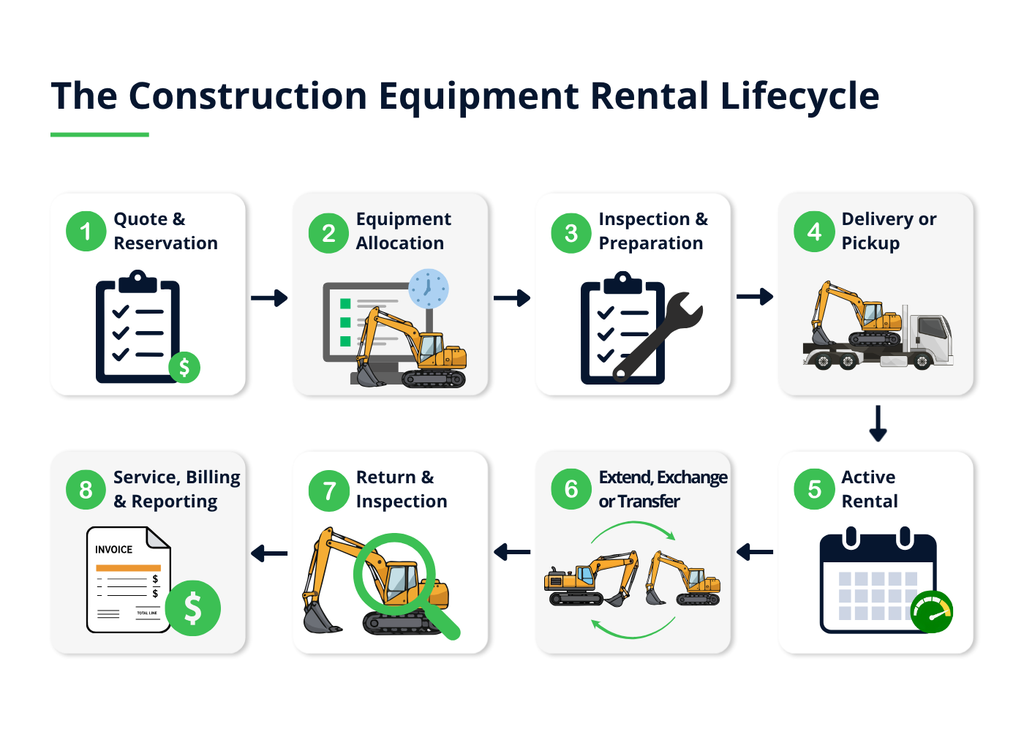
Construction equipment rental software follows each asset through eight stages, preserving its operational and financial history as the rental changes.
1. Quote and Reservation
The rental coordinator records the requested equipment, attachments, rental period, jobsite and pricing terms. The system checks current and future availability before the reservation is confirmed.
2. Equipment Allocation
A reservation may begin with an equipment category, such as a 5,000-pound excavator. Closer to the rental date, the team assigns a specific machine based on its location, condition and service requirements.
Attachments and accessories can be allocated at the same time so the complete package is reserved.
3. Inspection and Preparation
Employees inspect the equipment, record meter readings and document its condition before release. If the machine requires maintenance or repair, its status changes and another unit can be assigned.
4. Delivery or Pickup
Dispatchers schedule the equipment movement and record the driver, vehicle, delivery window and jobsite instructions when applicable. Once the equipment leaves, its location and rental status update for the rest of the team.
5. Active Rental
Employees can view the contract, equipment location, expected return and accumulated charges. If the customer requests an extension, the system checks for conflicts with future reservations before confirming the new date.
6. Extension, Exchange or Transfer
The rental team records schedule changes, equipment exchanges and moves between jobsites. Availability, dispatch requirements, contract details and billing update with the change.
7. Return and Inspection
At return, employees record the equipment’s condition, meter reading, fuel level and missing or damaged items. The machine remains unavailable if it requires cleaning, inspection, maintenance or repair.
8. Service, Billing and Reporting
The completed rental supplies the information needed to calculate time, usage, transportation, fuel, damage and other charges. Service requirements can create maintenance work, while rental revenue and related costs contribute to operational and financial reporting.
A connected workflow prevents employees from recreating the same rental in separate dispatch, maintenance and accounting systems whenever its status changes.
12 Essential Construction Equipment Rental Software Features
Feature lists can make competing systems look more similar than they are. During demonstrations, ask vendors to show how each capability handles your actual equipment, pricing and rental exceptions.
1. Real-Time Fleet Availability
Employees should be able to search an equipment category and see which units are available for the requested period. The calculation should account for future reservations, expected returns, maintenance, transfers and preparation time.
Ask the vendor to extend an active rental into another reservation. The system should identify the conflict before the extension is confirmed.
2. Reservations and Rental Contracts
The software should carry customer, equipment, pricing and jobsite information from the original quote through the completed rental.
Look for support for contract changes without losing the original record. Authorized employees should be able to manage legitimate exceptions while controls prevent accidental overbooking or unapproved pricing changes.
3. Serialized Equipment Tracking
Each high-value machine should have an individual record containing its location, status, meter readings, specifications, rental history and service history.
This allows employees to distinguish between otherwise identical machines. One may be ready to rent while another has an open repair or is approaching a service interval.
If you want to learn more about equipment tracking, read our in-depth guide on construction equipment tracking systems.
4. Multi-Location and Jobsite Tracking
The system should track equipment across branches, yards, service facilities and customer jobsites. Transfers must update availability without separating the asset from its rental and maintenance history.
Confirm that the software supports direct jobsite-to-jobsite moves and records any resulting changes to transportation, responsibility or billing.
5. Dispatch, Delivery and Pickup Scheduling
Dispatchers need a coordinated view of equipment movements, drivers, vehicles and customer commitments.
Useful capabilities include:
- Delivery and pickup windows
- Driver and vehicle assignments
- Jobsite instructions
- Status updates
- Proof of delivery
- Photos and customer signatures
Mobile updates should make equipment status visible to the office without waiting for drivers to return with paperwork.
6. Attachments and Equipment Packages
Construction rentals often combine machines, attachments and quantity-based accessories. The software should confirm that every component is available for the same period and location.
It should also support partial returns. Returning one attachment should update its availability and charges without closing the remaining rental.
7. Flexible Rental Rates
Heavy equipment rental software may need to manage hourly, daily, weekly and monthly pricing alongside customer-specific agreements.
Ask vendors to demonstrate your rules for minimum periods, overtime, excess usage, duration discounts and manual overrides. The demonstration should show how a pricing change affects both the contract and invoice.
8. Recurring and Prorated Billing
Long-term rentals should generate invoices according to the agreed schedule without being rebuilt each period.
The system must also calculate what happens when equipment starts late, returns early, is exchanged or leaves partway through a billing cycle. These exceptions are a better test of billing flexibility than a standard recurring invoice.
9. Inspections and Condition Records
Employees should be able to complete pre-rental and return inspections with meter readings, notes, photos and signatures.
When damage is identified, the record should show which customer had the equipment, what repair is required, whether the asset remains rentable and which costs may be chargeable.
10. Preventive Maintenance and Repairs
Maintenance may be scheduled by date, operating hours, mileage or another usage measurement. The system should retain work orders, parts, labour, outside services and repair history for each asset.
Most importantly, an open safety issue or repair must affect availability. Rental coordinators should not be able to promise a machine that is not ready.
Learn how to build a heavy equipment maintenance schedule that accounts for service triggers, upcoming rentals, technician capacity and equipment availability.
11. Mobile and Offline Access
Employees working in yards, delivery vehicles and jobsites may need to:
- Review assignments and rental details
- Record inspections and meter readings
- Capture photos and signatures
- Confirm deliveries or pickups
- Report damage or breakdowns
- Enter parts and labour
If connectivity is unreliable, confirm which functions work offline and how records synchronize afterward.
12. Utilization and Profitability Reporting
Reporting should help managers evaluate performance by asset, equipment category, branch, contract and customer.
Confirm which costs can be included alongside rental revenue, such as maintenance, labour, parts, transportation and third-party equipment. Also ask how the system defines utilization. Calendar, physical and financial utilization measure different aspects of fleet performance and should not be treated as interchangeable.
Rental Management Software vs. Equipment Rental ERP
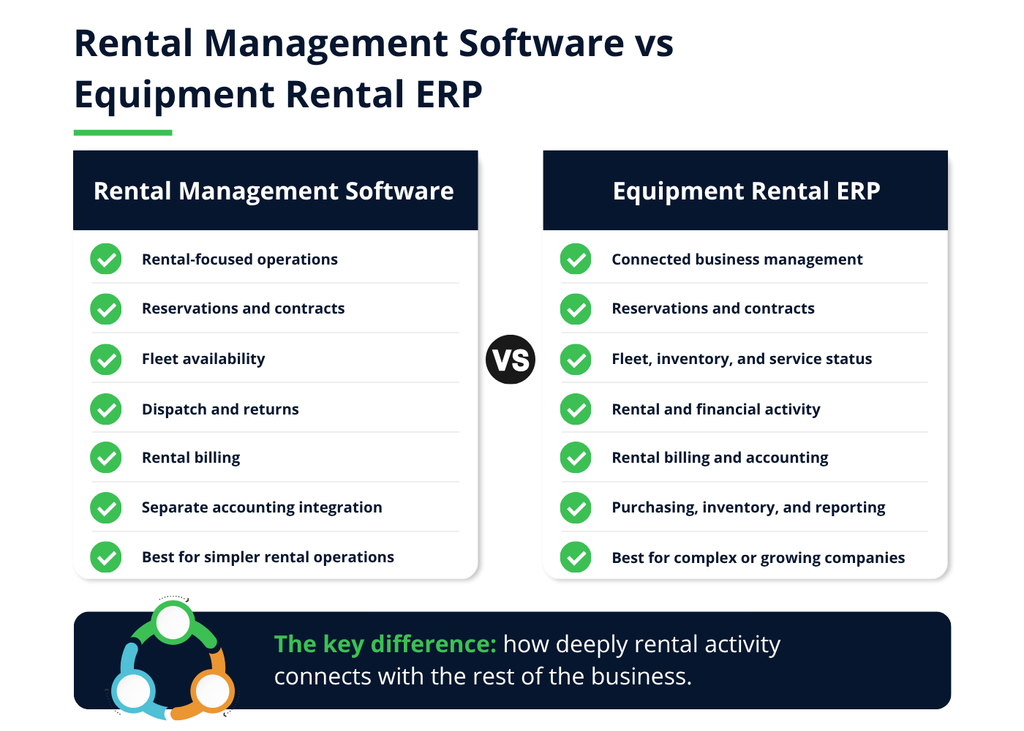
Both rental management software and equipment rental ERP systems can manage reservations, contracts and fleet availability. The difference is how deeply rental activity connects with the rest of the business.
Standalone rental software focuses on the operational rental lifecycle. An equipment rental ERP connects those workflows with accounting, purchasing, inventory, maintenance and financial reporting.
| Business Area | Rental Management Software | Equipment Rental ERP |
|---|---|---|
| Reservations and contracts | Core capability | Core capability |
| Fleet availability | Typically included | Connected with inventory and service status |
| Dispatch | Often included | Connected with rental and financial activity |
| Maintenance | Included or separately integrated | Connected with parts, purchasing and asset costs |
| Accounting | Usually a separate integration | Part of the wider platform |
| Reporting | Primarily rental-focused | Operational and financial reporting |
| Best fit | Companies prioritizing rental operations | Companies connecting rentals across the business |
When Is Standalone Rental Software Enough?
Standalone construction rental software may suit a company with relatively simple processes and an accounting platform it intends to keep.
The integration still needs careful evaluation. Confirm how customers, equipment, invoices, payments and corrections move between systems. An integration that sends only summary invoices may not provide enough detail for cost or profitability analysis.
When Does an Equipment Rental ERP Make More Sense?
An equipment rental ERP becomes more valuable when a company has:
- Multiple branches or legal entities
- A large serialized fleet
- Significant parts and warehouse activity
- Internal or external service work
- Complex purchasing and re-rentals
- Recurring or customer-specific billing
- Extensive financial reporting requirements
- Frequent duplicate entry between rental and accounting systems
The advantage is not simply having more functionality. It is preserving the relationship between activities. A repair can consume parts and labour, affect availability, generate purchasing activity and change asset profitability without being recreated in several applications.
Neither category is automatically better. The decision depends on whether the primary problem exists within rental operations or across the wider business. Companies considering a complete ERP can also compare five rental software ERP systems based on their capabilities, ideal fit and limitations.
How Construction Rental Software Improves Fleet Performance
Construction equipment rental software improves fleet performance by connecting availability, maintenance, billing and costs.
Availability reporting helps managers identify equipment sitting idle at one branch while another has unmet demand. Maintenance records reveal machines losing rental time to recurring repairs. Connecting operational events with billing reduces missed charges for extensions, transportation, fuel and damage.
The system should also help management evaluate more than rental revenue. Asset-level reporting can support repair-or-replace decisions, while contract-level reporting can reveal when transportation, service or discounts consumed the expected margin.
The result is a clearer picture of which equipment is being used, what it costs to keep operating and where the fleet is generating value.
How to Choose the Best Heavy Equipment Software for Your Construction Rental Business
The best heavy equipment software for a construction rental company is not necessarily the product with the most features. It is the one that supports the company’s real workflows, connects the right departments and can be implemented without creating new layers of manual work.
1. Map Your Rental Workflows
Document how a rental moves from the initial request through final payment. Include the people, systems and documents involved at each stage.
Pay particular attention to exceptions:
- Last-minute extensions
- Equipment breakdowns
- Partial returns
- Mid-rental exchanges
- Direct jobsite transfers
- Third-party re-rentals
- Billing corrections
- Disputed damage
These scenarios reveal requirements that a standard reservation-to-return demonstration may overlook.
2. Prioritize the Requirements
Classify each requirement as:
- Must have: The business cannot operate effectively without it.
- Should have: It would provide meaningful value, but an acceptable alternative exists.
- Future requirement: It will become important as the fleet or company grows.
Include rental operations, dispatch, service, accounting, management and IT in this process. A system chosen by one department can easily create more work for another.
3. Evaluate the Complete Technology Stack
Identify how construction equipment rental management software will connect with the company’s:
- Accounting or ERP platform
- Telematics
- Payment processing
- Field service
- CRM
- Payroll
- Customer portal
- Reporting tools
Determine which integrations are native, third-party or custom. Confirm which information moves in each direction and who supports the connection when it fails.
4. Control the Demonstration
Give each vendor the same scenarios and ask them to complete the workflows in the software.
For example, have the vendor reserve a machine and two attachments, extend the rental into another reservation, exchange the machine, return one attachment early, record damage and produce the revised invoice.
This exposes whether each step uses standard functionality, configuration, custom development or a workaround.
5. Assess Implementation and Support
A realistic implementation plan should cover:
- Process design and configuration
- Data cleanup and migration
- Integrations
- Testing
- Employee training
- Permissions
- Launch support
Clarify what the vendor or implementation partner will deliver and what your employees must provide. Ask who will support the system after launch and how future changes are priced.
6. Compare Total Cost
Look beyond the monthly subscription. Include licences, implementation, migration, integrations, custom development, training, internal labour, support and future upgrades.
The final decision should balance cost with operational fit and implementation risk. Less expensive construction rental software can become the more costly choice if it requires extensive workarounds or another replacement as the business grows.
Ask These Questions During the Demonstration
- How does the system calculate future availability?
- What happens when a rental extension conflicts with another reservation?
- Can it handle exchanges and partial returns?
- Does maintenance status affect availability?
- Which integrations are native, third-party or custom?
- How does it calculate utilization and profitability?
- Who implements and supports the system?
- Which workflows require customization?
Ask vendors to answer through the software wherever possible. If an essential workflow cannot be demonstrated, document whether it requires configuration, an integration, custom development or a change to your process.
How Business Central Can Support Construction Equipment Rental Companies
Microsoft Dynamics 365 Business Central provides an ERP foundation for managing financials, purchasing, inventory, projects and reporting.
It can also use serial numbers to track individual items and maintain records for service items and their components. These capabilities are useful for equipment-based businesses, but Business Central is not specialized rental management software on its own.
Learn more about what Business Central Essentials includes for rental and field service companies
Construction rental companies typically need an industry application for workflows such as:
- Equipment reservations
- Time-based rental rates
- Contract extensions
- Recurring charges
- Equipment exchanges
- Partial returns
- Rental packages
Connecting Rental Operations with ERP
Service Dynamics combines Business Central with RUX Rentals to connect specialized rental activity with the wider business.
RUX Rentals manages rental contracts, equipment reservations and billing events. Business Central supplies the underlying customer, inventory, purchasing, accounting and reporting capabilities.
This prevents rental transactions from being recreated in a separate accounting system. Equipment, customers, invoices and related costs remain connected as the rental progresses.
See the Complete Rental Lifecycle in RUX Rentals
See how RUX Rentals connects equipment availability, contracts, service, maintenance, billing and fleet reporting within Microsoft Dynamics 365 Business Central.
Adding Field Service Capabilities
Some construction rental companies also dispatch technicians for breakdowns, repairs or other work at customer locations. These businesses may add ExpandIT Field Service for scheduling, mobile field-service work and jobsite information.
The required combination depends on the operation. A counter-rental company may not need the same field-service capabilities as a business supporting heavy equipment across a wide geographic region.
Why the Connection Matters
Consider what happens when a machine breaks down during a rental:
- The asset becomes unavailable.
- A technician inspects or repairs it.
- Parts and labour create additional costs.
- A replacement machine may be delivered.
- The rental contract or invoice may change.
- The event affects asset and contract profitability.
A connected equipment rental ERP preserves the relationships between these activities. Managers can evaluate the financial impact of the breakdown instead of seeing only the original rental charge.
The software still needs to be configured around the company’s equipment, rates, service processes and reporting requirements. The ERP provides the foundation, while specialized applications manage the rental and field-service workflows.
Frequently Asked Questions About Construction Equipment Rental Software
What Is the Best Software for a Construction Equipment Rental Company?
The best system is the one that supports the company’s equipment, rates, maintenance processes and reporting requirements with minimal manual work.
Smaller companies may need focused software for reservations, contracts and billing. More complex businesses may benefit from an equipment rental ERP that connects rentals with accounting, purchasing, inventory and service.
How Much Does Construction Equipment Rental Software Cost?
Pricing depends on the number of users, required applications, implementation complexity, integrations, migration and support.
Compare the total cost, including licenses, implementation, training, internal labour and future upgrades. Vendors should separate initial project costs from recurring expenses.
Can Rental Software Track Equipment Across Multiple Locations?
Yes. Multi-location software can track equipment across branches, yards, service facilities and customer jobsites.
It should also manage transfers, update availability and preserve the asset’s rental and service history. Ask vendors to demonstrate a direct jobsite-to-jobsite transfer because it may affect transportation, contracts and billing.
Can It Manage Attachments and Accessories?
Rental software can manage attachments, accessories and equipment packages alongside the primary machine.
The system should confirm that every component is available for the same period and support partial returns when the customer keeps the main machine but returns an attachment.
Does Rental Software Include Preventive Maintenance?
Many systems include maintenance functions or connect with service management software. Maintenance can be scheduled by date, operating hours, mileage or another usage measurement.
The critical requirement is that equipment with an open service or safety issue does not appear available for another rental.
Can Construction Rental Software Integrate with Telematics?
Some systems connect with telematics platforms to receive equipment location, hours, mileage, fault codes or usage information.
Support varies by equipment and provider. Confirm which data is transferred, how frequently it updates and whether it can trigger maintenance or other actions.
What Is the Difference Between Rental Software and an ERP?
Rental software primarily manages reservations, contracts, availability, dispatch, returns and rental billing.
An ERP manages broader functions such as accounting, purchasing, inventory and financial reporting. An equipment rental ERP connects the specialized rental lifecycle with these company-wide processes.
Choosing Software That Connects the Entire Rental Operation
Construction equipment rental software should give rental coordinators, dispatchers, service teams and accounting employees a shared view of each asset and contract. That includes availability, location, attachments, transportation, maintenance, billing and profitability.
The right type of system depends on where the operational gaps exist. Some companies need focused construction rental software connected to their existing accounting platform. Others need an equipment rental ERP that connects rental activity with inventory, purchasing, service and company-wide financial reporting.
Before choosing a platform, document the exceptions that are hardest to manage today. Ask vendors to demonstrate extensions, exchanges, partial returns, breakdowns and jobsite transfers using your equipment structures and pricing rules. These scenarios will reveal more about operational fit than a standard feature presentation.
Service Dynamics helps construction equipment rental companies connect Microsoft Dynamics 365 Business Central with specialized rental and field-service applications. If disconnected systems are making it difficult to manage equipment, maintenance and billing, talk to our team about a more connected approach.