Construction rental equipment must be ready when customers need it. A machine sitting in the yard may still be unavailable because it requires an inspection, scheduled service or repair before its next rental.
Construction equipment maintenance software helps rental companies schedule this work using engine hours, mileage, calendar intervals, inspection results and equipment condition. It can also connect rental fleet maintenance with work orders, technicians, parts, equipment availability and service history.
An effective maintenance process should:
- Create an accurate record for every asset.
- Define the correct maintenance triggers.
- Collect current usage and condition information.
- Identify service requirements before the next rental.
- Schedule work around customer commitments.
- Record labour, parts and completed procedures.
- Update the equipment’s service history and rental status.
This guide explains how to build a heavy equipment maintenance schedule and connect maintenance with the wider rental operation.
What Is Construction Equipment Maintenance Software?
Construction equipment maintenance software is used to schedule, perform and document service for heavy equipment, vehicles, trailers, attachments and other fleet assets.
It gives maintenance teams one place to manage:
- Equipment records
- Engine hours and mileage
- Preventive maintenance schedules
- Inspections and repair requests
- Work orders and technicians
- Parts and outside services
- Warranties
- Service history and costs
The software can generate alerts as equipment approaches a maintenance threshold and turn those requirements into actionable work orders. Once service is complete, the equipment record can be updated with the work performed, meter reading, labour, parts, costs and next service date.
However, maintenance software does not determine the correct procedures or intervals by itself. These should be based on the manufacturer’s documentation, equipment configuration, warranty conditions and operating environment. Caterpillar, for example, recommends consulting each machine’s Operation and Maintenance Manual for its required procedures and service intervals.
The software should allow these requirements to be configured for individual assets rather than applying one universal maintenance schedule across the fleet.

Why Rental Fleet Maintenance Is More Complicated
Rental fleet maintenance must be coordinated with customer commitments, equipment availability, transportation, technicians and parts. A maintenance delay can quickly become a missed rental.
Equipment May Be Away When Service Is Due
Rental equipment can accumulate hours at a customer’s jobsite without returning to the yard. Maintenance teams need advance warnings so they can arrange mobile service, schedule a pickup or provide replacement equipment before service becomes overdue.
Different Assets Use Different Maintenance Triggers
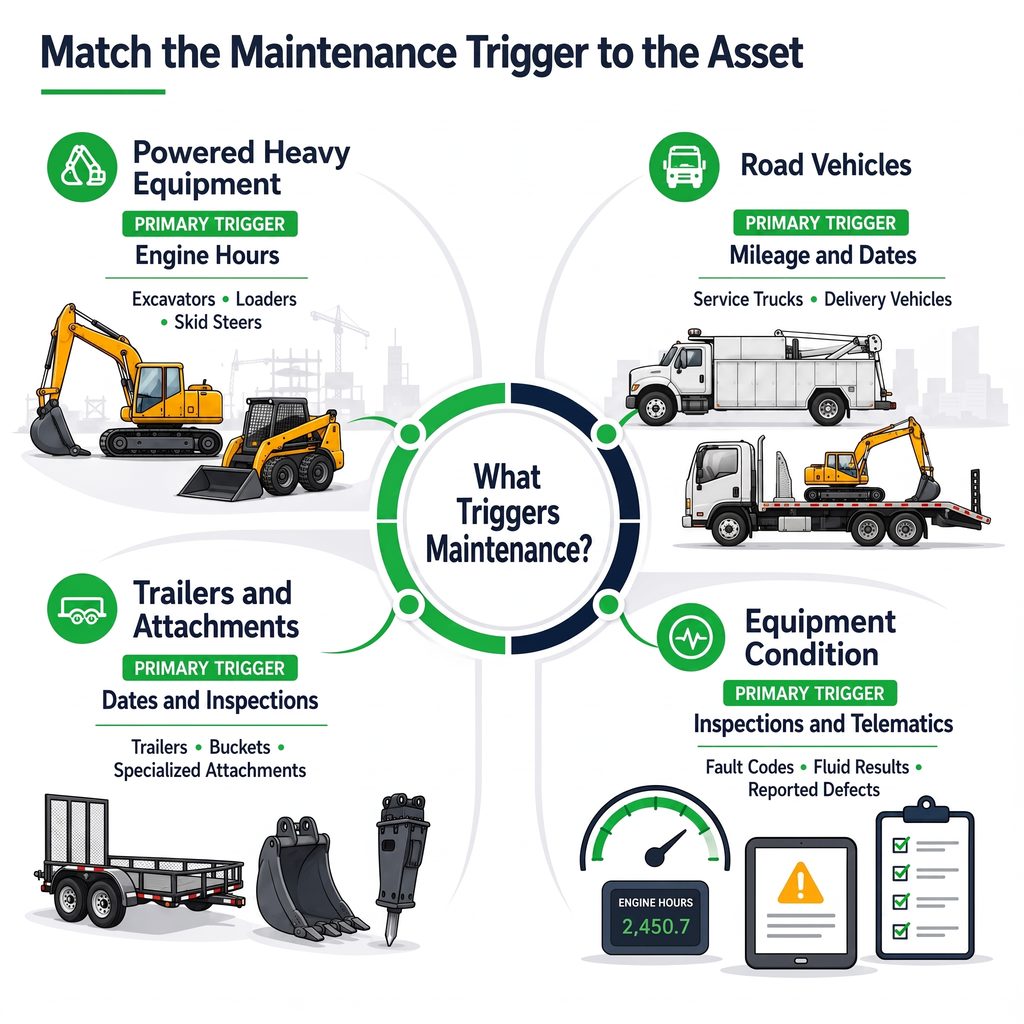
Heavy equipment may require service based on engine hours, while trucks often use mileage and calendar intervals. Trailers, attachments and smaller assets may rely more heavily on inspections, equipment condition or manufacturer requirements.
The schedule may also need to respond to fault codes, fluid analysis, warranty work and reported defects.
Maintenance Affects Rental Availability
Equipment should not appear available simply because it is physically in the yard. An asset may still be waiting for inspection, parts, service or final approval.
Connecting maintenance status with rental availability prevents employees from promising equipment that will not be ready.
Damage May Be Discovered at Return
Return inspections can uncover damage, excessive wear or missing components. These findings should create repair activity and prevent the equipment from being assigned to another customer until the required work is complete.
Types of Construction Equipment Maintenance
A heavy equipment maintenance schedule usually includes several types of planned and unplanned work:
- Preventive maintenance follows manufacturer requirements, engine hours, mileage or calendar intervals.
- Condition-based maintenance responds to inspection results, fault codes, fluid analysis or visible wear.
- Predictive maintenance uses operating and condition data to identify potential failures before they occur.
- Corrective maintenance addresses known defects before they become urgent.
- Emergency maintenance responds to breakdowns or safety-critical problems requiring immediate attention.
Tracking these categories separately helps rental companies understand whether planned service is preventing breakdowns. A growing volume of emergency work may indicate missed inspections, ineffective maintenance intervals or recurring equipment problems.
How to Schedule Maintenance for Construction Rental Equipment
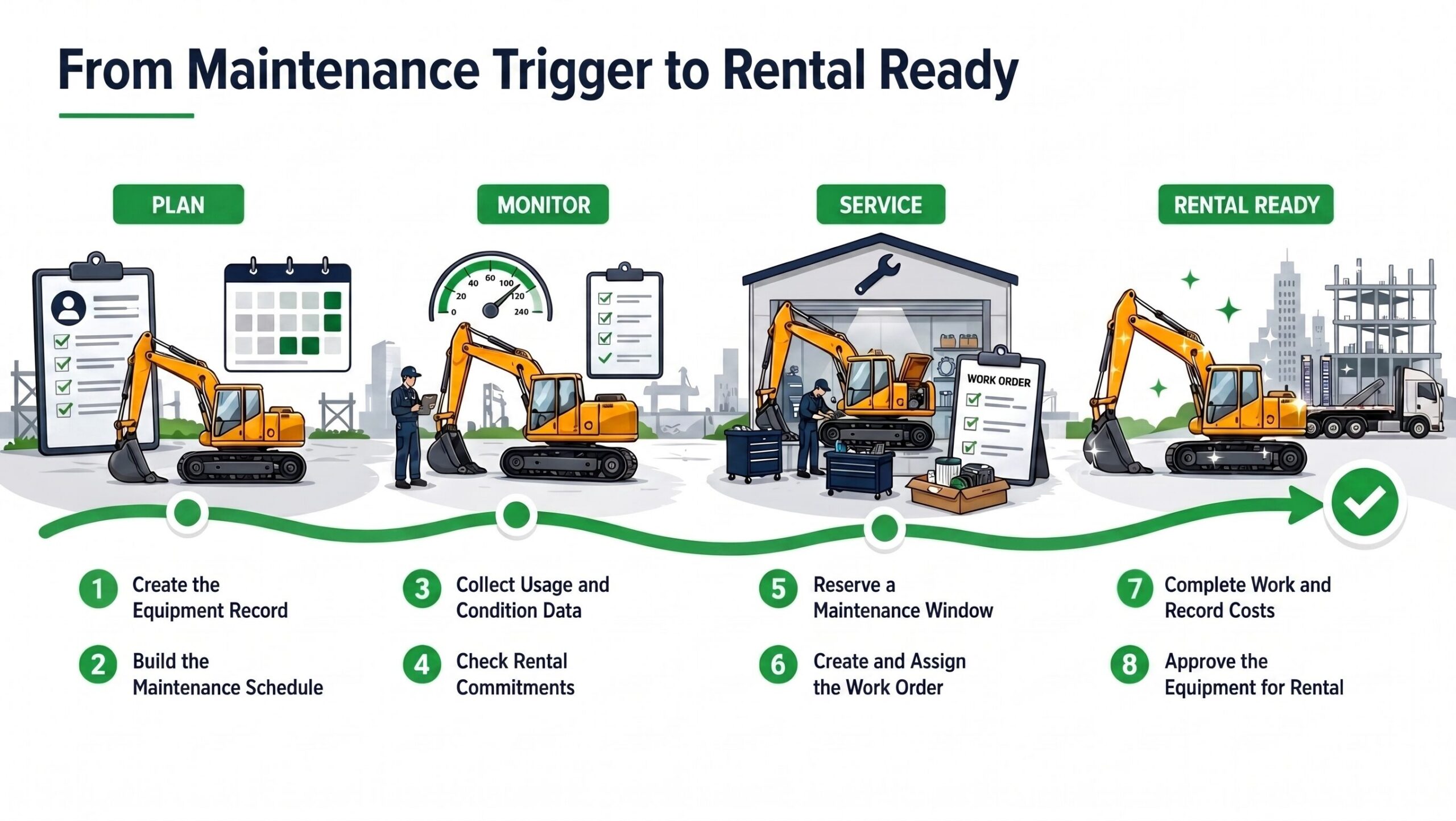
1. Create a Complete Record for Every Asset
An effective maintenance schedule starts with an accurate record for every asset. Without consistent equipment information, service intervals, work orders and costs can become attached to the wrong machine or disconnected from its rental history.
Each equipment record should include:
- Asset ID and equipment category
- Manufacturer, model and serial number
- Current location and rental status
- Engine-hour or odometer reading
- Warranty and maintenance information
- Previous inspections and service
The record should also identify how maintenance will be measured. An excavator may use engine hours, while a delivery truck may use mileage and a trailer may rely on calendar and inspection intervals.
Attachments and components may require separate records when they have their own serial numbers, inspection requirements or repair costs. This is particularly important when attachments move between machines or are rented independently.
Standardized records give rental, service and accounting teams a shared equipment identity while creating the foundation for accurate service history, downtime and maintenance costs.
For a broader look at how these records support location, availability, attachments and reusable materials, read our guide to managing construction equipment inventory.
2. Build the Heavy Equipment Maintenance Schedule
Build each maintenance schedule around the requirements for the specific machine. Review its manufacturer documentation, warranty terms and service information before setting tasks or intervals.
A maintenance plan may include:
- Engine-hour intervals
- Mileage thresholds
- Calendar dates
- Pre-use or seasonal inspections
- Fluid and condition analysis
- Telematics alerts
- Warranty requirements
The schedule should reflect how and where the equipment operates. Dust, mud, extreme temperatures and high-load applications may require additional attention. Any changes to the maintenance plan should follow qualified technical guidance and remain documented.
Set advance warnings early enough to review upcoming rentals, secure parts and reserve technician time before service becomes due. Avoid applying one generic plan to every machine because model, age, configuration and operating conditions can change what work is required.
3. Collect Meter Readings and Equipment Condition
A maintenance schedule is only reliable when it receives current information about equipment usage and condition. Outdated readings can cause service to be performed too early or after the required threshold has passed.
Information can come from:
- Equipment telematics
- Operator submissions
- Return inspections
- Technician inspections
- Yard checks
- Manual meter entries
- Diagnostic fault codes
Telematics can automatically provide engine hours, mileage and available diagnostic information. However, not every asset has compatible hardware or reliable connectivity. Rental companies still need a consistent process for collecting readings manually.
Inspection results should also feed the maintenance process. A failed check, visible leak, damaged attachment or unusual operating condition should create a repair request rather than remain in a paper form, email or employee message.
Construction equipment maintenance software should record when each reading was collected and where it came from. This helps the maintenance team determine whether the information is current enough to guide scheduling decisions.
Read our in-depth guide, Best Construction Equipment GPS Tracking Systems
4. Identify Maintenance Before the Next Rental
Equipment does not need to be due for maintenance today to create a conflict with its next rental. The service team must consider how much usage the machine may accumulate during the upcoming rental period.
Before confirming availability, compare:
- Current engine hours or mileage
- Next maintenance threshold
- Expected usage during the rental
- Reservation start and end dates
- Estimated maintenance duration
- Parts and technician availability
For example, a machine with 40 hours remaining before service may appear ready to rent. Assigning it to a four-week job could push it beyond the maintenance threshold while it is at the customer’s location.
The company must decide whether to service the machine before delivery, complete the work at the jobsite, arrange an equipment swap or schedule a temporary return.
Advance warnings should appear early enough to support these decisions. An alert generated only after maintenance becomes overdue does not give rental and service teams enough time to protect the customer commitment.
5. Reserve a Maintenance Window
Once maintenance has been identified, reserve enough time to complete the work before the equipment is assigned elsewhere. The maintenance window should account for transportation, inspection, technician capacity, parts availability and final testing.
The process should:
- Place the equipment into a planned-service status.
- Prevent conflicting reservations or dispatch.
- Identify where the work will be completed.
- Reserve technician time.
- Confirm that parts and tools are available.
- Set an expected return-to-service date.
If the equipment is already on rent, the rental coordinator may need to arrange field service, schedule a pickup or provide a replacement unit. These decisions should be visible to maintenance, rental and dispatch employees.
Include contingency time in the schedule. An inspection may uncover additional work, or a required part may arrive later than expected. When maintenance status and rental availability are connected, employees can see why the asset is unavailable and when it is expected to return.
6. Create and Prioritize the Work Order
A maintenance alert identifies that service is approaching. A work order turns that requirement into assigned and trackable work.
Each work order should include:
- Equipment and current location
- Reason for service
- Required procedures
- Inspection checklist
- Priority and target date
- Assigned technician
- Estimated duration
- Required parts and tools
- Relevant safety or warranty instructions
Priority should reflect more than the date the request was created. Safety issues, breakdowns and equipment required for upcoming rentals may need attention before routine service on an asset with no immediate commitment.
The system should distinguish preventive maintenance from corrective repairs and emergency work. This allows managers to understand why equipment is entering the shop and whether urgent repairs are displacing scheduled maintenance.
Technicians should also be able to document additional defects discovered during the work. These issues can be added to the current work order or scheduled separately, depending on their severity and effect on rental readiness.
7. Complete the Work and Capture Actual Costs
Technicians should record what was completed rather than simply marking the work order finished. This creates a reliable construction equipment service history and gives managers accurate maintenance costs.
The completed work order should capture:
- Final meter reading
- Procedures performed
- Inspection results
- Technician labour
- Parts and consumables
- Outside vendor charges
- Photos and supporting documents
- Additional defects discovered
- Outstanding work
Mobile access is valuable when maintenance takes place in the yard or at a customer’s jobsite. Technicians can review the work order and record readings, labour, parts or photos without returning to the office.
Parts used during service should update inventory and the cost of maintaining the asset. Over time, complete cost records can reveal recurring repairs, expensive equipment categories and machines that may no longer be economical to retain.
8. Close the Work Order and Update Fleet Availability
Closing a work order should update the equipment’s maintenance records and confirm whether it is ready to return to service.
The closing process should:
- Add the completed work to the service history
- Record the final meter reading and actual costs
- Advance the next maintenance requirement
- Retain inspection and warranty documents
- Create follow-up work for unresolved defects
- Update the equipment’s service condition
- Release the asset for rental after approval
Equipment should not automatically become available because a technician entered a completion date. Final testing or inspection may still be required.
If work remains outstanding, the equipment record should explain whether the issue prevents rental. A cosmetic repair may be deferred, while a safety or operating problem must keep the asset unavailable.
Connecting work-order completion with fleet availability prevents equipment from remaining unnecessarily blocked after service. It also reduces the risk of dispatching a machine before all required work has been reviewed.
Heavy Equipment Maintenance Schedule Template
A heavy equipment maintenance schedule should show what work is approaching, why it is required and how it may affect equipment availability.
| Field | Purpose |
|---|---|
| Asset ID | Identifies the machine |
| Maintenance plan | Defines its service requirements |
| Trigger type | Identifies hours, mileage, date, condition or inspection |
| Current reading | Records present equipment usage |
| Service threshold | Shows when maintenance becomes due |
| Advance warning | Provides time to plan the work |
| Expected downtime | Helps protect upcoming rentals |
| Required parts | Supports inventory and purchasing |
| Service location | Identifies where the work will occur |
| Responsible person | Establishes ownership |
| Work order status | Tracks progress |
| Return-to-service date | Communicates expected availability |
For smaller fleets, these fields may be managed in a spreadsheet. Larger operations benefit from construction equipment maintenance software that updates the schedule when meter readings, inspections or telematics data are received.
The schedule organizes maintenance requirements but does not replace equipment-specific technical guidance. Tasks and intervals should still come from the appropriate manufacturer documentation and qualified service professionals.
What to Look for in Construction Equipment Maintenance Software
Heavy construction equipment maintenance software should do more than send service reminders. It should connect maintenance requirements with equipment availability, technicians, parts and costs.
Prioritize the following capabilities:
- Multiple maintenance triggers: Schedule service using engine hours, mileage, dates, inspections, fault codes or equipment condition.
- Rental availability integration: Prevent equipment from being reserved or dispatched while it is waiting for maintenance, parts or approval.
- Actionable work orders: Convert upcoming service and reported defects into prioritized work with assigned technicians, procedures and completion dates.
- Mobile access: Allow technicians to record readings, labour, parts, photos and inspection results from the yard or customer jobsite.
- Parts and purchasing: Identify required materials, update inventory and connect outside services with the correct equipment and work order.
- Complete service history: Maintain a chronological record of readings, inspections, maintenance, repairs, costs and warranty activity.
- Telematics integration: Use available engine hours, mileage and condition data without repeated manual entry.
- Cost and downtime reporting: Compare maintenance expenses, recurring failures and unavailable time by asset, category, location or branch.
The system should also distinguish between a maintenance reminder, repair request and active work order. These records represent different stages of heavy equipment maintenance management and should not be treated as interchangeable.
Maintenance KPIs for a Construction Rental Fleet
Maintenance reporting should show whether equipment is becoming more reliable and available. Useful rental fleet maintenance KPIs include:
- Preventive maintenance compliance: Percentage of scheduled work completed within the required interval.
- Planned versus unplanned maintenance: Comparison of preventive work with corrective and emergency repairs.
- Equipment downtime: Time an asset remains unavailable because of inspection, service, repairs or parts delays.
- Mean time to repair: Average time required to return failed equipment to service.
- Repeat repairs: Equipment returning for the same or a related problem within a defined period.
- Maintenance cost per operating hour: Total labour, parts and outside service costs divided by recorded operating hours.
- Equipment availability: Percentage of time an asset is ready to rent or already working.
- Work order backlog: Outstanding work organized by age, priority and equipment status.
Review these measurements as trends rather than comparing them with one universal benchmark. Equipment age, fleet composition, utilization and operating conditions can materially affect the results.
The most useful reporting also connects maintenance performance with rental activity. This makes it possible to see which assets lose the most rental time, require repeated repairs or cost more to maintain than comparable equipment.
Connecting Maintenance with the Rental Operation
Construction equipment maintenance is most effective when usage, service activity, rental availability and financial information remain connected.
A maintenance requirement should move through a consistent process:
- A meter reading, inspection or reported issue identifies required work.
- An alert or repair request creates a work order.
- A technician records labour, parts and completed procedures.
- The system updates the equipment’s service history and costs.
- The asset returns to available rental status after approval.
Service Dynamics connects these processes using RUX Rentals, ExpandIT and Microsoft Dynamics 365 Business Central.
RUX Rentals Manages Rental Readiness
RUX Rentals connects planned maintenance and repair records with equipment availability and rental commitments. Employees can see whether equipment is available, on rent, returning or unavailable for service.
ExpandIT Supports Field Service
ExpandIT’s mobile field service software supports technician scheduling, mobile work orders and service performed in the yard or at a customer location. Technicians can receive work information and record completed activity from the field.
Business Central Connects Operational Costs
Microsoft Dynamics 365 Business Central connects maintenance activity with inventory, purchasing, costs, accounting and reporting. Parts and outside services can remain associated with the work and equipment that required them.
Together, these systems give rental, maintenance and accounting teams a shared view of equipment activity. This reduces manual re-entry and makes it easier to understand how service affects availability, costs and fleet performance.
Frequently Asked Questions About Construction Equipment Maintenance Software
What Is Construction Equipment Maintenance Software?
Construction equipment maintenance software schedules and documents inspections, preventive maintenance and repairs. It connects equipment records with meter readings, work orders, technicians, parts, service history, costs and availability.
How Do You Create a Heavy Equipment Maintenance Schedule?
Create an accurate asset record, review the manufacturer’s requirements and configure triggers based on engine hours, mileage, dates, inspections or condition. Add advance warnings so service can be completed before it conflicts with an upcoming rental.
Should Heavy Equipment Maintenance Be Scheduled by Hours or Dates?
Many machines require multiple triggers. Maintenance may become due when an engine-hour, mileage or calendar threshold is reached. The correct intervals depend on the equipment and its operating conditions.
How Do Rental Companies Maintain Equipment That Is on Rent?
Rental companies can provide mobile service, schedule a temporary return or exchange the equipment. Advance warnings give rental and maintenance teams time to coordinate the work with the customer.
Can Telematics Automatically Schedule Equipment Maintenance?
Telematics supplies engine hours, mileage, fault codes and other available data. Maintenance software applies scheduling rules to that information and can generate alerts or work orders as service approaches.
What Should Be Included in Construction Equipment Service History?
Service history should include meter readings, inspections, completed maintenance, repairs, labour, parts, outside costs, warranty activity, technician notes and supporting documents.
What Is the Difference Between Maintenance Software and Rental Software?
Maintenance software manages equipment condition, service schedules and work orders. Rental software manages availability, reservations, contracts, pricing, billing and customer commitments. Connecting them prevents rental and maintenance teams from working with conflicting information.
Want to learn more? Read our Construction Equipment Rental Software Guide.
Keep Equipment Ready Without Losing Rental Time
Effective rental fleet maintenance connects equipment requirements, current usage, inspections, upcoming reservations, technicians, parts and service history.
Start with accurate asset records and configure the appropriate maintenance triggers for each machine. Collect current usage and condition data, create advance warnings and reserve service time before maintenance conflicts with the next rental. Once work is complete, record the actual labour, parts and costs before returning the equipment to available status.
Construction equipment maintenance software makes this process easier to manage across a growing fleet. Its value increases when maintenance schedules and work orders connect with rental availability, inventory, purchasing and financial reporting.
If your maintenance, rental and accounting teams are working in separate systems, Service Dynamics can help connect your operation with RUX Rentals, ExpandIT and Microsoft Dynamics 365 Business Central. Contact our team to discuss your construction equipment maintenance and rental-management requirements.