Managing a scaffolding rental business creates inventory challenges that most general rental operations do not have. Thousands of frames, braces, platforms, jacks, guardrails, couplers, and other components can move between yards and jobsites, remain on rent for months, and return in different quantities at different stages of a project.
The best scaffolding rental software should therefore do more than create rental contracts and invoices. It should help you track large quantities of components, understand what is available now and in the future, manage partial returns, coordinate deliveries and pickups, bill long-term projects accurately, and connect rental activity with the financial side of the business.
What Are the Most Important Scaffolding Rental Software Features?
When comparing systems, prioritize these 10 capabilities:
- Scaffolding inventory management
- Real-time equipment availability
- Partial returns and off-rent management
- Flexible and recurring rental billing
- Delivery, pickup, and dispatch scheduling
- Jobsite and project tracking
- Inspection, maintenance, and safety records
- Multi-yard and location management
- Job costing and profitability
- Accounting and ERP integration
The most important question is not whether a platform has a long list of features. It is whether those features work together across the complete scaffolding rental lifecycle.
A useful test is to ask whether the software can follow one project from quote and reservation through delivery, changes in equipment quantities, partial returns, billing, final collection, and financial reporting without forcing your team back into spreadsheets or disconnected systems.
The sections below explain what each capability should actually look like in practice and what to test when comparing scaffolding rental software.
1. Scaffolding Inventory Management
Scaffolding inventory is different from managing a fleet of individually serialized machines.
A rental company may have thousands of frames, braces, platforms, jacks, couplers, and guardrails in circulation at the same time. Your scaffolding rental software should make it easy to track those components by quantity, location, and status without requiring every individual piece to be serialized.
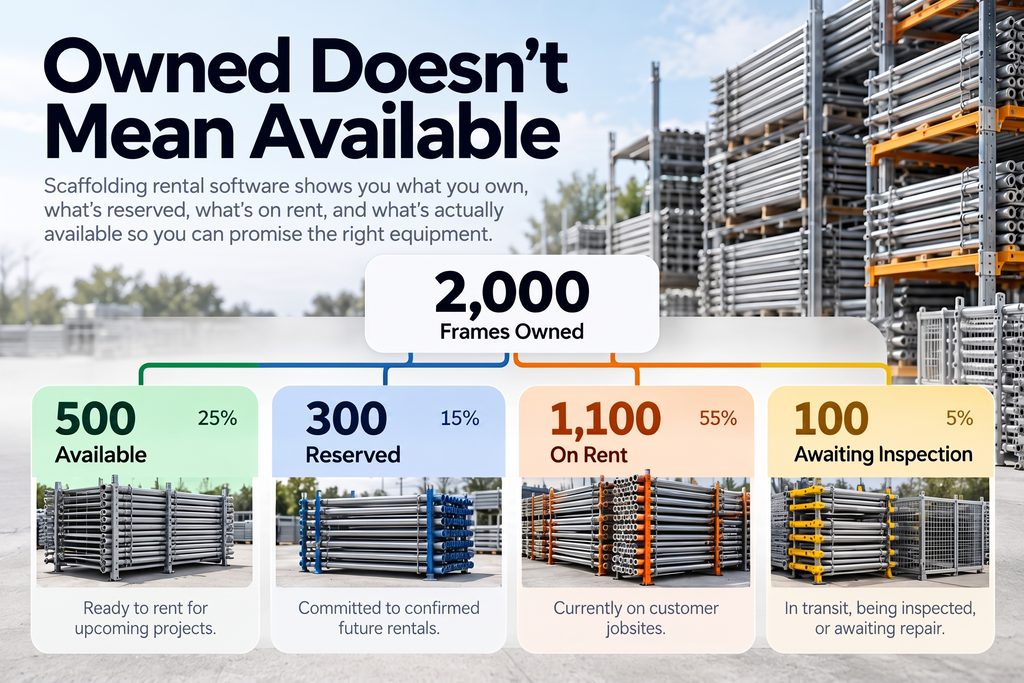
At a minimum, your team should be able to see:
- Total quantity owned
- Quantity available
- Quantity reserved
- Quantity currently on rent
- Equipment in transit
- Equipment awaiting inspection or repair
For example, owning 2,000 frames does not mean 2,000 are available for the next job. Some may already be committed to active or upcoming projects.
Good scaffolding inventory software should make that difference immediately clear.
What to test during a demo
Ask the vendor to show how the system handles a large quantity of identical components across multiple yards and jobsites.
That will quickly reveal whether the platform is truly built for scaffolding inventory or simply adapting a generic rental model.
2. Real-Time Equipment Availability
Inventory tracking tells you what you own. Availability tells you what you can actually promise to a customer.
That distinction is critical in scaffolding rental, where equipment may already be on rent, reserved for another project, in transit, or unavailable because it is being inspected or repaired.
Your scaffold rental software should show both current and future availability so your team can answer questions like:
- What can we rent out today?
- What will be available when this project starts?
- What inventory is already committed?
- What is expected to return before the next rental?
- Can another yard cover a shortage?
For example, if a customer needs 500 frames and 1,000 braces starting three weeks from now, the system should help determine whether those quantities will actually be available on that date before the rental is confirmed.
What to test during a demo
Ask the vendor to create a future-dated rental and show you what is available, what is already committed, and what is expected to return before the project begins.
That kind of visibility helps reduce double-booking, unnecessary purchases, and last-minute equipment shortages.
3. Partial Returns and Off-Rent Management
Scaffolding rarely comes back all at once.
A customer may rent 1,000 frames, 2,000 braces, and 800 platforms, then return only part of that equipment as different phases of the project are completed. The rest may remain on site for several more weeks.
Your scaffolding rental software should be able to process those partial returns without closing the entire rental.
The system should make it easy to:
- Record the quantities returned
- Keep the remaining equipment active on rent
- Make returned inventory available again
- Adjust billing where required
- Maintain a clear delivery and return history
This is especially important on long-term projects where equipment may come back in several loads.
What to test during a demo
Ask the vendor to show what happens when 20% of a rental is returned while the rest stays on site.
Then check whether inventory, availability, and billing all update correctly without requiring manual workarounds.
If partial returns are difficult to manage, that can create problems across inventory, billing, and customer service.
4. Flexible and Recurring Rental Billing
Scaffolding rentals often last for weeks or months, with equipment quantities changing throughout the project. Your billing system needs to keep up with those changes.
Look for software that can support:
- Weekly, monthly, or custom billing cycles
- Customer-specific or contract-specific rates
- Partial returns
- Rental extensions
- Additional equipment added mid-project
- Delivery, pickup, labour, or damage charges
The most important part is how billing responds when the rental changes.
If a customer returns 200 frames halfway through the billing period but keeps the rest of the equipment on site, the system should be able to adjust charges without forcing your team to rebuild the invoice manually.
For long-term rentals, recurring billing can also reduce administrative work by using the active contract and current quantities as the basis for future invoices.
Good scaffolding rental software should make billing more accurate as the rental evolves, not more complicated.
5. Delivery, Pickup and Dispatch Scheduling
Scaffolding rental depends on more than having the right equipment available. You also need to coordinate how that equipment gets to the jobsite and how it comes back.
Your scaffolding rental software should help manage:
- Deliveries and pickups
- Transfers between yards
- Drivers and vehicles
- Installation and dismantling schedules
- Field crews
- Jobsite timing
The key is having those activities connected to the rental itself.
If a project date changes, your team should be able to see how that affects the equipment reservation, delivery schedule, crew availability, and pickup plan.
This becomes especially important when several jobs are active at the same time.
Good scaffolding management software should reduce the need to coordinate rentals, trucks, crews, and jobsite schedules across separate spreadsheets, calendars, and systems.
6. Jobsite and Project Tracking
For scaffolding rental companies, tracking equipment by customer is often not enough.
A single contractor may have several active projects at the same time, each with different equipment, delivery dates, return schedules, and billing arrangements.
Your software should make it easy to see:
- Which equipment is assigned to each jobsite
- What has been delivered or returned
- Rental start and end dates
- Additional deliveries
- Site contacts
- Related documents
- Billing activity
This makes it much easier to answer a simple but important question:
What is still on this job right now?
Good scaffolding management software should connect the rental contract to the specific project or jobsite it supports.
That gives sales, operations, dispatch, and accounting teams a clearer view of each job and reduces the risk of equipment, charges, or returns being assigned to the wrong project.
7. Inspection, Maintenance and Safety Records
Scaffolding equipment moves through demanding environments, so rental companies need a reliable way to document condition, damage, inspections, and repairs.
Your scaffolding rental software should make it easy to connect those records to the equipment, rental, or project they relate to.
Useful records may include:
- Inspection history
- Damage reports
- Maintenance activity
- Repair status
- Equipment condition
- Photos and notes
- Certificates or related documents
The most important operational benefit is knowing whether returned equipment is actually ready to rent again.
If damaged components come back from a jobsite, the system should clearly separate them from inventory that is available for the next project.
Software does not replace your safety or compliance procedures. Organizations should still follow applicable scaffold safety requirements, including OSHA’s standards for scaffold construction, capacity, access, fall protection, and training.
8. Multi-Yard and Location Management
As a scaffolding rental company grows, inventory often becomes spread across multiple yards, branches, warehouses, and customer jobsites.
Your software should give you a clear view of what is available at each location and make it easy to move equipment between them.
For example, if one yard is short 300 frames for an upcoming project, your team should be able to quickly see whether another location has enough available stock before purchasing more equipment.
Good scaffolding inventory software should help track:
- Inventory by yard or branch
- Equipment at customer sites
- Transfers between locations
- Equipment in transit
- Future reservations by location
- Expected returns
The goal is to avoid situations where one branch is turning down work while usable equipment is sitting idle somewhere else.
For multi-location rental companies, centralized visibility can improve equipment utilization, reduce unnecessary purchases, and make it easier to plan upcoming jobs.
9. Scaffolding Job Costing and Profitability
Rental revenue does not tell you whether a scaffolding project was actually profitable.
A job can generate strong revenue while also carrying significant costs for labour, transportation, installation, dismantling, repairs, and additional equipment handling.
That is why scaffolding rental software should help you track more than what was invoiced.
Useful project costs may include:
- Labour
- Delivery and pickup
- Installation and dismantling
- Repairs
- Replacement equipment
- Purchasing
- Subcontractors
- Other project expenses
The goal is to compare those costs against the revenue generated by the job.
For example, two projects may produce similar rental revenue but very different margins if one requires more deliveries, crew time, repairs, or equipment movement.
A stronger scaffolding ERP or rental management platform should make it easier to see which jobs, customers, or contract types are actually the most profitable.
That insight can also support better pricing decisions over time.
10. Integrated Accounting and ERP
Rental operations do not exist separately from the rest of the business.
Every rental can affect purchasing, inventory, invoicing, accounts receivable, cash flow, and financial reporting. If those processes live in disconnected systems, your team may end up re-entering data, reconciling information manually, or managing rental accounting and billing separately from the rest of the operation.
That is where a more integrated scaffolding ERP can become valuable.
Microsoft Dynamics 365 Business Central, for example, supports core business processes including finance, purchasing, inventory, project management, service, manufacturing, and warehouse management.
A connected system should help bring together:
- Rental activity
- Inventory
- Purchasing
- Billing
- Customer records
- Accounting
- Project profitability
- Financial reporting
The important question is not simply whether your rental software can “integrate” with accounting. It is how much manual work still exists between the two systems.
If staff are regularly exporting data, rebuilding reports, or entering the same information twice, the integration may not be as seamless as it sounds.
For growing scaffolding rental companies, bringing operational and financial data together can provide a much clearer view of the business and reduce the amount of work required to keep systems in sync.
Bonus Features Worth Considering
Once the core rental workflows are covered, a few additional features can make the system easier to use and more valuable as the business grows.
Depending on your operation, look for capabilities such as:
- Mobile access
- Barcode or RFID scanning
- Digital signatures
- Photos and jobsite notes
- Quote management
- Customer portals
- Dashboards and reporting
- Role-based permissions
- Audit trails
- API and integration options
Not every scaffolding rental company will need every feature on this list.
The best approach is to prioritize features that reduce manual work, improve visibility, or make it easier for your team to complete common tasks.
A long feature list is less important than having the right features work well together.
Scaffolding Rental Software vs. Generic Rental Software
Generic rental software can work well for businesses renting individually tracked assets such as lifts, excavators, or generators.
The same distinction applies across other rental businesses too. Construction equipment rental software may be better suited to individually tracked machines, while scaffolding operations often depend more heavily on quantity-based component tracking and partial returns.
Scaffolding rental is different because companies often manage large quantities of interchangeable components, long-term projects, partial returns, and changing equipment quantities over the life of a job.
The difference is less about whether a platform is labelled “scaffolding software” and more about whether it can handle those workflows without forcing your team into manual workarounds.
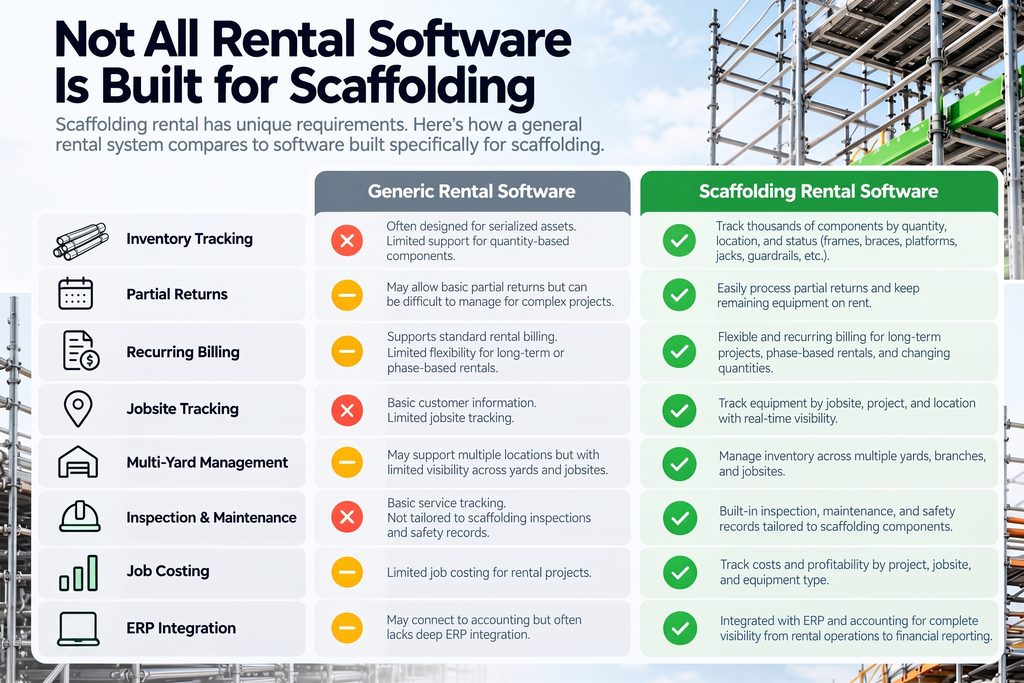
| Capability | Generic Rental Software | Scaffolding Rental Software |
|---|---|---|
| Individual asset rentals | Common | Common |
| Quantity-based component tracking | Varies | Often essential |
| Partial returns | Varies | Essential |
| Long-term recurring billing | Varies | Often essential |
| Project and jobsite tracking | Varies | Common requirement |
| Multi-yard inventory visibility | Varies | Often important |
| Installation and dismantling coordination | Often limited | More relevant |
| Inspection and repair records | Varies | Common requirement |
| Job costing | Varies | Increasingly important |
| ERP and accounting integration | Varies | Important as the business grows |
The best way to compare platforms is to ask each vendor to demonstrate your actual scaffolding rental process from reservation and delivery through partial return, billing, and final closeout.
That will tell you much more than a generic feature checklist.
Questions to Ask Scaffolding Rental Software Vendors
A software demo can make almost any platform look capable. The better approach is to test how the system handles the situations your team deals with every day.
Ask questions like:
- Can the system track non-serialized scaffolding components by quantity?
- Can we see current and future equipment availability?
- Can we reserve inventory for upcoming projects?
- Can we process partial returns without closing the entire rental?
- Does billing adjust when rental quantities change?
- Can we manage weekly, monthly, customer-specific, or contract-specific rates?
- Can we track equipment across multiple yards and jobsites?
- Can we coordinate deliveries, pickups, transfers, installation, and dismantling?
- Can we store inspection, damage, and maintenance records?
- Can we track costs and profitability by project?
- How does the system connect rental activity with accounting and purchasing?
- What tasks still need to be handled manually or outside the system?
That last question is especially important.
Most vendors will show you what their software does well. Understanding where spreadsheets, duplicate entry, third-party tools, or workarounds are still required gives you a much clearer picture of how the platform will fit into your operation.
Whenever possible, ask the vendor to demonstrate these workflows using a real scaffolding rental scenario rather than a generic equipment example.
When Does a Scaffolding Company Need an ERP?
Not every scaffolding rental business needs a full ERP system.
For smaller operations, standalone rental software paired with accounting software may be enough. The need for ERP usually becomes clearer as the business grows and more processes start to depend on the same data.
Signs you may be outgrowing disconnected systems include:
- Rental and accounting data live in separate platforms
- Staff regularly re-enter the same information
- Inventory requires frequent spreadsheet reconciliation
- Purchasing is disconnected from rental demand
- Multiple locations manage equipment differently
- Billing is difficult to manage across long-term projects
- Management cannot easily see project profitability
- Financial reporting requires manual consolidation
At that point, the problem may be bigger than rental software alone.
A scaffolding ERP can help connect rentals, inventory, purchasing, accounting, and reporting in one environment so information moves through the business more consistently.
The value is not simply having more features. It is reducing the amount of manual work required to keep operations and financial data aligned.
Choosing Scaffolding Rental Software
The best scaffolding rental software is not the platform with the longest feature list. It is the one that fits the way your business actually rents, moves, bills, and manages equipment.
Before comparing vendors, map out your typical workflow:
Quote → Reservation → Allocation → Dispatch → Installation → Rental → Partial Return → Inspection → Final Return → Billing → Financial Reporting
Then ask each vendor to show how their system handles that process from start to finish.
Pay close attention to where spreadsheets, duplicate data entry, or third-party tools are still required. Those gaps may seem minor during a demo but can create significant inefficiencies once the software is in daily use.
You should also think beyond your current needs. A system that works well for one yard or a small rental team may become limiting as you add locations, inventory, employees, or more complex projects.
The right platform should give your team better visibility into equipment, projects, billing, and profitability while reducing the amount of manual work required to keep everything connected.
See How Service Dynamics Supports Scaffolding Rental
Service Dynamics combines RUX Rentals with Microsoft Dynamics 365 Business Central to connect scaffolding rental operations with inventory, purchasing, billing, accounting, and financial reporting.
That means your team can manage more of the rental lifecycle in one connected environment instead of relying on separate systems for operations and finance.
Service Dynamics can help support:
- Equipment availability and reservations
- Partial returns
- Recurring rental billing
- Multi-location inventory
- Project and job costing
- Purchasing and financial management
If you are replacing spreadsheets, outgrowing standalone rental software, or looking for a more connected scaffolding ERP, the next step is to see how the system handles your actual rental workflow. Contact our experts to learn more.
Frequently Asked Questions About Scaffolding Rental Software
What is scaffolding rental software?
Scaffolding rental software helps rental companies manage scaffolding inventory, reservations, contracts, deliveries, returns, billing, and related rental operations. More advanced systems can also connect those activities with purchasing, accounting, job costing, and financial reporting.
What features should scaffolding rental software have?
The most important features include quantity-based inventory tracking, real-time availability, partial returns, recurring billing, jobsite tracking, delivery and pickup scheduling, multi-yard inventory, inspection records, job costing, and ERP or accounting integration.
Can scaffolding rental software track individual scaffold components?
Yes. Scaffolding software can track components such as frames, braces, platforms, jacks, guardrails, and couplers by quantity rather than requiring every piece to have a unique serial number.
How does scaffolding rental software handle partial returns?
A good system should allow part of a rental to be returned while the remaining equipment stays active on the same contract. Returned quantities can become available again while billing continues for the equipment still on site.
What is the difference between scaffolding rental software and scaffolding ERP?
Scaffolding rental software focuses primarily on rental operations. A scaffolding ERP connects those processes with broader business functions such as purchasing, accounting, inventory valuation, project profitability, and financial reporting.
Can scaffolding rental software manage multiple locations?
Yes. Multi-location systems can track inventory across yards, branches, warehouses, and customer jobsites while also managing transfers, reservations, and location-specific availability.