Dynamics 365 Field Service pricing starts with the license cost, but the real budget depends on how your service team works.
Microsoft currently lists Dynamics 365 Field Service at $105 USD ($142.50 CAD) per user/month, Field Service Contractor at $50 USD ($67.80 CAD) per user/month, and Resource Scheduling Optimization at $30 USD ($40.70 CAD) per resource/month, all paid yearly and before applicable tax.
Those prices are a useful starting point, but they do not tell you what your full project will cost. For most companies, licensing is only one part of the budget. Implementation, setup, integrations, training, and ongoing support often have a bigger impact on the final cost.
Your final budget will also depend on how many users need access, whether you use internal technicians or contractors, whether you need automated scheduling, and whether Field Service needs to connect with accounting, inventory, billing, or ERP.
In this guide, we’ll break down Dynamics 365 Field Service pricing, including license costs, contractor pricing, scheduling add-ons, implementation costs, and the questions to ask before choosing a field service system.
We’ll also explain when Dynamics 365 Field Service makes sense, and when a Business Central-based field service approach may be a better fit.
Dynamics 365 Field Service Pricing at a Glance
Here is the current Microsoft pricing for Dynamics 365 Field Service in the United States and Canada.
| License or Add-On | USD (per user/month) | CAD (per user/month) | Best Fit |
|---|---|---|---|
| Dynamics 365 Field Service | $105.00 | $142.50 | Full users who need access to work orders, scheduling, dispatch, mobile field service, service agreements, and field service operations |
| Dynamics 365 Field Service Contractor | $50.00 | $67.80 | External frontline technicians, subcontractors, vendors, or temporary field workers |
| Resource Scheduling Optimization | $30.00 | $40.70 | Companies that want automated schedule optimization for technicians and service resources |
Microsoft lists these prices as paid yearly and before applicable tax. Pricing may also vary based on region, currency, and checkout terms, so these numbers should be treated as a starting point rather than a complete project budget.
The full Dynamics 365 Field Service license is usually the main license for internal users who need to manage service work. This may include dispatchers, service managers, technicians, operations users, and anyone who needs deeper access to field service records and workflows.
The Field Service Contractor license is a lower-cost option for external frontline technicians. It can be useful when you work with subcontractors or third-party service teams, but it should not be treated as a cheaper replacement for every internal field service user.
Resource Scheduling Optimization is an optional add-on. It is mainly worth considering when manual scheduling becomes too difficult, inefficient, or time-consuming for your dispatch team.
What Is Included in the Dynamics 365 Field Service License?
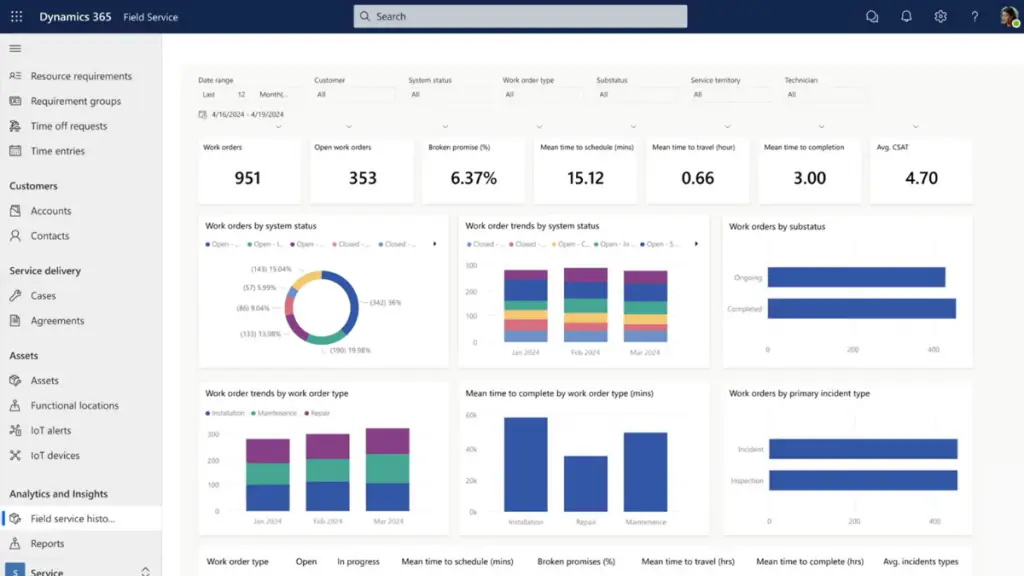
The full Dynamics 365 Field Service license is built for companies that need to manage service work from the first customer request through scheduling, dispatch, technician updates, and follow-up.
In practical terms, it is meant for users who need to manage real service workflows. That includes creating and updating work orders, scheduling technicians, managing service agreements, tracking customer assets, coordinating contractors, reviewing service performance, and using Copilot features to support field service work.
Dynamics 365 Field Service can help companies manage:
- Work orders
- Scheduling and dispatch
- Technician mobile access
- Customer and asset service history
- Preventive maintenance agreements
- Contractor and vendor coordination
- Returns processing
- Technician performance tracking
- AI-assisted work order creation, updates, scheduling, and summaries
The full license is usually best for internal users who need to create, edit, schedule, manage, or analyze service work. This may include dispatchers, service managers, technicians, operations managers, and customer service users who are involved in the field service process.
For example, a dispatcher may need to view technician availability, schedule work orders, adjust the board throughout the day, and manage urgent service requests. A technician may need to access work orders from a mobile device, update job details, review service history, and close out work from the field. A service manager may need visibility into technician performance, open work orders, customer issues, and service trends.
That is why it is important to license users based on what they actually need to do in the system. A lower-cost license may work for lighter access or external contractor scenarios, but users who are responsible for managing the core service operation usually need the full Dynamics 365 Field Service license.

Dynamics 365 Field Service Contractor Pricing
The Dynamics 365 Field Service Contractor license is a lower-cost option for companies that use external frontline technicians.
Microsoft currently lists Field Service Contractor at $50 USD per user/month or CAD $67.80 per user/month, paid yearly. Microsoft describes this license as a way to assign and manage external frontline technicians.
This license can make sense if your service model includes:
- Subcontracted technicians
- Third-party installers
- Vendor service teams
- Seasonal field workers
- Temporary technicians
- Partner repair networks
For example, an HVAC, industrial equipment, electrical, or specialty service company may have a core internal team, but still rely on external contractors during busy seasons or for service work outside its main region. In that case, the Contractor license may help reduce licensing costs for users who do not need the same level of access as a full internal service user.
However, the Contractor license should not be treated as a cheaper replacement for every technician or dispatcher.
Microsoft’s comparison table shows that the Contractor plan has limited access to several Field Service capabilities, including Dynamics 365 Guides, Remote Assist, vendor and contractor management, and scheduling and resource dispatching.
That matters because some users need more than basic field access. A dispatcher who manages schedules all day, a service manager who reviews performance, or an internal technician who works deeply inside the system may still need the full Dynamics 365 Field Service license.
A good rule of thumb is this:
Use the Contractor license for external frontline users who need controlled access to assigned service work. Use the full Field Service license for internal users who manage, schedule, analyze, or control the service operation.
Getting this distinction right can help reduce monthly licensing costs without under-licensing the people who actually run your service department.
Resource Scheduling Optimization Pricing
Resource Scheduling Optimization is an optional add-on for Dynamics 365 Field Service. Microsoft currently lists it at $30 USD per resource/month or CAD $40.70 per resource/month, paid yearly and before applicable tax. Microsoft describes it as a way to automatically create optimized schedules for resources.
In simple terms, Resource Scheduling Optimization helps automate the scheduling process. Instead of having a dispatcher manually decide which technician should go to which job, the system can help optimize schedules based on factors like availability, location, travel time, skills, priority, and service windows.
This add-on can be valuable for companies with:
- A large number of technicians
- Multiple service territories
- High daily work order volume
- Emergency or same-day service calls
- Skill-based scheduling requirements
- Complex travel routes
- Tight appointment windows
- Dispatchers spending too much time manually adjusting schedules
For example, a company with 25 technicians across several regions may struggle to manually balance urgent calls, technician skills, travel time, and customer appointment windows. In that case, Resource Scheduling Optimization may help reduce inefficient scheduling, lower drive time, and make better use of available service capacity.
However, not every company needs this add-on right away.
A smaller service team with one dispatcher and a manageable number of daily work orders may be able to handle scheduling manually inside Dynamics 365 Field Service. In that case, it may make more sense to start with the core Field Service license, build a clean scheduling process, and evaluate Resource Scheduling Optimization later.
The key is to avoid buying automation before your process is ready for it. Resource Scheduling Optimization is most useful when your dispatch rules, technician data, territories, skills, job durations, and service priorities are already well-defined.
If those pieces are not clean, the add-on may not solve the real problem. It may simply automate a messy process faster.
For pricing purposes, Resource Scheduling Optimization should be treated as a separate budget item. It is not included in the standard Field Service license, and the cost is based on the number of resources you want to optimize.
Dynamics 365 Field Service Attach License Pricing
The full Dynamics 365 Field Service license is not always the only option.
For users who already have a qualifying Dynamics 365 base license, Field Service may be available as an attach license at a much lower monthly cost. Encore Business Solutions lists the Dynamics 365 Field Service attach license at $20 USD per user/month or CAD $27.20 per user/month. That is significantly lower than the full Field Service license.
| License Type | USD Price | CAD Price | Best Fit |
|---|---|---|---|
| Full Dynamics 365 Field Service license | $105/user/month | $142.50/user/month | Users whose main job is managing field service work |
| Field Service attach license | $20/user/month | $27.20/user/month | Users who already have a qualifying Dynamics 365 base license and need Field Service as a secondary app |
What Is an Attach License?
An attach license is a discounted second Dynamics 365 app license.
For example, a user may already have a qualifying license for another Dynamics 365 application, such as Sales or Customer Service. If that user also needs access to Field Service, they may be able to add Field Service as a secondary app instead of paying for a second full-price license.
When an Attach License May Make Sense
An attach license may work well for users who need some Field Service visibility, but do not run their day-to-day work primarily inside Field Service.
This may include:
- Sales managers who need to view service activity
- Customer service managers who need service context
- Operations leaders who review field service performance
- Executives who need visibility into service work
- Users who mainly work in another Dynamics 365 app
When a Full Field Service License Is Usually Needed
Attach licensing should not be used as a shortcut for users who actively run the service operation.
A full Field Service license is usually the better fit for users who spend most of their day:
- Creating or updating work orders
- Scheduling technicians
- Managing dispatch
- Updating service records
- Running service agreements
- Managing technician activity
- Reviewing detailed service operations
This usually includes dispatchers, service managers, technicians, and other core field service users.
Attach Licensing Takeaway
Attach licensing can reduce monthly subscription costs, but only when the user already has a qualifying Dynamics 365 base license and Field Service is truly a secondary application.
The goal is not to choose the cheapest license. The goal is to avoid paying for more than a user needs while still giving each person the right access to do their job properly.
Team Member and Device Licenses: Can They Reduce Field Service Costs?
Some users may only need light access to view information, approve workflows, update limited records, or use a shared device. In the right scenarios, lower-cost license types may help reduce the total monthly cost of your Dynamics 365 environment.
| License Type | USD Price | Best Fit |
|---|---|---|
| Team Member license | $8/user/month | Individual users who need light access, such as viewing information, approving workflows, or making limited updates |
| Field Service Device license | $160/device/month | Shared devices used by multiple workers, such as a service vehicle device, shop floor terminal, warehouse station, or service counter device |
The Team Member license is usually meant for users who need limited access, not people who actively run field service work. Microsoft describes Team Members access as limited access to read data, approve workflows, and create or update select information.
A Team Member license may work for:
- Executives who only need to view service information
- Admin staff who need limited access
- Users who approve workflows
- Users who review basic reports or records
- Employees who need occasional visibility into service activity
However, a Team Member license is usually not enough for users who need to create work orders, manage dispatch, update service records in detail, schedule technicians, or run day-to-day field service operations.
The Field Service Device license is different. Instead of being assigned to one person, it is assigned to a shared device. Microsoft’s Dynamics 365 pricing update lists the Field Service Device license at $160 USD per device/month as of October 1, 2024.
A Device license may make sense for:
- A shared tablet in a service vehicle
- A warehouse terminal
- A shop floor workstation
- A service counter device
- A common operations device used by multiple employees at different times
The main thing to remember is that lower-cost licenses should be used carefully. They can reduce subscription costs, but only when they match how the person or device is actually used.
If someone is responsible for managing field service work every day, they likely need a full Dynamics 365 Field Service license. If they only need limited visibility or access through a shared device, a Team Member or Device license may be worth reviewing.

Dynamics 365 Field Service Implementation and Integration Costs
The monthly license price is only one part of Dynamics 365 Field Service pricing. To use the system properly, you also need to budget for implementation.
A license gives your team access to the software. An implementation turns that software into a working field service system.
That usually includes configuring work orders, setting up scheduling rules, building technician workflows, migrating customer and asset data, connecting Field Service to other systems, training users, testing the process, and supporting the go-live.
Typical planning range: A Dynamics 365 Field Service implementation may range from $25,000 to $250,000+, depending on the complexity of the business.
Implementation costs are usually shaped by factors such as:
- How many users need to be set up and trained
- How many technician, dispatcher, manager, and admin roles are involved
- How complex your work order process is
- Whether you need manual scheduling or advanced dispatch rules
- How much customer, equipment, asset, and service history data needs to be migrated
- Whether technicians need mobile forms, checklists, photos, signatures, or offline access
- Whether Field Service needs to connect with ERP, accounting, inventory, invoicing, or CRM
- Whether you need service agreements, preventive maintenance, inspections, or warranty workflows
- Whether you plan to use Resource Scheduling Optimization or other advanced tools
- How much reporting, dashboarding, and management visibility you need
The biggest mistake companies make is treating implementation like a technical setup instead of a business process project.
Field service software affects how calls are received, work orders are created, technicians are scheduled, parts are used, jobs are completed, and invoices are generated. If those workflows are not planned properly, the system may go live but still create problems in daily operations.
That is when companies run into duplicate data entry, poor technician adoption, incomplete work orders, billing delays, inventory confusion, weak reporting, or dispatch teams falling back into spreadsheets.
This is why the cheapest implementation is not always the lowest-cost option. A poorly designed system often needs to be fixed later through extra consulting, process redesign, data cleanup, retraining, or even a partial reimplementation.
For companies that rely on field service to drive revenue, customer satisfaction, and profitability, implementation quality matters just as much as license cost. The goal is not just to launch the software. The goal is to build a service system your team can actually use every day.
Sample Dynamics 365 Field Service Monthly Cost Scenarios
To make the pricing easier to understand, here are a few simplified license-only examples.
These examples use Microsoft’s current list pricing for Dynamics 365 Field Service, Field Service Contractor, and Resource Scheduling Optimization. Prices are paid yearly and do not include applicable taxes, implementation, support, integrations, or other related costs.
| Scenario | Users Included | Estimated License Cost (USD) | Estimated License Cost (CAD) |
|---|---|---|---|
| Small service team | 1 service manager, 1 dispatcher, 5 technicians | $735/month | $997.50/month |
| Contractor-based team | 2 full users, 8 contractor users | $610/month | $827.40/month |
| Larger scheduling operation | 4 managers/dispatchers, 20 technicians, RSO for 20 resources | $3,120/month | $4,234/month |
These examples are not full project budgets. They only show estimated monthly license costs. A real Dynamics 365 Field Service budget should also include implementation, configuration, training, data migration, integrations, reporting, support, and any additional Microsoft or third-party tools needed to run the service operation.
Dynamics 365 Field Service vs Business Central Service Management
Dynamics 365 Field Service is part of Microsoft’s customer engagement/CRM side of Dynamics 365. It is built for field service operations, not accounting or ERP.
That distinction matters when comparing pricing.
Dynamics 365 Field Service can help manage work orders, scheduling, dispatch, technicians, customer assets, service history, and mobile field activity. But it does not replace your accounting system. You still need a system for financials, invoicing, purchasing, inventory accounting, general ledger, accounts payable, accounts receivable, and financial reporting.
For many companies, that ERP system is Microsoft Dynamics 365 Business Central.
Read our in-depth guide on integrating Dynamics 365 Field Service with Business Central.
Business Central Premium licenses include the Service Management module, which gives companies service-related functionality inside the ERP system. This can support service items, service orders, service contracts, service pricing, service invoicing, and service history.
However, Business Central’s built-in Service Management module is not the same as a full field service dispatch platform.
If you need more advanced field service functionality, such as a modern dispatch board, technician mobile app, route planning, scheduling optimization, forms, photos, signatures, or richer technician workflows, you will likely need an AppSource add-on such as ExpandIT or Praxedo.
| Option | What It Is | Best Fit |
|---|---|---|
| Dynamics 365 Field Service | A CRM-side field service application | Companies that need advanced work orders, dispatch, scheduling, mobile technician workflows, and customer asset tracking |
| Business Central Premium Service Management | Service functionality inside the Business Central ERP system | Companies that want service orders, contracts, invoicing, service items, and financial control inside ERP |
| Business Central + ExpandIT or Praxedo | ERP-based field service with added dispatch and mobile capabilities | Companies that want service connected to accounting, inventory, billing, and financial reporting, but also need stronger field execution tools |
The pricing question is not just: How much does Dynamics 365 Field Service cost?
The better question is: Do you need a CRM-first field service system connected to ERP, or an ERP-first service system extended with field service tools?
If your priority is advanced dispatching, technician scheduling, mobile work orders, and customer engagement, Dynamics 365 Field Service may be the better fit.
If your priority is connecting service work to inventory, invoicing, accounting, profitability, and financial reporting, Business Central with the right field service add-on may be a better option.

How to Reduce Dynamics 365 Field Service Costs Without Under-Licensing
There are ways to reduce Dynamics 365 Field Service costs, but cutting licenses too aggressively can create problems.
The goal is not to give every user the cheapest possible license. The goal is to match each user with the license they actually need to do their job properly.
Here are a few ways to control costs without weakening the system.
1. Match Licenses to Real User Roles
Start by grouping users by what they actually do.
A dispatcher who manages schedules all day likely needs a full Field Service license. A technician who updates work orders from the mobile app may also need full access. But an executive who only reviews service activity may not need the same license.
Before buying licenses, map users into clear groups:
- Dispatchers
- Technicians
- Service managers
- Contractors
- Admin users
- Executives or light-access users
This helps avoid both over-licensing and under-licensing.
2. Use Contractor Licenses Only for True Contractor Scenarios
The Field Service Contractor license can lower costs for external frontline workers, but it should not be used as a blanket replacement for internal users.
It may work well for subcontractors, vendor technicians, seasonal workers, or third-party repair teams. But internal dispatchers, service managers, and technicians who need deeper access may still require the full license.
3. Review Attach Licensing Opportunities
If some users already have qualifying Dynamics 365 licenses, they may be eligible for a lower-cost Field Service attach license.
This can be useful for users who work primarily in another Dynamics 365 application but still need some access to Field Service. It is especially worth reviewing in companies that already use Sales, Customer Service, or other Dynamics 365 apps.
4. Do Not Buy Advanced Add-Ons Too Early
Resource Scheduling Optimization can be valuable, but not every company needs it on day one.
If your scheduling process is still being cleaned up, it may be better to start with the core Field Service setup first. Once your territories, skills, job durations, priorities, and technician data are reliable, you can decide whether automated optimization is worth the added cost.
5. Clean Up Your Data Before Implementation
Messy data increases project cost.
If customer records, asset history, service items, addresses, contracts, and work order history are incomplete or duplicated, your implementation partner may need more time to clean and migrate that data.
Cleaning your data before the project starts can reduce implementation effort and improve the quality of the final system.
6. Avoid Unnecessary Customization
Customization can be useful, but too much customization can increase cost, slow down implementation, and make the system harder to support.
Whenever possible, start with standard Dynamics 365 Field Service functionality and only customize where there is a clear business reason.
7. Compare Field Service Against Business Central-Based Options
If your main concern is dispatching, mobile work orders, customer assets, and field execution, Dynamics 365 Field Service may be the right fit.
If your main concern is connecting service work to accounting, inventory, invoicing, job costing, and financial reporting, Business Central with a field service add-on may be more cost-effective.
The best way to reduce cost is not always choosing the cheapest license. It is choosing the right system architecture from the beginning.
Frequently Asked Questions (FAQ)
How much does Dynamics 365 Field Service cost?
Microsoft currently lists Dynamics 365 Field Service at $105 USD ($142.50 CAD) per user/month, paid yearly. Prices are before applicable tax and may vary by region, currency, and checkout terms.
How much does the Dynamics 365 Field Service Contractor license cost?
Microsoft currently lists the Dynamics 365 Field Service Contractor license at $50 USD ($67.80 CAD) per user/month, paid yearly. It is designed for assigning and managing external frontline technicians.
How much does Resource Scheduling Optimization cost?
Resource Scheduling Optimization is currently listed at $30 USD per resource/month or CAD $40.70 per resource/month, paid yearly. It is an add-on used to automatically create optimized schedules for resources.
Is Dynamics 365 Field Service an ERP system?
No. Dynamics 365 Field Service is built for field service operations on the customer engagement side of Dynamics 365. It can manage work orders, scheduling, dispatch, technicians, customer assets, and mobile field activity, but it does not replace an ERP or accounting system.
Do I still need accounting software with Dynamics 365 Field Service?
Yes. Dynamics 365 Field Service does not replace the need for accounting, financial reporting, purchasing, inventory accounting, accounts payable, accounts receivable, or general ledger functionality. Many companies use Dynamics 365 Field Service alongside an ERP system such as Microsoft Dynamics 365 Business Central.
Does Business Central include field service functionality?
Business Central Premium includes everything in Business Central Essentials, plus enhanced capabilities for service management and manufacturing. That can support service work inside the ERP system, but companies that need more advanced dispatch, route planning, technician mobile workflows, or field execution tools may still need an AppSource add-on such as ExpandIT or Praxedo.
What is the difference between Dynamics 365 Field Service and Business Central Service Management?
Dynamics 365 Field Service is designed for field service operations such as work orders, scheduling, dispatch, mobile technician workflows, and customer asset tracking. Business Central Service Management is part of the ERP system, so it is more closely connected to service orders, contracts, invoicing, inventory, accounting, and financial reporting.
What is a Dynamics 365 attach license?
Microsoft’s licensing resources describe the base-plus-attach model as a way for one user to license multiple Dynamics 365 applications more cost-effectively. A user may purchase a base license for their main application and, where eligible, add another Dynamics 365 application as an attach license at a reduced price.
How much should I budget for a Dynamics 365 Field Service implementation?
As a general planning range, a Dynamics 365 Field Service implementation may cost $25,000 to $250,000+, depending on users, workflows, integrations, data migration, mobile requirements, reporting, training, and implementation complexity. Licensing is only one part of the total budget.
Final Thoughts: The Real Cost of Dynamics 365 Field Service
Dynamics 365 Field Service pricing starts with Microsoft’s published license costs, but your real budget depends on users, contractors, add-ons, implementation, integrations, training, and support.
It can be a strong fit if your main priority is advanced dispatch, technician scheduling, mobile work orders, customer asset tracking, and field service visibility.
But Dynamics 365 Field Service is not an ERP system. If service work needs to connect tightly with accounting, inventory, invoicing, purchasing, financial reporting, and profitability, you should also compare Business Central-based service management options. Business Central Premium includes the Service Management module, and AppSource add-ons like ExpandIT or Praxedo can extend it with stronger dispatch and mobile field service capabilities.
The right choice depends on what you need the system to solve.
If you are not sure whether Dynamics 365 Field Service or Business Central-based field service is the better fit, contact our experts at Service Dynamics. We can help you compare your options, understand your licensing needs, and build a realistic budget for your field service system.