Dynamics 365 Field Service is often described as a scheduling and dispatch tool, but that only tells part of the story. It is a broader service management platform designed to help organizations manage work orders, coordinate technicians, track customer assets, support preventive maintenance, and improve visibility across the service operation.
That matters because most service teams are not dealing with just one issue. They are trying to manage scheduling, service history, communication between the office and the field, job documentation, and day-to-day operational visibility. The real value of a field service platform comes from how well it connects those moving parts.
In this guide, we will break down the core Dynamics 365 Field Service features and capabilities, including work order management, scheduling and dispatch, mobile tools, asset tracking, inspections, preventive maintenance, inventory, and Copilot. We will also look at how those features work together in real service environments and what they mean for dispatchers, technicians, managers, and leadership teams.

What Is Dynamics 365 Field Service?
Dynamics 365 Field Service is Microsoft’s field service management application for organizations that deliver onsite service at customer locations. It helps service teams manage the full lifecycle of field work, from work order creation and scheduling to technician execution, asset tracking, and service follow-up.
At a high level, the platform supports work orders, scheduling and dispatch, technician mobility, customer asset history, preventive maintenance, inspections, parts usage, and service visibility across the operation.
What makes Dynamics 365 Field Service valuable is that it is not just a dispatch tool. It is designed to connect the office and the field in one system, helping service organizations run more efficiently, respond faster, and maintain better control over service delivery.
Learn more about the cost of Dynamics 365 Field Service.
Core Dynamics 365 Field Service Features at a Glance
Dynamics 365 Field Service includes a broad set of capabilities designed to support the full service lifecycle, not just scheduling. At a high level, these are the features that matter most for most service organizations.
- Work order management: Create, manage, and track service work with details like status, priority, duration, products, services, and related customer information.
- Scheduling and dispatch: Assign the right technician to the right job using scheduling tools built around availability, requirements, and resource matching.
- Mobile tools for technicians: Give field staff access to job details, status updates, customer information, and work execution tools from the field.
- Customer asset tracking: Maintain records of installed equipment and connect service activity to specific customer assets.
- Preventive maintenance and agreements: Automate recurring service work and support planned maintenance through agreements and scheduled work order generation.
- Inspections: Add digital inspections to work orders so technicians can complete standardized forms and checklists during service.
- Inventory, parts, and purchasing support: Track products used on jobs and connect field service activity to inventory and related operational processes.
- Copilot and AI capabilities: Use AI for work order summaries, inspection template creation, and natural language-assisted work order updates.
Work Order Management Features
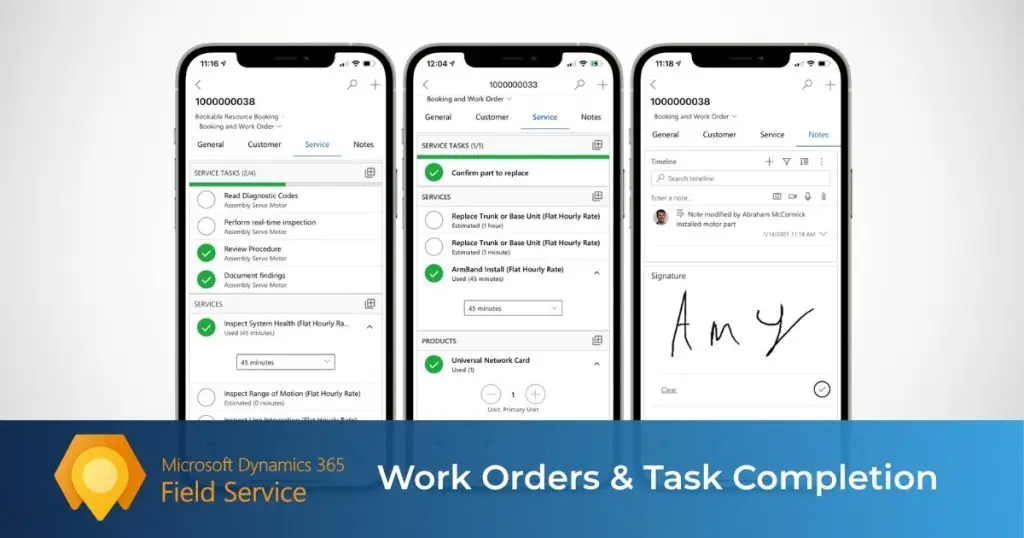
Work orders sit at the center of Dynamics 365 Field Service. They give service teams a structured way to define the job, capture service details, assign resources, and move work through to completion.
What a work order can include
- Work order type
- Status and priority
- Duration
- Service account
- Customer asset
- Tasks, products, and services
- Required skills or characteristics
How work orders can be created
Work orders can be created from several service triggers, including service requests, agreements, sales activity, customer communication, or connected systems. That gives service teams more flexibility than a manual ticketing process alone.
Standardizing repeatable service work
Dynamics 365 Field Service also supports incident-based work orders, which help preload common tasks, products, services, and requirements for recurring job types. This can improve consistency and reduce administrative work.
Scheduling and Dispatch Features
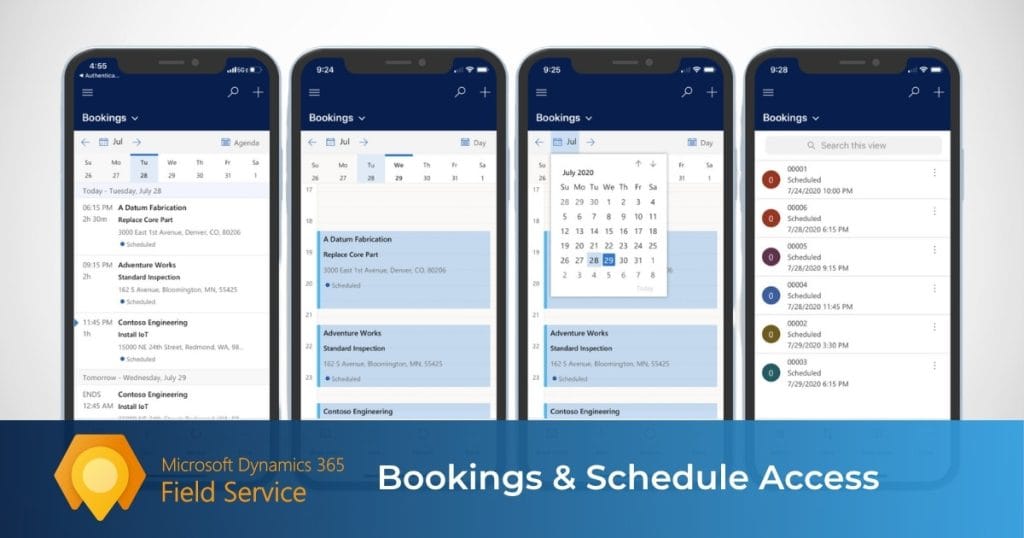
Scheduling is where field service operations either become more efficient or more chaotic. Dynamics 365 Field Service is built to help dispatchers assign the right resource to the right job with better visibility, control, and coordination.
What the scheduling tools help with
- Viewing resource availability and existing bookings
- Assigning and reassigning work orders
- Matching resources based on requirements
- Filtering by territory, location, and other criteria
- Managing day-to-day dispatch activity from one board
Schedule board and manual dispatching
The schedule board is designed for dispatchers who need visibility and control. It supports direct scheduling and rebooking, which is especially useful when priorities shift, emergency calls come in, or jobs need to be reassigned quickly. Microsoft also notes that manual scheduling is useful when dispatchers want full control over the assignment.
Schedule Assistant and resource matching
When a job has more specific requirements, Dynamics 365 Field Service can use the Schedule Assistant to help find the best fit. Microsoft’s scheduling model supports matching resources based on factors such as availability, characteristics like skills or certifications, and location-related criteria.
Automated scheduling and optimization
For organizations with more complex scheduling needs, Dynamics 365 Field Service also supports Resource Scheduling Optimization. Microsoft describes this add-in as a way to automatically schedule multiple jobs at once to the resources best equipped to complete them, while maximizing resource use and minimizing travel time.
Mobile Capabilities for Field Technicians
For technicians, field service software only matters if it works well in the field. The mobile experience in Dynamics 365 Field Service is designed to help frontline workers manage jobs, capture updates, and complete service work without relying on paper or disconnected tools.
What technicians can do in the mobile app
- View assigned bookings and job details
- Access customer and service information
- Capture photos and video
- Scan barcodes
- Add notes with speech-to-text
- Record time entries
- Complete inspections
- Generate customer service reports with signatures and optional PDF email delivery
- Use driving directions and location-aware tools
Offline access
One of the more important mobile capabilities is offline functionality. Microsoft says the Field Service mobile app is built to support offline work, allowing technicians to continue viewing job details and working even without internet access. The app runs offline-first after setup, which helps create a more consistent technician experience in areas with weak or inconsistent connectivity.
Mobile features that support field execution
Microsoft’s current mobile feature list also includes push notifications, geofencing, checklist support for service tasks, inspection support, asset lookup, and optional real-time location sharing with the back office. Together, these features help technicians move through the job with better context and give service teams better visibility into what is happening in the field.
Customer Asset Tracking and Service History
When service teams can see the equipment they support and the work already performed on it, they can make better decisions in the field. That is where customer asset tracking and service history become especially valuable in Dynamics 365 Field Service.
What this helps track
- Customer equipment and installed assets
- Service history tied to specific assets
- The location of equipment at the customer site
- Repair, maintenance, and installation details connected to past work
Why asset history matters in the field
Microsoft highlights accurate account and equipment history as one of the core benefits of the platform. When technicians can see what equipment is onsite and what has already been done to it, they can arrive with better context, diagnose issues faster, and avoid repeating work that has already been performed.
How it connects to the service process
Asset tracking is not separate from the rest of Field Service. Microsoft includes customer equipment and service history as part of the broader workflow, and notes that technicians can view customer assets and service history from the mobile experience while completing work orders. As completed work is submitted, equipment service history updates automatically.
nspection work. For example, they can be configured to generate daily inspection work orders, monthly maintenance work orders, or recurring jobs tied to specific assets and locations.
How it connects to scheduling
Once agreement-based work orders are generated, they can be scheduled through the same Field Service scheduling framework used for other jobs. Microsoft notes that these work orders can be scheduled manually through the schedule board or Schedule Assistant, and they can also be included in Resource Scheduling Optimization.
Inspections and Checklists
Inspections help turn field documentation into a more consistent and repeatable process. In Dynamics 365 Field Service, they give teams a structured way to capture service checks, assessments, and compliance-related information digitally.
What inspections help with
- Standardizing safety and service procedures
- Capturing pass/fail results and assessment data
- Replacing paper forms with digital checklists
- Associating inspections with customer assets
- Reporting on inspection results through Dataverse-backed data storage
Why inspections are stronger than basic service tasks
Microsoft specifically distinguishes inspections from standard work order service tasks. Inspections are easier to create with a drag-and-drop interface, easier for technicians to complete in one flow, and more flexible because they support different question types, required fields, images, and attachments.
Offline support in the field
One of the more important advantages is offline use. Microsoft says technicians can view and fill out inspections on phones or tablets without internet access, and the answers sync once connectivity returns. That makes inspections especially useful for service teams working in low-connectivity environments.
How inspections fit into the service process
Microsoft outlines the inspection flow as: an administrator creates and publishes an inspection template, the dispatcher adds the related service task type to the work order, the technician completes the inspection, and the dispatcher reviews the results. That makes inspections a structured part of the broader work order workflow rather than a disconnected form process.
Inventory, Parts, and Purchasing Support
Field service does not stop at scheduling and labor. Parts availability, truck stock, purchasing, and returns all affect whether a job can be completed efficiently, and Dynamics 365 Field Service includes tools to help manage that side of the operation.
What this helps with
- Managing inventory across static and mobile warehouses, including technician trucks
- Transferring stock between locations
- Adjusting inventory levels to reflect real-world counts
- Recording parts used on work orders
- Purchasing products for warehouse stock or customer jobs
- Handling returns and inventory journals
Warehouses and truck stock
In Field Service, a warehouse can be a traditional warehouse, a distribution center, a loading dock, or a technician truck. Microsoft explains that inventory at each warehouse is updated based on used work order products, purchase order returns, adjustments, and transfers, which helps service organizations keep better visibility into where parts are and how they are being consumed.
Purchasing support
Field Service also supports purchase orders. Microsoft states that a purchase order can be created either to add inventory to a warehouse or to buy products that will be sold to a customer through a work order. When inventory-tracked products are ordered for a warehouse, the system can automatically create an inventory journal that increases the on-order quantity, which helps inventory managers understand what stock is already incoming.
Copilot and AI Features in Dynamics 365 Field Service
AI is becoming a bigger part of the Dynamics 365 Field Service story, but its value is most practical when it helps users move faster, reduce manual entry, and understand service context more quickly.
What Copilot can help with
- Work order summaries for quickly understanding status, priority, related activities, and next steps.
- Natural language questions in the web app, with a prompt library to help users get started.
- AI-powered work order updates in the mobile app, where technicians can describe completed work using text or speech and review suggested changes before applying them. This feature is currently in preview.
- Inspection template creation from uploaded PDFs or images, which Copilot converts into draft inspection templates. This feature is also currently in preview.
Work order summaries
One of the more practical AI capabilities is the work order summary. Microsoft says these summaries help users understand the state of a work order and get next steps, with the generated recap adapting to the work order’s lifecycle stage. For example, summaries can emphasize scheduling context for unscheduled work, asset history for scheduled or in-progress work, and cost, price, or invoice-related information for completed work orders.
Natural language assistance in the web app
Microsoft also gives users a Copilot side pane in the Field Service web app. From there, dispatchers and other users can ask questions in natural language, catch up on recent changes, prepare for onsite visits, and query related service information using either freeform prompts or predefined prompt suggestions.
AI-powered work order updates
For frontline workers, Microsoft’s AI-powered work order update feature is aimed at reducing the amount of manual entry in the mobile app. Technicians can describe work performed using standard text or speech-to-text, and Copilot then recommends updates to fields such as booking status, booking times, task completion, product quantities, and service line details. Microsoft labels this feature as preview, so it should be treated as an emerging capability rather than a fully mature production workflow.
Inspection template creation
Copilot can also help service teams digitize existing forms and checklists. Microsoft says users can upload PDFs or images and have Copilot convert them into draft inspection templates that can then be reviewed, edited, published, and attached to Field Service work orders. Microsoft currently labels this capability as preview as well.
Who Uses These Features Day to Day?
Dynamics 365 Field Service is not built for just one type of user. It supports several roles across the service operation, each using different parts of the platform day to day. Microsoft’s overview explicitly frames the product around dispatchers, technicians, service managers, and others who need to coordinate, execute, and monitor field work.
Dispatchers
Dispatchers are some of the heaviest day-to-day users of Dynamics 365 Field Service. Microsoft says they review and schedule work orders, assign them to resources on the schedule board, and use tools like availability searches and scheduling assistance to manage bookings. The schedule board itself is designed to give dispatchers an overview of resource availability and bookings so they can schedule, reassign, and manage work as priorities change.
Field technicians
Technicians use the mobile side of the platform to manage the work assigned to them in the field. Microsoft says the Field Service mobile app is designed for technicians and frontline workers, helping them view bookings, work with work orders and customer assets, and complete tasks from a phone or tablet. That makes the technician experience a core part of the platform, not a secondary add-on.
Service managers
Service managers are typically less focused on individual bookings and more focused on overall service performance. Microsoft’s overview highlights service managers as users who monitor operations and track key performance indicators, while newer scheduling tools like Resource Scheduling Optimization also support simulation and broader operational planning.
Leadership teams
Leadership teams usually care less about the mechanics of dispatch and more about outcomes such as service performance, responsiveness, and operational efficiency. Because Field Service connects work orders, scheduling, technician activity, customer assets, and service data in one system, it gives leaders better visibility into how the service operation is actually running. Microsoft positions the platform around improving outcomes like first-time fix rates, resource productivity, and service delivery quality.
Is Dynamics 365 Field Service Right for Your Organization?
The best fit for Dynamics 365 Field Service is usually an organization that delivers onsite service and needs more structure, visibility, and coordination than a lightweight scheduling tool can provide.
It is likely a good fit if you need
- A structured work order process
- Scheduling and dispatch tools for multiple technicians
- Mobile tools for field execution
- Customer asset and service history tracking
- Preventive maintenance and recurring service workflows
- Stronger visibility between service operations and back-office processes
It can be especially attractive if you already use Microsoft tools
For organizations already using the Microsoft ecosystem, Field Service can become even more compelling because it integrates with Business Central. Microsoft says that when a work order is completed in Field Service, the integration can transfer data to Business Central for further processing, including invoicing and fulfillment, while reducing duplicate entry between systems.
It may be a better fit than lighter service tools when
- You manage a larger or more complex dispatch environment
- You need field mobility and office visibility in the same platform
- You service customer-owned equipment and need stronger asset history
- You want service activity to connect more closely with financials, inventory, and procurement
It may not be the best fit if
- Your service process is very simple and mostly administrative
- You do not need mobile field workflows or asset-based service history
- Your team only needs a lightweight scheduling tool
- You are not prepared to invest in process design, setup, and adoption
How Do Dynamics 365 Field Service Features Compare to those of Business Central and ExpandIT?
Feature lists can be misleading if they do not separate standalone field service depth from ERP-based service functionality and field service extensions. That is why this comparison matters. Dynamics 365 Field Service, Business Central Service Management, and ExpandIT can all support service operations, but they do not solve the same problems in the same way.
At a high level, here is how they compare across several common service capabilities.
| Feature | Dynamics 365 Field Service | Business Central Service Management | ExpandIT |
|---|---|---|---|
| Work orders / service orders | ✓ | ✓ | ✓ |
| Scheduling / dispatch board | ✓ | ✓ | ✓ |
| Automated scheduling / optimization | ✓ | ✕ | ✕ |
| Technician mobile app | ✓ | ✕ | ✓ |
| Offline mobile access | ✓ | ✕ | ✓ |
| Customer asset / service item history | ✓ | ✓ | ✓ |
| Preventive maintenance / agreements / service contracts | ✓ | ✓ | ✕* |
| Structured inspections / checklists | ✓ | ✕ | ✓ |
| Time and material capture on jobs | ✓ | ✓ | ✓ |
| Customer self-service portal | ✕ | ✕ | ✓ |
| Field-service-specific Copilot / AI features | ✓ | ✕ | ✕ |
* For ExpandIT, preventive maintenance is more fairly treated as a Business Central-led capability in a BC + ExpandIT stack. Business Central handles service contracts and contract-generated service orders, while ExpandIT handles planning, mobile execution, and related field workflows.
Dynamics 365 Field Service is the strongest standalone field service platform in this comparison. It offers the deepest native functionality for scheduling, technician mobility, inspections, and field-service-specific AI.
Business Central Service Management is better viewed as an ERP service module. It covers important service processes such as service orders, contracts, repair parts, and resource assignment, but it is lighter in areas that matter heavily in the field, such as native technician mobility, structured inspections, and field-service-specific Copilot workflows.
ExpandIT is best understood as a field service extension for Business Central. It strengthens the Business Central stack with mobile field execution, offline access, digital checklists, scheduling support, and customer portal capabilities. For some organizations, that can be a strong alternative to Dynamics 365 Field Service. For others, especially those that want a more purpose-built field service platform out of the box, Dynamics 365 Field Service will feel more complete.
How to Decide Between Dynamics 365 Field Service, Business Central, and ExpandIT
Choosing between Dynamics 365 Field Service, Business Central Service Management, and ExpandIT is usually less about feature count and more about where your service operation needs the most help. While all three can support service processes, they are built around different strengths.
Dynamics 365 Field Service may be the best fit if
Your organization needs a more purpose-built field service platform with stronger scheduling, technician mobility, inspections, and a more complete field-service experience. It is usually the strongest option when dispatch complexity, field execution, and service coordination are the biggest challenges.
Business Central Service Management may be enough if
Your service operation is more ERP-driven and your biggest priorities are service orders, contracts, repair parts, and back-office control. For some companies, that is enough without adding a more specialized field service platform.
ExpandIT may make the most sense if
You already use Business Central and want to strengthen the field side of the operation without moving to Dynamics 365 Field Service. ExpandIT is often most attractive when the goal is to add mobile tools, offline capability, digital checklists, and portal functionality on top of the existing ERP environment.
The real question buyers should ask
The best decision usually comes from identifying where the operational pressure is today. If the biggest issue is dispatch and field execution, one answer may make more sense. If the biggest issue is ERP alignment and service administration, another may be the better fit. The strongest evaluations start with the workflow that needs the most improvement, not the longest feature list.
Frequently Asked Questions About Dynamics 365 Field Service Features
What are the main features of Dynamics 365 Field Service?
The core features of Dynamics 365 Field Service include work order management, scheduling and dispatch, a mobile app for technicians, customer asset tracking, inspections, agreements for recurring service, inventory-related capabilities, and Copilot features.
Does Dynamics 365 Field Service include a mobile app for technicians?
Yes. The mobile app is designed to help technicians manage bookings, work orders, customer assets, inspections, and service activity from the field.
Does Dynamics 365 Field Service support preventive maintenance?
Yes. The platform includes agreements that can automate recurring work orders and support planned maintenance workflows.
Does Dynamics 365 Field Service include inspections?
Yes. Inspections are digital forms that technicians can complete as part of a work order and use for audits, assessments, and standardized field documentation.
Does Dynamics 365 Field Service include AI features?
Yes. Current Copilot capabilities include work order summaries, natural language assistance, AI-assisted work order updates, and inspection template creation.
Is Dynamics 365 Field Service the same as Business Central Service Management?
No. They overlap in some areas, but Dynamics 365 Field Service is a dedicated field service platform, while Business Central is an ERP that can support service management and integrate with Field Service.
Conclusion
Dynamics 365 Field Service is more than a dispatch tool. It is a connected field service platform built to help organizations manage work orders, scheduling, technician execution, customer assets, preventive maintenance, inspections, and service visibility in one system.
Its real strength is not just the feature list. It is how those capabilities work together to support a more complete and controlled service operation from start to finish.
If your organization is exploring field service software, the real question is not just whether Dynamics 365 Field Service has the right features. It is whether Dynamics 365 Field Service, Business Central, or ExpandIT is the best fit for the way your service team operates.
If you would like help evaluating your options, contact us at Service Dynamics to explore whether Dynamics 365 Field Service, Business Central, or ExpandIT would be the right fit for your business.