
Microsoft Dynamics 365 Field Service is a cloud-based field service management platform that helps organizations manage technicians, service work, and customer equipment in the field. Companies use it to schedule technicians, manage work orders, track service history, and coordinate field operations from a single system.
Many field service organizations still rely on spreadsheets, phone calls, or disconnected systems to manage service requests and technician schedules. As service operations grow, these manual processes make it harder to schedule jobs efficiently, respond quickly to customers, and maintain visibility into field activity.
Dynamics 365 Field Service helps solve these challenges by connecting dispatchers, technicians, customers, and equipment data in one platform. Dispatchers can manage scheduling through a visual dispatch board, technicians can access work orders through a mobile app, and managers gain real-time visibility into service operations.
In this guide, we’ll explain what Microsoft Dynamics 365 Field Service is, how it works, its key features, and what organizations should know when evaluating pricing and implementation.

What is Microsoft Dynamics 365 Field Service?
Microsoft Dynamics 365 Field Service is a field service management platform that helps organizations manage the full lifecycle of service operations, from service requests and work orders to technician scheduling and job completion in the field.
The solution is designed for companies that send technicians to customer locations to install, maintain, or repair equipment. Using Dynamics 365 for field service, organizations can manage service requests, dispatch technicians, track customer assets, and monitor service activity through a centralized system.
At the center of the platform is the work order, which contains the information needed to complete a service job. Dispatchers use a visual schedule board to assign work orders to technicians based on factors such as availability, location, and required skills. Technicians then access their assigned jobs through a mobile application, allowing them to review service details, update job status, record labor and parts used, and capture notes or photos directly from the field.
The platform also tracks customer equipment and service history, enabling organizations to manage preventive maintenance programs and identify recurring service issues. This visibility helps service teams move beyond reactive repairs and toward more proactive service models.
Because the system integrates with other Microsoft technologies (including Dynamics 365 applications, the Power Platform, and connected IoT solutions), it can support advanced capabilities such as automated workflows, intelligent scheduling, and connected device monitoring.
For organizations that rely on field technicians, Dynamics 365 Field Service provides the operational foundation needed to coordinate service work, improve scheduling efficiency, and maintain visibility across field operations.
Key Features of Dynamics 365 Field Service
Microsoft Dynamics 365 Field Service includes a set of core capabilities designed to support the full field service lifecycle, from work order creation and scheduling to service execution and asset tracking.
| Feature | What It Enables |
|---|---|
| Work Order Management | Tracks service jobs, labor, parts, and job status |
| Scheduling & Dispatch | Assigns technicians based on availability and skills |
| Mobile Field Service App | Enables technicians to access and update work in the field |
| Asset & Equipment Management | Stores equipment history and maintenance records |
| Preventive Maintenance | Automates recurring service work |
| IoT Monitoring | Generates alerts and work orders from connected devices |
| AI & Copilot | Provides AI-driven assistance and insights |
Work Order Management
Work orders are the central records used to manage service jobs. Each work order contains the required information for a service task, including job details, location, assigned technician, required parts, customer asset information, and service instructions.
Work orders also store labor entries, parts usage, service notes, and job status updates, creating a complete record of each service activity.
Scheduling and Dispatch
Scheduling and dispatch functionality allows service teams to assign work orders to technicians based on availability, location, required skills, and job priority.
The schedule board provides a visual interface showing technician calendars, assigned work, and unassigned service requests. Dispatchers can assign jobs manually using drag-and-drop scheduling or use resource scheduling tools to optimize assignments.
Mobile Field Service App
The mobile app allows technicians to access work orders while working in the field. Technicians can view job details, service instructions, and customer asset information from their mobile devices.
The app also allows technicians to update job status, record labor and parts usage, and capture notes or images during service visits.
Asset and Equipment Management
Dynamics 365 Field Service maintains detailed records of customer equipment installed at service locations. These records include service history, maintenance schedules, warranty details, and previous repair activity.
Asset records are linked to work orders, allowing service teams to track maintenance and service activity over time.
Preventive Maintenance
Preventive maintenance functionality enables organizations to define recurring service schedules for customer equipment. Work orders can be generated automatically based on time intervals or usage criteria.
This ensures that routine service tasks are scheduled and tracked consistently within the system.
IoT and Connected Devices
The platform can integrate with IoT-connected equipment to monitor device performance and generate service alerts. These alerts can be converted into work orders when predefined conditions are met.
This allows organizations to track equipment performance and manage service activity based on real-time data.
AI and Copilot Capabilities
Microsoft Dynamics 365 Field Service includes AI-powered features through Microsoft Copilot. These capabilities support tasks such as summarizing work orders, assisting with service information, and providing insights based on service data.
AI features are embedded within the platform to support decision-making and information access during service operations.
How Microsoft Dynamics 365 Field Service Works
To understand how Dynamics 365 Field Service operates in practice, it helps to follow how a service job moves through the system from start to finish.
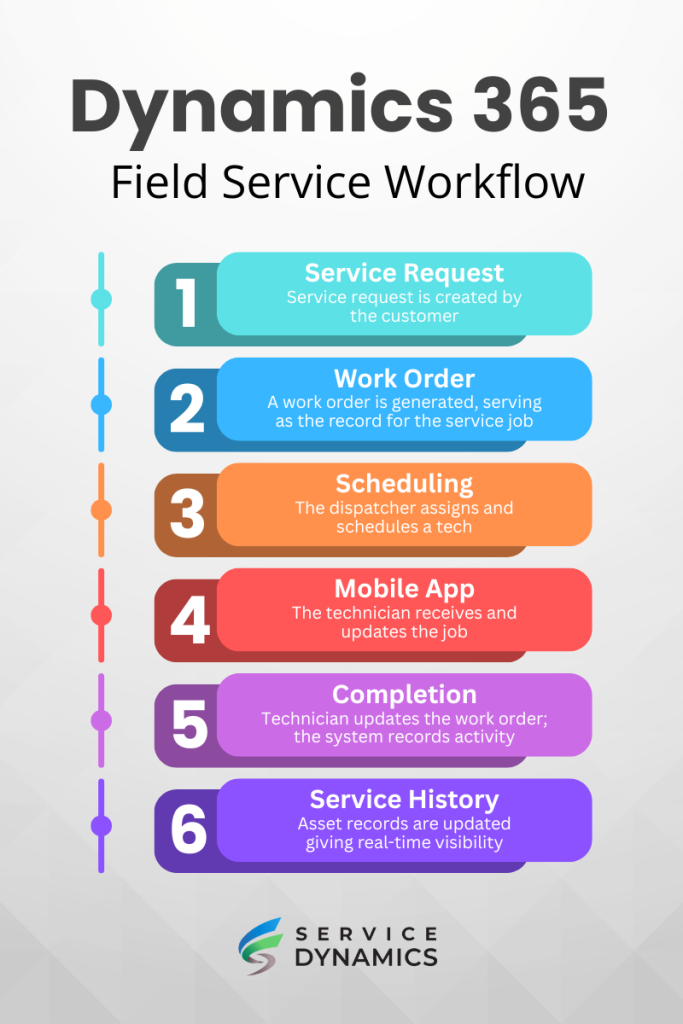
1. Service Request Creation
The process begins when a service request is created. Requests may originate from customer support tickets, phone calls, emails, service portals, IoT alerts, or recurring maintenance schedules.
Each request represents a service need that must be reviewed, scheduled, and completed.
2. Work Order Creation
Once the request is confirmed, it is converted into a work order. The work order serves as the central record for the job and includes details such as the service task, location, required parts, customer asset information, and service instructions.
At this stage, the job is defined and ready to be scheduled.
3. Scheduling and Dispatch
The work order is then assigned to a technician. Dispatchers review technician availability, location, and required skills to determine the appropriate assignment.
Using the schedule board, the job is placed into a technician’s schedule, either manually or through scheduling tools that assist with assignment decisions.
4. Technician Execution in the Field
Once scheduled, the technician receives the job through the mobile application. The technician reviews the work order, follows the service instructions, and performs the required work on-site.
During the job, updates such as labor entries, parts usage, notes, and photos are recorded directly within the system.
5. Job Completion
After the work is finished, the technician updates the work order to reflect completion. The job status is updated, and all recorded information becomes part of the service record.
This marks the completion of the service activity.
6. Service History and Asset Records
Once completed, the service activity is stored within the customer asset record. This creates a historical record of maintenance, repairs, and service interactions over time.
This information remains available for future service work and ongoing equipment tracking.
Benefits of Microsoft Dynamics 365 Field Service
When applied in real-world service operations, Dynamics 365 Field Service helps organizations improve efficiency, reduce operational friction, and gain better control over field activity.
Improved Scheduling Efficiency
Coordinating technicians across multiple jobs and locations can create scheduling conflicts and unnecessary travel time. With centralized scheduling and visibility into technician availability, organizations can reduce scheduling gaps and assign work more efficiently.
In our experience working with field service organizations, scheduling inefficiencies are often the largest hidden constraint on growth.
This leads to better utilization of technician time and more jobs completed within the same working hours.
Higher First-Time Fix Rates
When technicians arrive on-site with complete job information, equipment history, and required parts, they are more likely to resolve issues during the first visit.
Fewer repeat visits reduce labor costs, minimize downtime for customers, and improve overall service performance.
The Aquant Benchmark Report shows that top-performing field service organizations achieve first-time fix rates up to 87%, while lower-performing teams fall closer to 55%.
Better Customer Service Experience
Accurate scheduling and clearer communication help organizations meet customer expectations for service reliability. When service appointments are predictable and issues are resolved quickly, customer satisfaction improves.
This contributes to stronger customer relationships and increased long-term retention.
Greater Visibility into Service Operations
Access to real-time service data allows managers to monitor technician activity, job progress, and overall service performance. This visibility makes it easier to identify delays, resource constraints, and inefficiencies across the operation.
Better insight into service activity supports more informed operational decisions.
More Proactive Equipment Maintenance
With access to historical service data and recurring maintenance schedules, organizations can shift from reactive repairs to planned service strategies.
Addressing maintenance needs earlier reduces the likelihood of unexpected failures and helps maintain consistent equipment performance over time.
Dynamics 365 Field Service Pricing
Dynamics 365 Field Service pricing includes both user licensing and implementation costs. The platform is licensed on a per-user, per-month basis, while total project costs vary depending on the number of technicians, integrations, and the complexity of service operations.
Organizations evaluating the platform should consider three primary cost areas: licensing, implementation, and optional add-ons such as automation or integrations.
Licensing Overview
Dynamics 365 Field Service is licensed through named user subscriptions. These licenses provide access to core functionality such as work orders, scheduling, dispatching, asset management, and the mobile app.
The most common license types include:
| License Type | Typical Use |
|---|---|
| Field Service License | Full access for dispatchers, service managers, and field technicians |
| Customer Service License | Used by support teams that create service requests and manage customer cases |
| Team Member License | Limited access for users who only need to view records or update basic information |
Licenses are billed monthly and can be scaled up or down as needed.
Typical Licensing Costs
Microsoft updates pricing periodically, but most organizations encounter ranges similar to the following:
| Cost Category | Typical Range |
|---|---|
| Field Service User License | ~$95–$120 per user per month |
| Customer Service License (optional) | ~$50–$95 per user per month |
| Team Member License | ~$8–$10 per user per month |
Actual pricing varies based on Microsoft agreements, bundled products, and partner discounts.
Implementation Costs
In addition to licensing, organizations must account for implementation. This typically includes:
- system configuration
- data migration
- integrations
- user training
Costs vary depending on project scope. Simpler deployments require less effort, while organizations with complex workflows, asset tracking, or multiple integrations will require a larger investment.
For most mid-sized service organizations, implementation costs typically range from $40,000 to $150,000+.
Additional Cost Considerations
Several additional factors can influence the total cost of ownership for Microsoft Dynamics 365 Field Service, including:
- integrations with ERP, CRM, or financial systems
- mobile deployment for technicians
- Power Platform automation or workflow customization
- storage and data management requirements
- IoT integrations for connected equipment
- AI capabilities such as Microsoft Copilot
Organizations with larger service teams or advanced automation requirements may see higher costs as these capabilities are added.
Dynamics 365 Field Service vs Other Field Service Software
Organizations evaluating Dynamics 365 Field Service often compare it with other field service platforms before making a decision. While most solutions offer scheduling, dispatching, and mobile tools for technicians, they differ in areas such as asset management, system integration, and scalability.
Dynamics 365 Field Service is typically selected by organizations that require deeper integration with ERP systems, more advanced scheduling capabilities, and full lifecycle asset tracking. The comparisons below highlight how it differs from other commonly evaluated platforms.
Dynamics 365 Field Service vs ServiceTitan
ServiceTitan is one of the most widely used field service platforms in residential service industries such as HVAC, plumbing, and electrical contracting. It is designed primarily for home service companies that focus on dispatching technicians and managing service calls.
| Capability | Dynamics 365 Field Service | ServiceTitan |
|---|---|---|
| Target Market | Mid-sized to large service organizations | Residential service contractors |
| Asset Management | Tracks customer assets, equipment history, and maintenance schedules | Limited asset lifecycle management |
| ERP Integration | Integrates with ERP and financial systems | Primarily service management focused |
| Scheduling & Dispatch | Advanced schedule board and optimization tools | Dispatch and scheduling tools |
| Customization | Extensible through Power Platform | More standardized platform |
ServiceTitan works well for residential service businesses focused on dispatching and invoicing. Dynamics 365 Field Service is often chosen by organizations that need deeper integration with ERP systems, asset lifecycle management, and more complex service workflows.
See the best ServiceTitan alternatives in our detailed guide.
Dynamics 365 Field Service vs Salesforce Field Service
Salesforce Field Service is another enterprise field service platform used by large service organizations. Both platforms provide advanced scheduling, technician mobility, and asset tracking capabilities, but they are built on different technology ecosystems.
| Capability | Dynamics 365 Field Service | Salesforce Field Service |
|---|---|---|
| Platform Ecosystem | Microsoft Dynamics 365, Power Platform, Azure | Salesforce CRM ecosystem |
| Scheduling Optimization | Schedule board and resource optimization | Advanced scheduling engine |
| Asset Management | Strong support for equipment lifecycle tracking | Asset tracking capabilities |
| Customization | Low-code development through Power Platform | Customization through Salesforce platform |
| Integration | Native integration with Microsoft applications | Native integration with Salesforce tools |
Organizations typically choose the platform that best aligns with their broader business systems. Companies already using Microsoft technologies often adopt Dynamics 365 Field Service, while organizations invested in Salesforce infrastructure may prefer Salesforce Field Service.
Dynamics 365 Field Service vs Business Central Service Management
Some organizations evaluating Microsoft solutions compare Dynamics 365 Field Service with the Service Management module in Dynamics 365 Business Central.
While Business Central includes service management capabilities, they are generally designed for simpler service operations within an ERP system rather than large-scale field service coordination.
| Capability | Dynamics 365 Field Service | Business Central Service Management |
|---|---|---|
| Scheduling & Dispatch | Advanced schedule board with optimization tools | Basic service scheduling |
| Technician Mobility | Dedicated mobile field service app | Limited mobile capabilities |
| Asset Lifecycle Management | Detailed asset records and maintenance history | Equipment tracking within ERP |
| Service Complexity | Designed for large field service operations | Designed for simpler service workflows |
| ERP Integration | Integrates with multiple Dynamics applications | Built directly into the ERP system |
Organizations that require advanced dispatching, technician mobility, and complex service coordination typically adopt Dynamics 365 Field Service. Companies with smaller service teams or simple service processes may find that Business Central’s built-in service functionality is sufficient.
Learn more about Service Management in Business Central.
Choosing the Right Field Service Platform
The best field service platform depends on the size and complexity of an organization’s service operations. Companies with large technician teams, complex scheduling requirements, connected equipment, and asset lifecycle management needs often benefit from the advanced capabilities of Microsoft Dynamics 365 Field Service.
Organizations with smaller service teams or simpler dispatch needs may find that lighter field service tools meet their requirements. Evaluating technician workforce size, service complexity, and integration needs can help determine which platform best supports long-term service operations.

Is Microsoft Dynamics 365 Field Service Right for Your Business?
Not every organization requires a full-scale field service management platform. While Microsoft Dynamics 365 Field Service provides powerful capabilities for managing technicians, scheduling work orders, and maintaining customer equipment, the platform is best suited for companies with complex service operations.
Organizations evaluating Dynamics 365 for field service should consider the size of their technician workforce, the complexity of their service workflows, and how tightly field operations must integrate with other business systems.
When Dynamics 365 Field Service Is a Good Fit
Microsoft Dynamics 365 Field Service is typically a strong fit for organizations that:
- Manage teams of field technicians who perform on-site service work
- Maintain customer equipment or assets that require ongoing maintenance
- Rely on service contracts or preventive maintenance programs
- Need advanced scheduling and dispatch capabilities
- Require integration between field service operations and ERP, CRM, or financial systems
- Want greater visibility into technician productivity and service performance
Companies that operate large service teams or manage complex service operations often benefit from the platform’s scheduling tools, asset management capabilities, and mobile technician support.
When Other Field Service Tools May Be Simpler
Some organizations may not require the full capabilities of Microsoft Dynamics 365 Field Service. Businesses with smaller service teams or simpler workflows may find that lighter field service solutions meet their needs.
Examples include companies that:
- Have only a few technicians performing service work
- Do not manage customer equipment or asset maintenance
- Do not require advanced scheduling or dispatch optimization
- Use field service primarily for basic appointment scheduling
In these situations, simpler service management tools may provide sufficient functionality with lower implementation complexity.
Evaluating Your Service Operations
Choosing the right field service platform requires understanding the operational demands of your service organization. Companies should evaluate factors such as technician workforce size, equipment maintenance requirements, integration with other systems, and long-term service growth.
Organizations with complex service environments, large technician teams, or asset-intensive operations often benefit from the capabilities provided by Dynamics 365 Field Service. Carefully evaluating service workflows and operational needs helps ensure the selected platform supports both current operations and future growth.
Frequently Asked Questions About Dynamics 365 Field Service
What is Microsoft Dynamics 365 Field Service used for?
Microsoft Dynamics 365 Field Service is used to manage service operations for organizations that deploy technicians to customer locations. The platform helps companies create work orders, schedule technicians, track customer equipment, and manage service activity from a centralized system.
Field service teams use the platform to coordinate dispatching, monitor job progress, and maintain service history for customer assets.
How much does Dynamics 365 Field Service cost?
Dynamics 365 Field Service pricing typically includes both licensing and implementation costs. Licensing is usually structured as a monthly subscription per user, while implementation costs depend on the complexity of the service operation and required integrations.
Organizations evaluating the platform commonly see licensing costs ranging from approximately $95–$120 per user per month, with implementation projects varying based on system configuration, data migration, and integration requirements.
Is Dynamics 365 Field Service part of CRM?
Yes. Dynamics 365 Field Service is built on the Dynamics 365 platform and is closely integrated with Dynamics 365 Customer Service, which is part of Microsoft’s CRM ecosystem. This allows service requests, customer records, and case management to connect directly with field service operations.
Does Dynamics 365 Field Service include scheduling and dispatch?
Yes. The platform includes a visual schedule board that allows dispatchers to assign work orders to technicians based on availability, location, required skills, and job priority. Dispatchers can schedule jobs manually using drag-and-drop tools or use optimization features to improve technician routing and scheduling efficiency.
What industries use Dynamics 365 Field Service?
Many industries use Dynamics 365 Field Service, particularly organizations that manage equipment or infrastructure requiring on-site service. Common examples include HVAC companies, utilities, telecommunications providers, equipment service organizations, and healthcare equipment maintenance providers.
These industries often rely on field technicians to install, repair, inspect, or maintain customer equipment.
Ready to learn more?
If you would like to learn more about implementing Dynamics 365 Field Service or Business Central for a service company, contact our experts at Service Dynamics today.