
For field service companies, the mobile app is where service work gets done.
You can have strong scheduling, dispatching, and back-office systems, but if technicians do not have the right information in the field, service still slows down. The Microsoft Dynamics 365 Field Service mobile app gives technicians one place to view bookings, manage work orders, access asset history, complete inspections, capture notes and photos, and keep work moving even when they are offline.
For service leaders, that means more than convenience. It can reduce calls back to dispatch, improve data capture, speed up updates from the field, and give technicians the context they need to improve first-time fix rates.
In this article, we will explain what the Dynamics 365 Field Service mobile app does, who it is for, its key features, and what field service organizations should know before implementing it. The goal is to help you decide whether it is just another field app or a valuable part of a more connected service operation.
What Is the Dynamics 365 Field Service Mobile App?
The Dynamics 365 Field Service mobile app is the mobile workspace technicians and frontline service teams use to carry out field work from a phone or tablet. Instead of relying on calls to the office or printed paperwork, technicians can use it to view bookings, review work orders, update job status, capture service details, and access the information they need while on site. Microsoft describes it as the core mobile experience for service technicians and notes that it is available on iOS, Android, and Windows devices.
At a practical level, the app connects technicians to the rest of the Dynamics 365 Field Service environment. That includes scheduling information, customer and asset records, inspections, notes, images, signatures, location tools, and time entry. Because it is built as a model-driven app on Microsoft Power Platform, it can also be tailored to fit specific field service processes rather than forcing every organization into the same workflow.
Most importantly, this is not just a calendar app for field staff. It is designed to support the full service workflow in the field, from reviewing the job, to performing the work, to documenting what happened, to syncing that information back to the office. With offline functionality also built in, it plays a central role in helping technicians complete work accurately and consistently, even in environments where connectivity is unreliable.
When Dynamics 365 Field Service Is More Than You Need
Dynamics 365 Field Service is a strong platform, but for some companies it can be too broad or too complex for what they are trying to accomplish. If your main goal is to improve technician mobility, scheduling, service history, and field data capture without adding unnecessary complexity, it may make more sense to start with Business Central and the ExpandIT Field Service Mobile App.
That approach gives you a connected field service solution tied directly to your ERP, which can be a better fit for companies that want practical service functionality without the larger footprint of Dynamics 365 Field Service.
Why a Mobile App Matters for Field Service Teams
A field service platform is only as useful as the information technicians can access in the field. The mobile app helps bring bookings, work orders, asset history, updates, and documentation into one place so technicians can keep work moving without relying on paper, phone calls, or disconnected tools.
A strong mobile app helps field service teams:
- Access bookings, schedules, and work order details from the field
- Review customer asset history before starting work
- Capture inspections, notes, photos, and signatures on site
- Log labor, parts, and service updates more accurately
- Keep working when internet access is limited
- Reduce calls back to dispatch for missing information
- Standardize how work is completed across the team
- Sync job updates back to the office faster
Key Features of the Dynamics 365 Field Service Mobile App
The Dynamics 365 Field Service mobile app helps technicians manage the full service visit from the field, not just view their schedule. It brings together the tools they need to review jobs, complete work, document what happened, and keep the office informed from a phone or tablet.
Key capabilities include:
- Bookings and schedule access to view appointments and plan the day
- Work orders and task completion to manage job details and service tasks
- Customer assets and service history to give technicians better context on site
- Inspections, forms, and data capture to standardize field documentation
- Photos, notes, and signatures for cleaner job records and closeout
- Offline access and synchronization so work can continue without reliable connectivity
- GPS, maps, and route support to help technicians travel efficiently
- Teams integration, notifications, and other mobile tools to improve communication and awareness
What makes these features valuable is not just that they exist. It is that they work together in one mobile experience. The real question during evaluation is whether technicians can do the work properly, capture the right information, and keep the office updated without relying on disconnected tools. That is where the app becomes much more than a technician calendar.
Bookings and Schedule Access
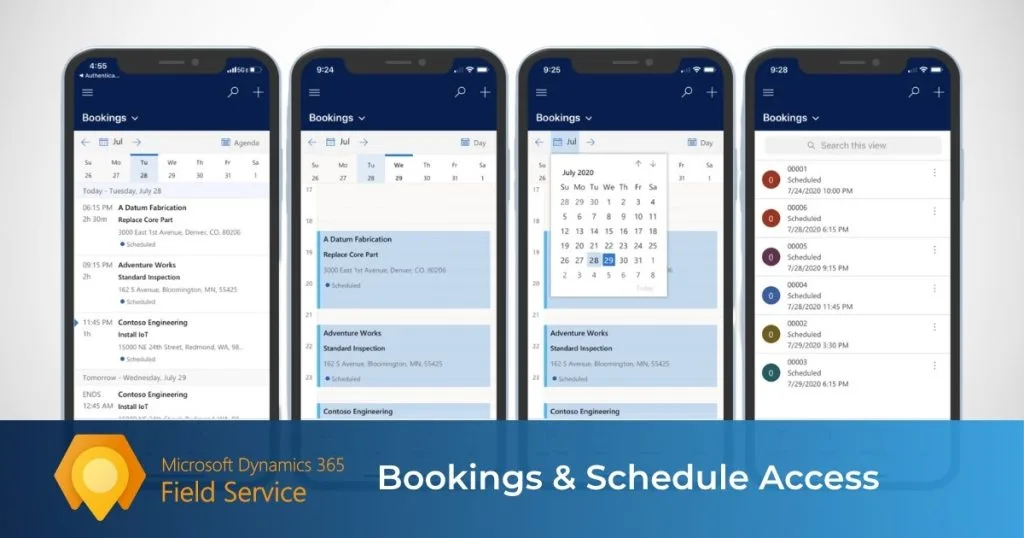
Technicians need a clear view of their day before they can deliver efficient service. The mobile app gives them access to assigned bookings and schedules from their phone or tablet, so they can quickly see where they need to go, what job is next, and how the day is laid out.
This matters because the schedule is more than a list of appointments. It is the starting point for the service workflow. From the booking, technicians can open the job, review key details, and head to the site with better context.
Bookings and schedule access help technicians:
- View assigned appointments from the field
- Understand the order and timing of the day
- Open the next job directly from the booking
- Get directions to the customer site
- Stay aligned when schedules change
- Reduce calls back to dispatch
For service teams, that means fewer missed updates, better coordination, and a smoother field experience overall.
Work Orders and Task Completion
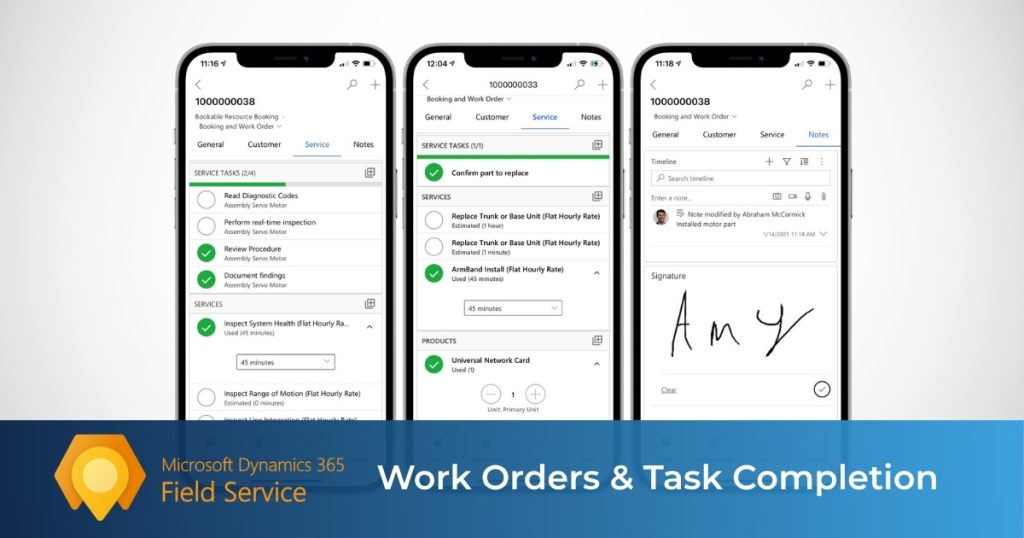
Once a technician opens a booking, the real work begins at the work order level. The mobile app gives them access to the job details they need to understand the scope of work, complete required tasks, and move the visit forward from the field.
A work order is more than a service ticket. It can include tasks, products, services, billing details, asset information, instructions, and location details. The app helps technicians turn that information into action while keeping service documentation cleaner and more consistent.
Work orders and task completion help technicians:
- Review the scope of work before starting
- See instructions and relevant job details
- Complete service tasks from the field
- Update progress as work is performed
- Record labor and time directly in the app
- Capture cleaner information for billing and service history
This is where the app starts to show real operational value. It helps technicians do the work, not just see the appointment.
Customer Assets and Service History
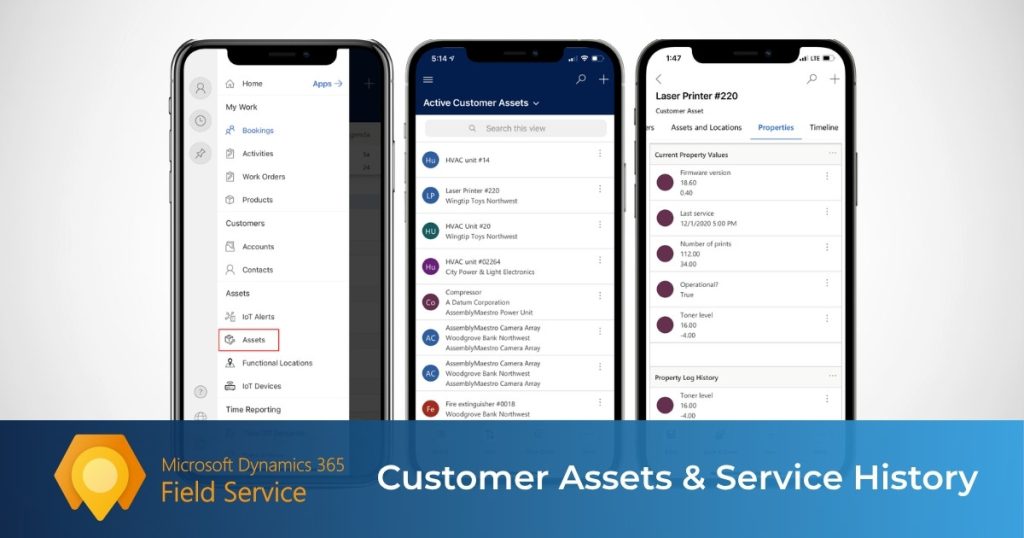
Technicians work more effectively when they understand the equipment in front of them before they begin. The mobile app gives them access to customer asset information and service history so they can arrive with better context and make more informed decisions on site.
That matters because many service calls are not first-time visits. When technicians can review past repairs, recurring issues, installed parts, and prior service activity, they can diagnose problems faster and work more confidently.
Customer assets and service history help technicians:
- Understand the equipment before starting work
- Review previous service activity
- See useful job context without calling the office
- Diagnose repeat issues more quickly
- Capture better documentation for future visits
- Support more consistent maintenance and repair work
For the business, this also creates a stronger long-term service record and helps connect field activity back to the broader service operation.
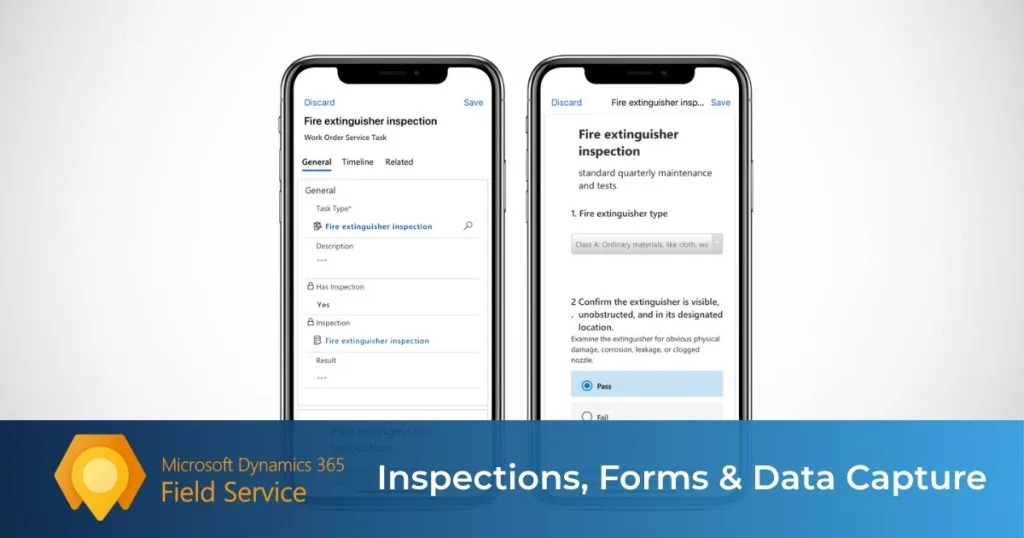
Inspections, Forms, and Data Capture
This is one of the most valuable parts of the mobile app because it helps technicians capture information in a more structured and consistent way while the job is happening. Instead of relying on handwritten notes or memory, teams can use digital inspections and forms tied directly to the work order.
That creates a more repeatable process across technicians, job types, and service scenarios. It also makes it easier to standardize safety checks, compliance steps, pass-or-fail tests, and other field documentation.
Inspections, forms, and data capture help technicians:
- Complete required checklists from the app
- Record safety and compliance steps
- Capture consistent answers across similar jobs
- Improve documentation for audits and service history
- Reduce missing or incomplete job information
- Standardize field documentation across the team
The biggest advantage is consistency. The app helps teams capture what matters while they are still on site, not later from memory.
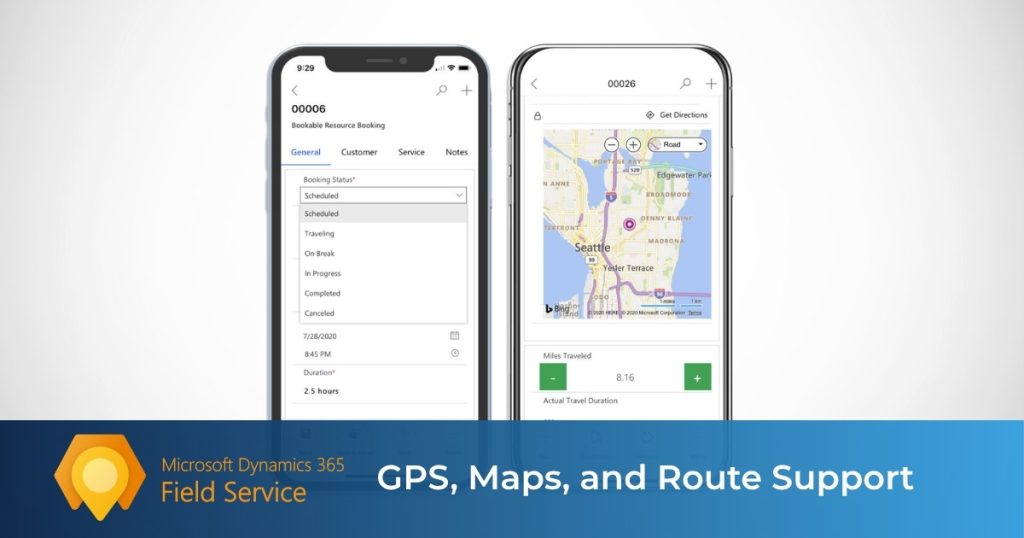
GPS, Maps, and Route Support
For field technicians, getting to the job efficiently is part of delivering good service. The mobile app includes location-based tools that help technicians understand where they need to go and how to get there.
That reduces the friction of switching between systems just to find the next address or map the route. By connecting the schedule to the destination, the app helps technicians move through the day more efficiently.
GPS, maps, and route support help technicians:
- Open the job location directly from the app
- Get directions to the next appointment
- Spend less time switching between tools
- Move between jobs more efficiently
- Support better arrival tracking in the field
For service organizations, these tools improve more than convenience. They help connect scheduling, travel, and job execution into one smoother workflow.
Photos, Notes, and Signatures
Not every important service detail fits into a checklist. That is why the mobile app also supports photos, notes, attachments, and signature-style input to help technicians document what they found, what they did, and what happened on site.
This is especially useful in field service because so much of the work is visual and situational. A technician may need to document equipment damage, show completed work, explain an unusual issue, or leave behind a clear record for the office.
These capabilities help technicians:
- Add written notes to the booking or job record
- Capture photos of conditions or completed work
- Attach audio or video notes when useful
- Build a clearer service history
- Give dispatch and managers better documentation after the visit
Taken together, these features help close out jobs more cleanly and create a stronger service record for follow-up.
Offline Access and Synchronization
Offline capability is one of the most important parts of the Dynamics 365 Field Service mobile app because service work does not always happen where connectivity is strong. Technicians still need to access jobs, capture updates, and move work forward in plants, mechanical rooms, remote sites, and other environments where internet access can be unreliable.
The app allows technicians to keep working with synced data when they are offline, then upload changes once a connection returns. That makes the app much more practical in real-world service conditions.
Offline access and synchronization help technicians:
- Keep working when connectivity drops
- Access synced job and customer data in the field
- Record updates locally on the device
- Sync changes back once a connection returns
- Manually trigger synchronization when needed
- Monitor sync status in the app
Offline support is what makes the mobile experience dependable in the field. It is also one of the most important areas to plan properly during implementation, since performance depends heavily on how offline data is configured.
Teams Integration, Notifications, and Other Mobile Capabilities
The mobile app is not just about schedules and work orders. It also includes supporting tools that help technicians stay informed, communicate more easily, and keep work moving throughout the day.
Some of the most useful include push notifications, Teams integration, reporting, geofencing, manual sync controls, and scan-to-find-asset. These features help technicians stay aware of schedule changes, collaborate on jobs, confirm status in the field, and generate cleaner service documentation.
What Can Technicians Do in the App?
The Dynamics 365 Field Service mobile app gives technicians one place to manage the full service visit, from the first booking update to final job documentation. Instead of switching between tools or calling the office for missing details, they can use the app to review the job, complete the work, and capture what happened on site.
Technicians can use the app to:
- View daily bookings and switch between schedule views
- Open a booking to review job details and planned duration
- Update booking status, such as traveling or in progress
- Get directions to the work order location
- Review work order details, tasks, services, and products
- Mark service tasks or services as complete
- Adjust product quantities and service hours
- Add text, image, audio, and video notes
- View customer and asset information
- Create time entries for work, travel, and breaks
- Create follow-up work orders when more work is needed
What makes this important is that the app supports the full field workflow, not just one part of it. A technician can move from seeing the appointment, to traveling to the site, to doing the work, to documenting the visit before leaving. For service organizations, that means better structure in the field, cleaner documentation, and fewer gaps between what happened on site and what the office needs to see afterward.
Learn more about working with the Dynamics 365 Field Service mobile app.

Benefits of the Dynamics 365 Field Service Mobile App
The biggest value of the Dynamics 365 Field Service mobile app is not that it gives technicians another screen to work from. It is that it helps service work happen faster, more accurately, and with fewer gaps between the field and the office.
In practice, the biggest benefits usually show up in five areas:
1. Faster response times
Technicians can view bookings, open job details, get directions, and update status from one app. That reduces delays, cuts down on calls back to dispatch, and helps work move faster in the field.
2. Better technician productivity
The app helps technicians stay focused on the job instead of the admin around it. They can review tasks, update labor and products used, capture notes, and complete more of the service workflow from one place.
3. Improved first-time fix rates
When technicians have access to work order details, service history, customer assets, inspections, and notes, they arrive with better context. That helps reduce guesswork and repeat visits.
4. More accurate data capture
A mobile app creates a cleaner service record than paper forms, memory, or scattered updates. Technicians can log time, record parts and services used, and capture notes or photos while the job is happening.
5. Faster invoicing and follow-up
When labor, products, and service activity are recorded in the app during or right after the visit, the office has cleaner information for invoicing, reporting, and follow-up.
In simple terms, the mobile app helps reduce friction across the entire service workflow. It gives technicians the information they need in the field and gives the office better visibility into what happened after the job is done.
Dynamics 365 Field Service Mobile App vs Paper, Spreadsheets, or Basic Field Apps
One of the clearest ways to understand the value of the Dynamics 365 Field Service mobile app is to compare it to how many field service teams still operate today.
Many organizations still rely on paper forms, spreadsheets, phone calls, text messages, or simple field apps that only handle one part of the job. That may work for a while, but it often creates gaps between dispatch, the technician, and the back office. By contrast, the Dynamics 365 Field Service mobile app brings bookings, work orders, notes, inspections, directions, and field updates into one mobile experience.
| Approach | What it usually looks like | Common limitations |
|---|---|---|
| Paper-based process | Printed work orders, handwritten notes, manual signatures, phone calls back to the office | Slower updates, harder-to-read documentation, lost paperwork, delayed invoicing, limited visibility for managers |
| Spreadsheets and shared docs | Schedules and job notes tracked in Excel or shared files | Easy to break, hard to update in real time, poor mobile usability, limited workflow control, no true field execution layer |
| Basic field apps | A simple scheduling or forms app used alongside other systems | May handle one task well, but often lacks full work order context, asset history, inspections, offline structure, and broader field service workflow support |
| Business Central and ExpandIT mobile app | A mobile field service app tied closely to Business Central for scheduling, dispatch, service work, time entry, parts usage, and field updates | More focused and easier to manage for many SMB service teams, but may not be the right fit for companies that need the broader capabilities of Dynamics 365 Field Service |
| Dynamics 365 Field Service mobile app | Bookings, work orders, customer details, notes, inspections, maps, and updates in one app | Requires setup and adoption planning, but supports a far more connected service workflow |
The real issue with paper, spreadsheets, or basic apps is not just inconvenience. It is fragmentation. Technicians may have the schedule in one place, customer notes in another, asset history somewhere else, and time or parts updates handled later. That slows down service, weakens documentation, and creates more admin after the visit.
The mobile app helps solve that by giving technicians one place to do the work, record the work, and keep the office informed while the job is happening. That leads to cleaner documentation, faster follow-up, and a more connected field service process overall.
Common Challenges and What to Know Before Implementing
The Dynamics 365 Field Service mobile app is powerful, but successful implementation is not automatic.
Like most field service technology, results depend less on the feature list and more on how well the app is configured, adopted by technicians, and aligned with your real service process. Before rollout, there are a few things service teams should pay close attention to:
- Offline setup matters more than most teams expect: Offline is one of the app’s biggest strengths, but it needs to be configured carefully. Syncing the right data matters.
- Too much offline data can hurt performance: More data is not always better. If the offline profile is too broad, downloads can slow down and device performance can suffer.
- Initial sync and troubleshooting need to be planned for: Technicians need the right data on the device before offline work is reliable. Sync issues also need a clear support process.
- The mobile experience should match the field process: If forms, statuses, inspections, and required fields do not reflect how technicians actually work, adoption will suffer.
- Technician adoption is just as important as technical setup: Even a well-built mobile app can underperform if technicians are not trained properly or if the workflow feels clunky in the field.
- Customizations should be handled carefully: The app is flexible, but too much customization can create performance, maintenance, and upgrade issues.
The key takeaway is simple: do not treat the mobile app like a plug-and-play technician tool. Treat it like part of your service operating model. The best results usually come when the mobile experience, offline setup, technician workflow, and back-office process are designed to work together.
Measurable Outcomes for Field Service Organizations
The value of the Dynamics 365 Field Service mobile app becomes much clearer when you look at what a service organization can measure after implementation.
This is not just a usability tool. It should influence real service KPIs, especially around technician performance, service quality, and back-office efficiency.
Some of the most important outcomes to track include:
- First-time fix rate: When technicians have easier access to work order details, service history, inspections, notes, and customer asset information, they are better equipped to resolve issues on the first visit.
- Jobs completed per technician: A cleaner mobile workflow can reduce admin time, shorten delays between steps, and help technicians complete more service calls in a week.
- Travel efficiency: When bookings, maps, directions, and field updates are connected more tightly, service teams can reduce travel time and improve route efficiency.
- Documentation quality: The mobile app helps technicians capture products used, service hours, notes, attachments, and time entries in the field, which creates a cleaner and more complete service record.
- Invoicing readiness: A useful metric is how quickly completed jobs become invoice-ready after the technician leaves the site.
- Technician adoption: Mobile rollout only creates value if the team uses it consistently. Look at how often technicians update booking status, complete tasks, log time, submit notes, and sync data properly.
A practical way to evaluate impact is to compare performance before and after rollout. For example, you might track time to close a work order, technician callbacks to dispatch, percentage of jobs with complete documentation, or share of visits resolved on the first trip.
In simple terms, the best mobile app implementations do not just give technicians a better interface. They improve the numbers service leaders actually care about.
Frequently Asked Questions
What is the Dynamics 365 Field Service mobile app?
The Dynamics 365 Field Service Mobile App is a mobile application designed for field technicians. It gives them access to work orders, bookings, customer details, asset history, inspections, notes, and service tasks while they are on the job.
What can technicians do in the Dynamics 365 Field Service Mobile App?
Technicians can view their schedules, open work orders, review job details, check customer asset history, complete service tasks, fill out inspections, add notes and photos, capture signatures, and update job statuses from the field.
Can the Dynamics 365 Field Service Mobile App be used offline?
Yes. The app supports offline use, which is important for technicians working in areas with weak or unreliable internet access. Updates can be synced once the device reconnects.
Does the app help improve first-time fix rates?
It can. When technicians have access to service history, asset details, work instructions, and inspection data before and during the visit, they are better prepared to diagnose and resolve issues on the first trip.
Can technicians capture photos, notes, and signatures in the app?
Yes. The app allows technicians to document service work directly from the field by adding notes, uploading photos, and capturing customer signatures. This helps improve recordkeeping and provides proof of service completion.
Can the app handle inspections and forms?
Yes. The Dynamics 365 Field Service Mobile App supports digital inspections and structured forms. This helps standardize data collection, improve compliance, and reduce paperwork.
Is the Dynamics 365 Field Service Mobile App only for scheduling?
No. Scheduling is only one part of it. The app is also used for work order management, service documentation, inspections, asset history, customer information, and real-time job updates.
Can the Dynamics 365 Field Service Mobile App connect to other business systems?
Yes. Many companies use Dynamics 365 Field Service as part of a broader business system, which can include ERP, finance, inventory, and customer service tools. This helps connect field activity with the rest of the organization.
Conclusion
The Dynamics 365 Field Service mobile app is more than a digital schedule. It gives technicians one place to manage bookings, work orders, customer assets, inspections, notes, time entry, and service updates in the field.
That matters because field service is not just about dispatching work. It is about helping technicians complete jobs efficiently, document them accurately, and keep the office informed without extra friction. The mobile app helps make that possible.
If you are evaluating Dynamics 365 Field Service, the mobile app should be treated as a core part of the platform, not a side feature.
Read our in-depth guide on the top alternatives to Dynamics 365 for Field Service Management.
Next Steps
If you are evaluating Dynamics 365 Field Service, look closely at the mobile app, not just scheduling and dispatch. The technician experience has a direct impact on productivity, documentation quality, and how smoothly work moves from the field back to the office.
Your next step should be to assess how the app fits your service process, especially around work orders, inspections, offline access, and job closeout.
To see how Dynamics 365 Field Service could work in your business or to learn more about Business Central and ExpandIT, contact Service Dynamics. We would love to discuss your field workflows, mobile requirements, and implementation goals.