
There’s a common assumption that once a service organization grows, Dynamics 365 Field Service integration automatically becomes the next step. In reality, that isn’t always true.
For many smaller teams, Business Central on its own is enough, especially when it’s paired with field service add-ons like ExpandIT. These solutions extend Business Central’s service capabilities without introducing a second platform, which can be the right tradeoff when scheduling is simple and field operations are still manageable inside an ERP.
The conversation usually changes as service operations mature. Once scheduling becomes more complex, technicians rely on mobile tools, assets need to be tracked over time, and service execution starts happening faster than finance can keep up, ERP-only service models begin to show their limits. That’s when integrating Dynamics 365 Field Service with Business Central starts to make sense, not because it’s more software, but because it separates execution from accounting in a cleaner way.
It’s also worth keeping ERP scale in mind. Business Central is an excellent fit for SMBs and smaller enterprises, offering strong financial control without the overhead of a large enterprise system. As service organizations grow into multi-entity, highly regulated, or global operations, an ERP like Finance and Operations often becomes a more practical foundation for Field Service integration.
Read our in-depth guide on Business Central vs Finance & Operations with D365 Field Service.
This article walks through the real-world considerations behind Business Central Dynamics 365 Field Service integration, when it’s worth doing, when it isn’t, and how to think about the decision without defaulting to complexity for its own sake.
What is Dynamics 365 Business Central?
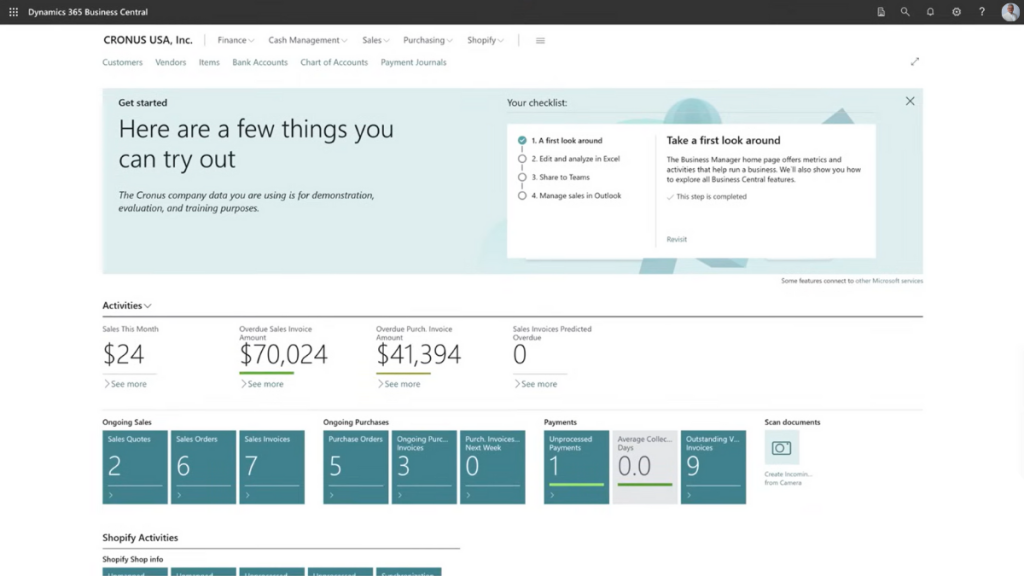
Dynamics 365 Business Central is Microsoft’s cloud-based ERP designed for small to mid-sized businesses and smaller enterprises. It allows you to manage all of your core operations in one system, including finance, inventory, purchasing, and reporting, while remaining flexible enough to scale as the business grows.
Where Business Central fits best is in providing structure without unnecessary weight. It gives organizations proper financial controls and operational visibility, but it doesn’t require the same level of governance, configuration, or ongoing administration as a full enterprise ERP. For many SMBs, that balance is exactly the point.
Key Capabilities of Dynamics 365 Business Central:
- Financial management: Manage accounting, cash flow, and financial reporting with built-in controls.
- Inventory and supply chain management: Track inventory levels, automate purchasing, and manage vendors.
- Project and cost management: Track costs, budgets, and margins across jobs and service work.
- Sales and service management: Manage customers, orders, and basic service processes.
- Manufacturing (when applicable): Plan production, manage resources, and control shop floor activity.
- Reporting and analytics: Use built-in reports and dashboards to support decision-making.
For smaller enterprises, this usually covers what an ERP needs to cover. It’s stable, predictable, and flexible enough to evolve as the business grows.
That context matters when talking about Dynamics 365 Field Service integration. Business Central is not meant to manage real-time service execution or technician workflows. Its role is to keep the business financially grounded while other systems handle how work gets done.
What is Dynamics 365 Field Service?
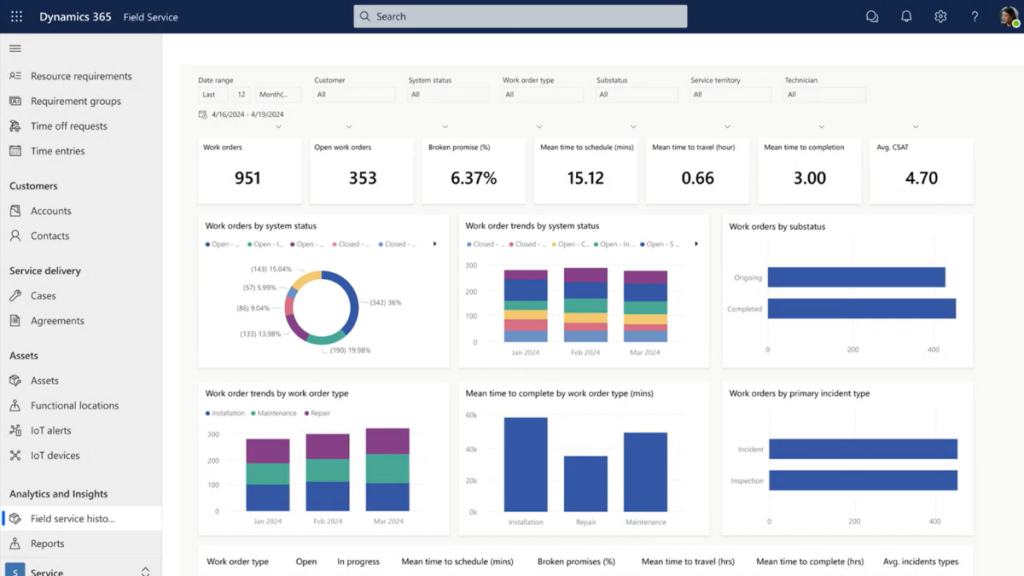
Dynamics 365 Field Service is the tool organizations turn to when service work stops being simple. Once jobs leave the office and start piling up in the field, spreadsheets, shared calendars, and phone calls don’t scale very far. Field Service exists to manage that moment.
At a basic level, it’s Microsoft’s platform for coordinating service work outside the office. It handles scheduling, dispatching, technician mobility, and the messy reality of tracking what actually happens on site. These are all things traditional ERP systems were never really built to manage well.
The difference between Field Service and an ERP like Business Central is focus. Business Central is about financial control and accuracy. Field Service is about execution. It helps teams plan work, get the right technician to the right place, and capture what was done while it’s still fresh — not hours or days later when someone is trying to piece things together.
Most organizations don’t start with Field Service. They arrive there. It usually happens when schedules become difficult to manage, technicians need better tools in the field, assets need to be tracked over time, and service data can no longer be an afterthought. At that point, coordinating service work manually becomes a risk, not just an inconvenience.
What Dynamics 365 Field Service Is Used For in Practice
In practice, Field Service is typically used to manage:
- Work orders and service requests: Creating, updating, and tracking service work from start to finish.
- Scheduling and dispatch: Assigning the right technician based on skills, availability, and location.
- Technician mobility: Enabling technicians to view jobs, capture labor and parts, and update status in the field.
- Asset and service history: Tracking equipment, maintenance history, and service contracts.
- Service agreements and entitlements: Managing coverage, response times, and billing rules.
This is where service work becomes visible and actionable, not just recorded after the fact.
Integrating Dynamics 365 Field Service with Business Central
Integrating Dynamics 365 Field Service with Dynamics 365 Business Central is less about connecting two pieces of software and more about deciding how service work flows through the business.
At a high level, the integration exists to bridge a gap. Field Service manages what happens in the field. Business Central manages what that work means financially. Without integration, those two views of the business drift apart. With integration, they stay aligned, as long as each system is allowed to do what it is designed to do.
This is not about replacing one system with the other. It is about letting Field Service handle execution, and letting Business Central remain the system of record for costs, inventory, and invoicing.
What the Integration Actually Does
In practical terms, the integration connects service activity captured in Field Service to ERP processes in Business Central.
It allows organizations to:
- Capture labor, parts, and service activity as work is performed
- Transfer that activity into Business Central in a structured way
- Convert service work into financial transactions without manual re-entry
Instead of technicians finishing a job and someone later retyping notes, parts usage, and time into the ERP, the integration ensures that service data moves forward automatically once it reaches the appropriate stage.
The key point is timing and intent. The integration does not push everything instantly or blindly. It is designed to move service data into Business Central when it becomes financially meaningful, typically when work is completed, approved, or ready to be invoiced.
When implemented properly, this reduces delays, minimizes errors, and gives finance teams confidence that what they see in Business Central reflects what actually happened in the field.
How the Systems Work Together
The integration works best when there is a clear division of responsibility between systems.
In most implementations:
Field Service is responsible for:
- Work orders and service execution
- Scheduling, dispatch, and technician activity
- Capturing labor, parts, and notes in the field
Business Central is responsible for:
- Financial posting and reporting
- Inventory valuation and cost control
- Invoicing and revenue recognition
Field Service answers the question, “What work was done?”
Business Central answers the question, “What did that work cost, and how do we bill it?”
The integration connects these two perspectives without forcing either system to behave like the other. This separation is what keeps the architecture manageable as service operations scale.
Learn more about the benefits of field service software that connects to your ERP.
Data Typically Shared Between Systems
While every implementation is different, most organizations share a common set of data between Field Service and Business Central.
This typically includes:
- Customers and service accounts: Ensuring service work is tied to the correct customer records.
- Work orders and service transactions: Passing completed service activity into ERP workflows.
- Labor and parts usage: Translating field activity into cost and billing data.
- Items and inventory references: Aligning parts used in the field with ERP inventory records.
- Invoicing data: Supporting accurate and timely billing in Business Central.
Not all data needs to move in real time, and not all data needs to move at all. The goal is not to synchronize everything, but to ensure that the information required for costing, billing, and reporting flows cleanly from service execution into ERP.
When that flow is clear, the integration feels almost invisible. When it is not, teams quickly feel the friction.
Challenges of Disconnected Field Service and ERP Systems
When field service and ERP systems aren’t connected, the problems usually don’t announce themselves right away. They show up slowly, in ways that feel annoying before they feel serious.
Common challenges include:
- Invoices going out later than they should, because labor and parts have to be reviewed, re-entered, or pieced together after the work is already done
- Billable items getting missed or questioned, simply because the details weren’t captured clearly or consistently in the field
- Inventory numbers drifting out of sync, as parts are used by technicians but don’t immediately show up as consumed in the ERP
- Stockouts and last-minute purchases, followed by overstocking “just to be safe” when inventory data stops being trusted
- The same information being entered more than once, usually by different people, in different systems, with slightly different results
- Small errors turning into bigger problems, because it’s hard to trace where the data first went wrong
- Difficulty understanding which service work is actually profitable, since service activity and financial data live in separate places
- A growing dependence on spreadsheets and manual workarounds to bridge gaps that the systems don’t handle on their own
- Slower reporting and decision-making, because pulling together a complete picture takes time and effort
- Friction between service and finance teams, even when everyone is doing their job, because they’re working from different versions of the truth
- Processes that quietly rely on a few key people, making things fragile when someone is away or leaves
- Operational risk as service volume increases, because what worked at a smaller scale no longer holds up
None of these issues usually point to a single failure. They’re the natural result of systems that weren’t designed to share responsibility for service execution and financial control.
Alternatives to Dynamics 365 Field Service
Most organizations don’t start with Dynamics 365 Field Service. They arrive there over time.
Before service operations reach that point, teams usually rely on simpler approaches that work, until they don’t. Understanding these earlier stages helps clarify when Field Service integration will actually make sense for your organization.
Running Service Directly in Business Central
For many smaller organizations, service is handled entirely inside Dynamics 365 Business Central using Premium licenses. Basic service orders, jobs, and billing are often enough when service volume is low and operations are fairly predictable.
This approach usually works when:
- Service calls follow a consistent, repeatable pattern
- The same team handles both service delivery and billing
- Scheduling is straightforward and doesn’t require much optimization
As service demand grows, limitations usually appear around mobility, scheduling flexibility, and real-time visibility, not accounting.
Extending Business Central with Field Service Add-ons
As service operations mature, many organizations look to extend Dynamics 365 Business Central with a dedicated field service add-on, such as ExpandIT. These tools enhance scheduling, service management, and technician workflows while keeping everything inside the ERP.
This approach often appeals to teams that want more structure without introducing a second platform.
It tends to work well when:
- Service complexity is increasing, but still within a manageable range
- Teams want better scheduling and service workflows without a separate system
- There is a strong preference to minimize integration overhead
Eventually, however, ERP-based service tools tend to feel constrained as scheduling, asset tracking, and mobile needs become more advanced.
When These Approaches Start to Break Down
Organizations typically start exploring Dynamics 365 Field Service integration when lighter approaches begin to feel stretched. not because they stop working entirely, but because they stop working comfortably at scale.
In many cases, field service add-ons for Dynamics 365 Business Central, such as ExpandIT, can handle a lot more than people expect. Scheduling, technician mobility, and basic asset tracking are often very manageable with these tools, especially for SMBs and mid-market organizations.
The pressure usually builds when:
- Scheduling becomes increasingly dynamic and harder to manage consistently
- Mobile workflows need to support larger teams, more jobs, or more variation
- Asset and service history grows in volume and complexity over time
- Service execution starts to move faster than finance and billing processes can reliably support
At that point, the question isn’t whether ERP-based tools can work, it’s whether they still make sense as the operation grows. What works well at a small or mid-market level can start to feel constrained when service volume, coordination, and reporting demands move closer to an enterprise scale.
That’s often when organizations step back and ask a different question: “What will still work a year from now, not just what works today?”

Comparing Your Options as Service Complexity Grows
As service operations evolve, the question usually isn’t which product is best, but which setup will hold up as complexity increases. Different architectures work well at different stages, depending on service volume, scheduling needs, and how tightly execution needs to align with finance.
The table below compares the most common approaches side by side.
| Option | Best Fit For | Strengths | Where It Starts to Strain |
|---|---|---|---|
| Business Central (ERP only) | Smaller service teams with predictable work, including service departments inside larger organizations | Simple architecture, strong financial control, minimal overhead | Limited scheduling flexibility, basic mobility, minimal real-time execution visibility |
| Business Central + ExpandIT | SMBs and mid-market organizations with growing service needs | Improved scheduling, technician workflows, and service management without adding a second platform | Becomes less comfortable as scheduling complexity, asset history, and mobile scale increase |
| Dynamics 365 Field Service + Business Central | Complex, high-volume service operations that need execution to scale | Advanced scheduling, mobile-first workflows, clear separation of execution and finance | Requires integration effort and clear system ownership |
| Dynamics 365 Field Service + Finance & Operations | Enterprise-scale, global, or highly regulated service organizations | Enterprise-grade financials, compliance, multi-entity support, scalable service execution | Higher cost, longer implementations, increased governance |
How to Read This Comparison
This isn’t a progression that every organization must follow from left to right. Many service teams stay on Business Central alone, or Business Central with add-ons like ExpandIT, for years. Others reach a point where separating service execution from ERP becomes necessary.
The key takeaway is to match your service architecture to how work actually happens today, while being honest about where complexity is heading. The right option is the one that supports your current operation without creating friction as it grows.
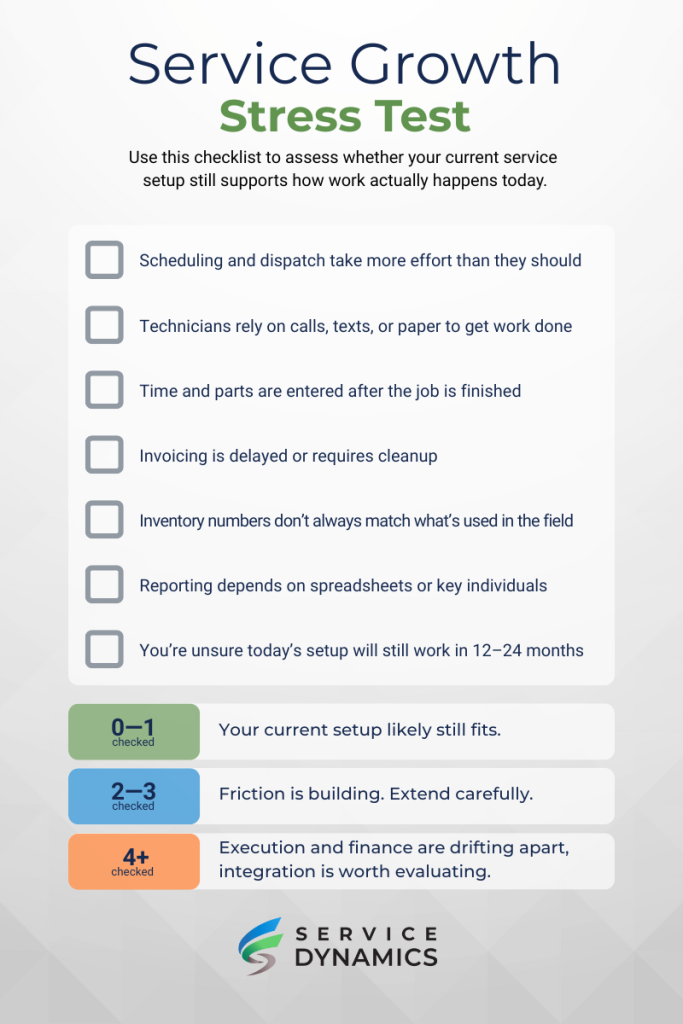
As service complexity grows, the signs usually show up before the architecture breaks. If you’re unsure whether your current setup still fits, use the quick gut check below to assess where friction may already be building. It takes less than a minute and can clarify whether you’re optimizing or simply coping.
Conclusion
There’s no default answer when it comes to Dynamics 365 Field Service integration. Some organizations run service entirely in Business Central and do just fine. Others extend it with add-ons like ExpandIT and never need to go further. Integration becomes valuable only when service complexity, volume, or coordination start to push those approaches beyond what they handle comfortably.
Business Central remains a strong ERP foundation for SMBs and smaller enterprises. Dynamics 365 Field Service makes sense when service execution needs to scale without compromising financial control. And as organizations move closer to enterprise scale, ERP decisions such as Business Central versus Finance & Operations become just as important as the field service platform itself.
The goal isn’t to add more systems. It’s to choose an architecture that will still work as your service operation grows.
Want to learn more? Talk to the Service Dynamics team to understand whether Business Central on its own, Business Central with ExpandIT, or Dynamics 365 Field Service integration is the right next step for your service business.
Frequently Asked Questions (FAQs)
Can Business Central handle field service without Field Service?
Yes. Dynamics 365 Business Central includes service management functionality, and many organizations use it effectively. Its limits tend to show up around advanced scheduling, technician mobility, and real-time execution.
What role do add-ons like ExpandIT play?
Field service add-ons for Business Central can bridge a lot of gaps. Tools like ExpandIT improve scheduling, technician workflows, and service management while keeping everything inside the ERP. For many SMBs and mid-market organizations, this approach works well for years before more advanced platforms are considered.
When does Dynamics 365 Field Service integration make sense?
Integration usually becomes relevant when service work becomes harder to coordinate. This often includes more complex scheduling, larger technician teams, heavier reliance on mobile tools, or a growing gap between service execution and billing. It’s less about company size and more about operational complexity.
Is Dynamics 365 Field Service an ERP?
No. Dynamics 365 Field Service is not an ERP. It focuses on service execution: scheduling, dispatch, mobility, and capturing work performed. Financial posting, inventory valuation, and invoicing are handled by an ERP such as Business Central or Finance & Operations.
Is Dynamics 365 Field Service better than ExpandIT?
They serve different needs. ExpandIT is often a strong fit for SMBs and mid-market organizations that want deeper service capabilities without adding another platform. Dynamics 365 Field Service is better suited to more complex, larger-scale service operations where execution needs to scale independently of ERP processes.
When should organizations consider Finance & Operations instead of Business Central?
As organizations grow into multi-entity, global, or highly regulated environments, Dynamics 365 Finance and Operations may become a more appropriate ERP foundation. This decision is typically driven by financial and compliance complexity rather than field service needs alone.