
Dynamics 365 Field Service can run on either Business Central or Finance & Operations (F&O). In the context of Business Central vs F&O, the Field Service application itself is the same in both cases. What changes is the ERP foundation underneath it, which directly impacts cost, complexity, scalability, and implementation time.
For most mid-market service organizations, the decision is not about Field Service features, it is about which ERP is the right operational and financial backbone.
- Business Central prioritizes speed, flexibility, and lower total cost of ownership
- Finance & Operations prioritizes enterprise-scale control, compliance, and global complexity
If you are evaluating Dynamics 365 Field Service and want a recommendation based on real-world experience (not vendor theory) this Business Central vs F&O guide will help you choose the right ERP foundation.
Want to know if Business Central is the right solution for your business? Schedule a call with our experts.What Is Dynamics 365 Field Service?
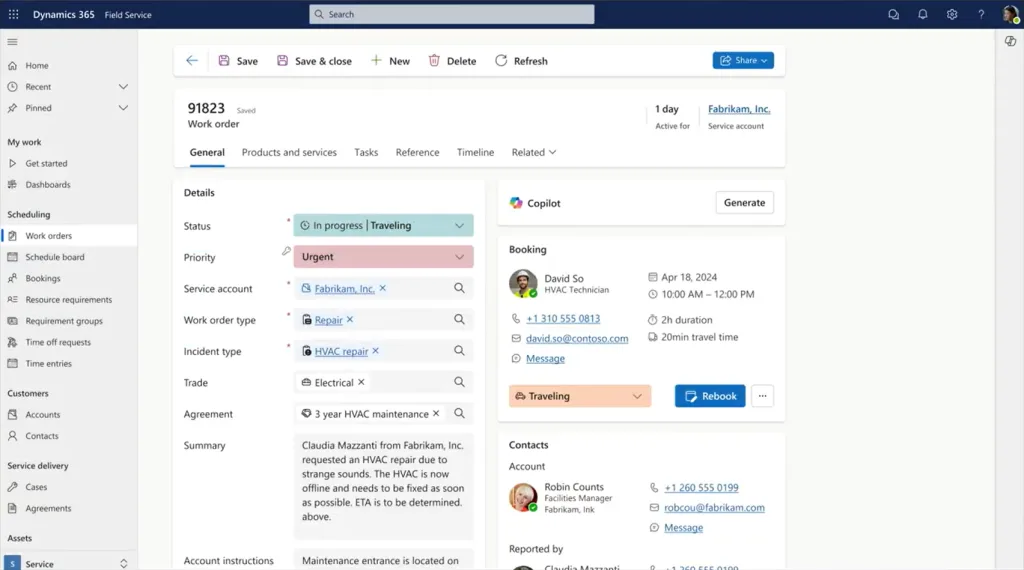
Dynamics 365 Field Service is Microsoft’s cloud-based application for managing and executing field service operations, including work orders, scheduling, dispatch, mobile technicians, assets, and service agreements.
It is designed to help service organizations plan, deliver, and track on-site work efficiently while giving technicians a modern mobile experience and giving the business full operational visibility.
At its core, Dynamics 365 Field Service enables organizations to:
- Create and manage work orders
- Schedule and dispatch field technicians
- Optimize routes and resource utilization
- Support preventive maintenance and recurring service
- Track assets, warranties, and service history
- Enable technicians through a mobile app (online and offline)
Where Dynamics 365 Field Service Fits in the Microsoft Ecosystem
Dynamics 365 Field Service is part of the Dynamics 365 CRM platform, built on Microsoft Dataverse. It works alongside applications such as:
- Dynamics 365 Sales
- Dynamics 365 Customer Service
- Power Platform (Power Apps, Power Automate, Power BI)
Importantly, Field Service is not an ERP.
It does not:
- Post financial transactions
- Manage general ledger or AR/AP
- Perform inventory valuation
- Handle revenue recognition
Instead, Field Service depends on an ERP system to handle financials, inventory, and operational accounting.
This is why Field Service is typically connected to:
- Dynamics 365 Business Central, or
- Dynamics 365 Finance & Operations (F&O)
What Stays the Same Regardless of ERP
One of the most misunderstood aspects of Dynamics 365 Field Service is that the Field Service application itself does not change based on the ERP you choose.
Whether you use Business Central or F&O:
- The schedule board is the same
- The mobile technician experience is the same
- Work order management is the same
- Preventive maintenance logic is the same
Your technicians, dispatchers, and service managers are all using the same Field Service product.
What changes is how Field Service connects to:
- Inventory
- Contracts and billing
- Financial posting
- Asset and service history at the ERP level
That distinction is the foundation of the Business Central vs F&O decision.
Why This Distinction Matters for Buyers
A common misconception in Dynamics 365 Field Service evaluations is that choosing Finance & Operations results in better Field Service functionality.
It does not.
The Field Service application is the same regardless of ERP. Scheduling, dispatch, preventive maintenance, and technician mobility do not improve based on whether you choose Business Central or Finance & Operations.
What does change is the complexity of the system behind Field Service. ERP choice directly impacts total cost of ownership, implementation timeline, governance requirements, and long-term flexibility.
Organizations that select an enterprise ERP without enterprise-level needs often face longer projects, higher costs, and slower ROI, without any benefit to day-to-day field service execution.
Understanding what Dynamics 365 Field Service is, and what it is not, makes the Business Central vs Finance & Operations decision far more practical and far less theoretical.
If you’re not sure if Dynamics 365 Field Service is the right choice for you, read our detailed guide: Top 9 Alternatives to Microsoft Dynamics 365 for Field Service Management.
Business Central vs Finance & Operations: ERP Foundations Explained
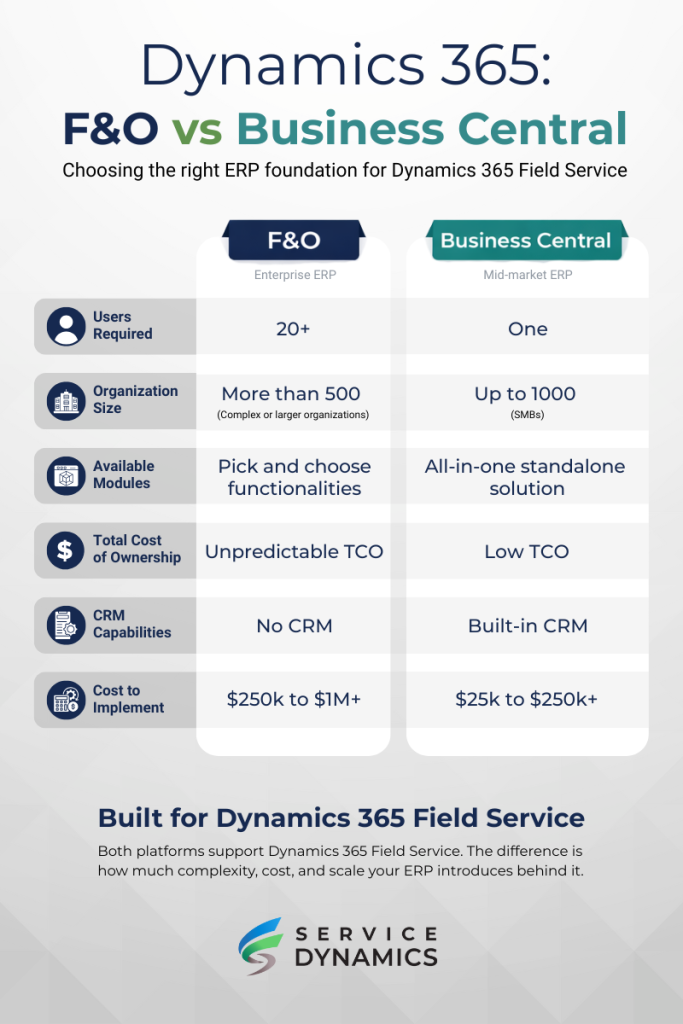
The difference between Dynamics 365 Field Service with Business Central vs Finance & Operations is not the Field Service application. It is the ERP system responsible for financials, inventory, contracts, and operational control.
Microsoft offers two ERP foundations for Field Service, each built for very different types of organizations.
Dynamics 365 Business Central
Dynamics 365 Business Central is Microsoft’s ERP for small to mid-market organizations, including many service-first companies and manufacturers with service divisions.
It is designed to balance operational depth with usability, faster implementations, and predictable cost.
Business Central characteristics
- Single ERP covering finance, inventory, purchasing, and service operations
- Faster deployment and lower customization overhead
- Strong partner and ISV ecosystem
- Easier to adapt as business processes evolve
These characteristics are why Business Central is commonly implemented for field service organizations by experienced partners such as Sabre Limited.
See our list of the best Business Central Field Service partners.
Typical Business Central + Field Service profile
- 10–250 technicians
- Regional or national service footprint
- Service revenue is critical but not hyper-regulated
- Need for faster ROI and operational flexibility
- Limited appetite for long, enterprise-scale ERP projects
When paired with Dynamics 365 Field Service, Business Central acts as the financial and inventory backbone, while Field Service handles execution, scheduling, and mobility.
Dynamics 365 Finance and Operations
Dynamics 365 Finance & Operations (Finance + Supply Chain Management) is Microsoft’s enterprise ERP platform, designed for large, complex, and often global organizations.
It emphasizes scale, governance, and deep process control.
Finance & Operations characteristics
- Advanced financial controls and compliance
- Highly complex supply chain and asset management
- Multi-entity, multi-country support
- Heavy customization and governance requirements
Typical F&O + Field Service profile
- Hundreds or thousands of technicians
- Global operations and regulatory complexity
- High transaction volumes and asset intensity
- Dedicated internal IT and ERP governance teams
- Willingness to invest in long transformation projects
When paired with Field Service, F&O provides enterprise-grade control, but at the cost of speed and flexibility.
Side-by-Side ERP Comparison
| Area | Business Central | Finance & Operations |
|---|---|---|
| Target market | SMB to upper mid-market | Enterprise |
| Typical company size | 10–1,000 employees | 1,000+ employees |
| Typical implementation timeline | ~8–24 weeks (FSM-focused) | ~6–18+ months (enterprise program) |
| Licensing cost (relative) | Low to moderate | High |
| Implementation cost (relative) | Low to moderate | High to very high |
| Ongoing IT dependency | Lower | Higher |
| Best fit service complexity | Operationally complex, commercially flexible | Operationally and financially complex |
Where Business Central vs F&O Actually Matters
When evaluating Dynamics 365 Field Service with Business Central vs Finance & Operations, it’s important to be precise about where functionality differs and where it does not.
Many comparisons imply that Finance & Operations unlocks superior Field Service capabilities. In practice, most Field Service functionality is identical, and the differences appear only when Field Service interacts with ERP-managed processes such as inventory, billing, and financial controls.
Work Orders, Dispatch & Scheduling
No functional difference at the Field Service level.
Both ERP options use the same Field Service capabilities:
- Work order lifecycle management
- Schedule Board and Resource Scheduling Optimization
- Preventive maintenance and recurring work orders
- Skill-based and territory-based dispatch
- Manual and automated scheduling
Dispatchers, service managers, and technicians are all working in the same Field Service interface, regardless of ERP.
Inventory & Parts Management
This is one of the first areas where ERP choice matters, but only at scale.
| Inventory Capability | Business Central | Finance & Operations |
|---|---|---|
| Truck stock management | ✔️ | ✔️ |
| Depot / warehouse inventory | ✔️ | ✔️ |
| Serialized and lot tracking | ✔️ | ✔️ |
| Inventory valuation | ✔️ | ✔️ |
| Advanced replenishment logic | Limited | Advanced |
| High-volume warehouse ops | Limited | Strong |
Business Central excels when:
- Inventory is primarily truck- or depot-based
- Parts complexity is moderate
- Replenishment rules are straightforward
Finance & Operations excels when:
- Inventory behaves like a supply chain operation
- High-volume, multi-warehouse planning is required
- Advanced forecasting and replenishment are critical
For most field service organizations, inventory complexity is operational, not industrial, making Business Central sufficient and often preferable.
Contracts, Billing & Invoicing
ERP choice becomes more visible once service work turns into revenue.
Business Central supports:
- Time & materials billing
- Fixed-price service contracts
- Preventive maintenance agreements
- Simple usage-based billing (often with extensions)
Finance & Operations supports:
- Complex contract hierarchies
- Multi-entity billing structures
- Advanced revenue recognition rules
- Highly regulated billing scenarios
Key distinction: Business Central covers the majority of real-world service billing needs with less configuration and lower cost. Finance & Operations is required only when billing rules become enterprise-grade and compliance-heavy.
Financial Posting & Accounting
This is entirely an ERP concern.
- Field Service generates operational data
- The ERP posts financial transactions
Business Central
- Simpler chart of accounts
- Faster posting cycles
- Lower accounting overhead
Finance & Operations
- Advanced financial dimensions
- Multi-ledger and multi-entity consolidation
- Heavy audit and compliance frameworks
Organizations with standard service accounting rarely benefit from F&O’s added complexity.
Mobile Technician Experience
No functional difference.
Both options use the same:
- Dynamics 365 Field Service mobile app
- Offline capabilities
- Custom forms and workflows
- Power Apps extensibility
Technicians do not experience any difference based on ERP choice.
This is a critical point for buyers: ERP selection does not improve technician usability.
Reporting, Analytics & Power BI
Both architectures support:
- Power BI reporting
- Operational dashboards
- Service performance KPIs
Differences emerge only when:
- Enterprise-wide financial consolidation is required (F&O advantage)
- Reporting needs are operational and service-focused (Business Central is often simpler)
Key Takeaway
Most of what buyers think they are choosing between does not change.
The Field Service experience remains the same. What changes is the level of financial, inventory, and governance complexity managed by the ERP.
For many mid-market service organizations, choosing Finance & Operations introduces more system than the business actually needs, without improving day-to-day field service execution.
Pricing & Total Cost of Ownership (With Real Numbers)
When comparing Dynamics 365 Field Service with Business Central vs Finance & Operations, pricing differences are driven far more by ERP choice than by Field Service itself.
The Field Service application is licensed the same way in both scenarios. What changes is:
- ERP licensing
- Implementation cost
- Ongoing support and change effort
Below are realistic 2026 list-price estimates and typical mid-market cost ranges. Actual pricing may vary by agreement and partner, but the relative differences are consistent.
Dynamics 365 Field Service Licensing (Same for Both Options)
| License | Approx. Monthly Cost (USD) | Notes |
|---|---|---|
| Dynamics 365 Field Service | $105.00 (per user/month, paid yearly) | Required for dispatchers & service managers |
| Dynamics 365 Field Service Contractor | $50.00 (per user/month, paid yearly) | For external technicians |
| Dynamics 365 Team Member | $8.00 (per user/month, paid yearly) | Read-only / light access |
Important Note: Field Service licensing does not change based on ERP choice. Learn more about Dynamics 365 Field Service licensing.
ERP Licensing Comparison
Dynamics 365 Business Central Licensing
| License | Approx. Monthly Cost (USD) | Typical Use |
|---|---|---|
| Essentials | $80.00 (per user/month, paid yearly) | Finance, inventory, purchasing |
| Premium | $110.00 (per user/month, paid yearly) | Everything in Essentials, plus manufacturing and service order management |
| Team Member | $8.00 (per user/month, paid yearly) | Read-only / limited access |
Learn more about Business Central license costs at Sabre Limited.
Dynamics 365 Finance and Operations Licensing
| License | Approx. Monthly Cost (USD) | Typical Use |
|---|---|---|
| Dynamics 365 Finance | $210.00 (per user/month, paid yearly) | Core ERP access with some limitations |
| Dynamics 365 Finance Premium | $300.00 (per user/month, paid yearly) | Includes advanced features such as: Admin/creator access/inputs, no limited contributor access, and higher entitlements for capacity and storage |
Read more about Dynamics 365 Finance pricing.
Best-Fit Scenarios: Which Option Is Right for Your Service Organization?
Choosing between Dynamics 365 Field Service with Business Central vs Finance & Operations is less about software capability and more about organizational fit.
Because the Field Service application is the same in both scenarios, the right choice depends on:
- Service scale
- Operational complexity
- Financial and compliance requirements
- Budget and tolerance for ERP governance
Below are clear, real-world best-fit scenarios to help you determine which option aligns with your service organization.
When Business Central + Field Service Is the Best Fit
Dynamics 365 Business Central + Dynamics 365 Field Service is typically the best choice for mid-market service organizations that need power without enterprise overhead.
Business Central Is a Strong Fit If You:
- Have 10–250 field technicians
- Operate regionally or nationally (not globally complex)
- Run a service-focused or service-led business
- Need faster implementation and faster ROI
- Want predictable costs and lower long-term risk
- Expect service processes to evolve over time
Common Business Central + Field Service Use Cases
- HVAC, electrical, mechanical, and specialty contractors
- Equipment service and maintenance providers
- Manufacturers adding aftermarket service revenue
- Project-based service organizations
- Growing service companies replacing legacy FSM tools
Why Business Central Works Well for These Organizations
- ERP complexity matches service reality
- Field Service delivers execution and mobility
- Business Central handles billing, inventory, and financials without overengineering
- Changes can be made post, go-live without major disruption
For many organizations, this combination provides the best balance of capability, cost, and agility.
When Finance & Operations + Field Service Is the Best Fit
Dynamics 365 Finance and Operations + Dynamics 365 Field Service is designed for enterprise-scale service operations with advanced governance requirements.
Finance & Operations Is a Better Fit If You:
- Have hundreds or thousands of technicians
- Operate across multiple countries and legal entities
- Require advanced financial controls and compliance
- Manage complex asset hierarchies and supply chains
- Have dedicated ERP and IT governance teams
- Are prepared for a long transformation timeline
Common F&O + Field Service Use Cases
- Global utilities and infrastructure providers
- Large industrial service organizations
- Highly regulated industries
- Asset-intensive, compliance-driven service operations
Why Finance & Operations Is Required in These Scenarios
- Enterprise-scale financial consolidation
- Deep supply chain and asset management
- Strict audit, security, and compliance controls
- Consistency across large, distributed organizations
In these environments, speed and flexibility are intentionally traded for control and stability.
How to Choose the Right ERP for Dynamics 365 Field Service
Choosing between Dynamics 365 Field Service with Business Central or Finance & Operations comes down to answering a small set of practical questions about scale, complexity, and risk tolerance.
You can use the framework below to make a clear, defensible decision.
Step 1: Define the Scale of Your Field Service Operation
Start with what exists today, not where you hope to be someday.
Ask:
- How many field technicians do we actively manage?
- How many dispatchers and service admins support them?
- Is our service footprint regional, national, or global?
Guidance: Businesses that manage less than roughly 250 technicians typically find Business Central sufficient. Service operations with hundreds or thousands of technicians across multiple countries may require Finance & Operations.
Step 2: Assess Financial and Compliance Complexity
Your ERP choice matters most once service work turns into financial reporting and compliance.
Ask:
- Do we operate across multiple legal entities or countries?
- Do we require advanced revenue recognition or regulatory controls?
- Are audits and compliance a primary driver of system design?
Guidance: Business Central supports standard service accounting and reporting needs. Finance & Operations becomes necessary only when advanced compliance, regulatory controls, or complex revenue recognition rules are driving system design.
Step 3: Evaluate Inventory and Asset Complexity
Not all service inventory behaves like a supply chain.
Ask:
- Is inventory primarily truck stock and service depots?
- Do we manage large-scale warehouse operations?
- Are assets deeply integrated into supply chain planning?
Guidance: When inventory is primarily truck stock or service depots, Business Central is usually a strong fit. Finance & Operations is better suited to industrial-scale inventory planning, multi-warehouse operations, and supply chain–driven asset management.
Step 4: Determine Tolerance for Implementation Time and Governance
This is where many decisions break down.
Ask:
- How quickly do we need to see ROI?
- Can the organization support a long ERP transformation?
- Do we have internal ERP governance and IT teams?
Guidance: Organizations that need results within months to a year should consider Business Central. Finance & Operations is appropriate when the organization is prepared for a longer, governance-heavy ERP transformation.
Step 5: Consider Long-Term Agility
Service organizations change frequently.
You should ask yourself:
- Do our service offerings evolve regularly?
- Do we expect pricing, contracts, or workflows to change?
- How costly is change after go-live?
Guidance: If pricing, contracts, and workflows change often, Business Central offers greater flexibility. Finance & Operations is better suited to environments where processes are stable and standardization is the priority.
Conclusion: Business Central vs Finance & Operations for Field Service
Dynamics 365 Field Service works equally well with both Business Central and Finance & Operations. The Field Service application itself does not change. What changes is the ERP foundation that supports financials, inventory, compliance, and long-term governance.
For most mid-market service organizations, Business Central provides the best balance of capability, cost, and agility. It supports modern field service operations, integrates cleanly with Dynamics 365 Field Service, and delivers faster time to value without introducing unnecessary enterprise complexity.
Finance & Operations is the right choice only when enterprise-scale requirements truly exist, such as global operations, advanced compliance, or highly complex financial and supply chain structures. In those cases, the additional cost and implementation effort are justified by the level of control required.
The key takeaway is simple:
- Choose Business Central when speed, flexibility, and ROI matter most
- Choose Finance & Operations when governance, compliance, and global scale are non-negotiable
Aligning ERP complexity with actual service needs is the most reliable way to ensure Dynamics 365 Field Service delivers measurable results, not just technical capability.
Need Help Choosing the Right Path?
At Service Dynamics, we help field service organizations implement Business Central and ExpandIT based on how service teams actually operate, not generic feature checklists.
If you’re planning a Dynamics 365 Field Service rollout or questioning whether your current ERP foundation is the right fit, talk to a team that specializes in service-first implementations.
Contact Service Dynamics for a clear, experience-based recommendation grounded in real-world deployments.
Frequently Asked Questions (FAQs)
Can Dynamics 365 Field Service work with Business Central
Yes. Dynamics 365 Field Service integrates with Dynamics 365 Business Central using certified connectors, APIs, and the Microsoft Power Platform. Field Service handles scheduling, dispatch, and mobile execution, while Business Central manages financials, inventory, and billing.
Do I need Finance & Operations to use Dynamics 365 Field Service?
No. Finance & Operations is not required to run Dynamics 365 Field Service. It is only necessary when your organization has enterprise-scale requirements such as global operations, advanced regulatory compliance, or highly complex financial and supply chain structures.
Is Dynamics 365 Field Service different when used with Business Central vs F&O?
No. The Field Service application itself is the same regardless of ERP. Scheduling, work orders, preventive maintenance, and the mobile technician experience do not change. The difference lies in how financials, inventory, and governance are handled by the ERP.
Which option is more cost-effective for mid-market service organizations?
For most mid-market service organizations, Business Central is significantly more cost-effective. It has lower licensing costs, faster implementation timelines, and lower ongoing support and change-management costs compared to Dynamics 365 Finance and Operations.
Does Finance & Operations provide better scheduling or dispatch features?
No. Scheduling, dispatching, and resource optimization are provided by Dynamics 365 Field Service, not the ERP. Choosing Finance & Operations does not improve technician scheduling or dispatch capabilities.
Can Business Central handle complex service billing and contracts?
Yes, for most service organizations. Business Central supports time-and-material billing, fixed-price contracts, preventive maintenance agreements, and recurring billing. Finance & Operations is only required when billing rules become enterprise-grade or highly regulated.
How long does a typical Dynamics 365 Field Service implementation take?
– Business Central + Field Service: typically 8–24 weeks for mid-market organizations
– Finance & Operations + Field Service: typically 6–18+ months due to enterprise ERP scope and governance
Actual timelines vary based on complexity and organizational readiness.
Does ERP choice affect the mobile technician experience?
No. Technicians use the same Dynamics 365 Field Service mobile app regardless of ERP. ERP choice does not impact mobile usability, offline capability, or technician workflows.
Can we start with Business Central and move to Finance & Operations later?
In some cases, yes, but most organizations do not need to. Many service businesses successfully scale on Business Central for years. Moving to Finance & Operations is typically driven by regulatory or global complexity, not service growth alone.
What is the biggest risk when choosing the wrong ERP for Field Service?
The biggest risk is over-implementing ERP complexity. Choosing an enterprise ERP without enterprise requirements often leads to longer implementations, higher costs, slower ROI, and reduced agility, without improving field service execution.