
Most service companies do not struggle because Business Central lacks functionality. They struggle because the system was never designed around how their people actually work. Service Management is often implemented as a feature checklist instead of a role-based workflow. When that happens, friction shows up immediately. Intake is incomplete. Dispatch lacks visibility. Technicians miss billable details. Accounting slows down billing.
Business Central Service Management only works when it is structured around the people using it every day. The CSR, dispatcher, technician, service manager, accounting team, and leadership all require different information at different moments. If the system supports each role properly, service flows. If it does not, inefficiency compounds quickly. Designing by role is what separates a functional system from a profitable one.
In this article, we’ll break down the needs of each role and the licenses required for them to do their job properly.
Business Central Service Management: Role Overview
Business Central Service Management only works when each role has the right visibility and licensing. The table below summarizes responsibilities, system needs, and license requirements.
| Role | Primary Responsibility | What They Need in Business Central | Typical License Requirement |
|---|---|---|---|
| CSR (Intake) | Define the service event correctly | Customer history, asset records, warranty/contract status, past workorders, parts availability | Premium Full User |
| Dispatcher | Control scheduling efficiency | Visibility into all open orders, technician availability, workload balancing, real-time updates | Premium Full User ExpandIT license if used |
| Technician | Convert service into billable revenue | Full workorder details, time entry, material usage, notes, photos, signatures, mobile access | Premium or Team Member License ExpandIT license if used |
| Service Manager | Protect margin and approve work | Review labor/material entries, approval workflows, utilization reporting, backlog visibility | Premium Full User ExpandIT license (optional) |
| Accounting / AR | Convert work into invoices | Clean approved workorders, accurate pricing, contract validation, invoice generation | Premium Full User |
| Warehouse Manager | Manage parts and truck stock | Parts consumption data, demand forecasting, inventory assigned to techs, usage trends | Premium Full User |
| Controller | Protect financial integrity | Margin by service call, billing cycle timing, unbilled work aging, variance reporting | Premium Full User |
| CFO / Executive | Evaluate operational sustainability | Revenue trends, margin trends, billing speed, utilization reporting, financial statements | Premium Full User |
Business Central Service Management for CSRs
Tom Shooter, Business Central consultant at Service Dynamics, put it simply when we discussed intake.
“If the first person talking to the customer does not have the full picture, everything downstream gets harder.”
The CSR is your front line. They’re not just answering calls, they’re setting up the financial outcome of the service event.
In many companies, that CSR used to be a technician. They understand equipment. They ask better questions. But even then, they need structured information in from of them.
In Business Central, your CSR should see:
- Customer history
- Asset or equipment records
- All past workorders
- Warranty status
- Service contract coverage
- Inventory availability (if parts are required)
Visibility into warranty and contract status is critical. If that information is buried or unclear, you create billing disputes before the tech even leaves the office.
Licensing Requirements
From a licensing perspective, this role requires a Business Central Premium full user license if you are using the native Service module. Service Management is not available under Essentials.
A Team Member license is typically not sufficient because the CSR is creating and modifying service orders. That level of document creation requires a full user.
If ExpandIT is part of the architecture, the CSR still works inside Business Central itself. ExpandIT primarily supports field execution and dispatch, not intake.
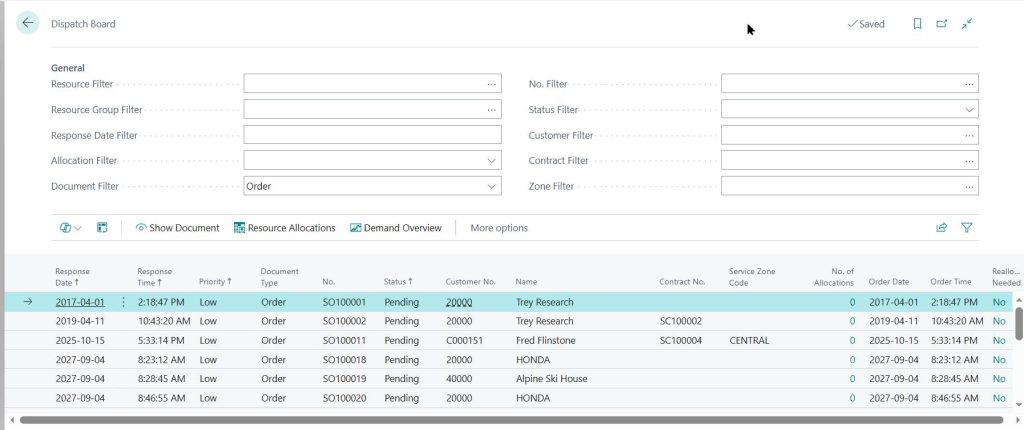
Field Service Dispatch in Business Central
If the CSR defines the service event, the dispatcher defines its efficiency.
“Dispatch is where you either gain control, or you lose it completely,” said Tom.
The dispatcher is the operational control tower. They need visibility across every open service order and every technician’s availability. Without that visibility, scheduling becomes reactive instead of strategic.
Inside Business Central, the dispatcher should be able to see:
- All unassigned workorders
- All assigned workorders by technician
- Backlog of open calls
- Scheduled work for today and future days
- Estimated duration of each service call
- Technician availability
They also need structured communication. If dispatch conversations are happening over text messages, phone calls, or side emails with no system record, you lose accountability and traceability.
Scheduling without reliable time estimates creates bottlenecks fast. If you underestimate service duration, you overbook. If you overbook, technicians rush. If technicians rush, quality drops.
This is not just a calendar problem. It is a margin problem.
Licensing Requirements
Dispatchers typically require a Business Central Premium full user license if you are running native Service Management.
If ExpandIT is part of the solution, dispatchers typically require an ExpandIT license depending on how scheduling and communication are structured.

Technician Workflow in Business Central Service Management
“If the tech does not enter it, you cannot bill it.”
The technician is where service turns into revenue. Everything up to this point sets the stage. Everything after depends on what the tech records.
When a technician opens a service order, they should see:
- Full details captured by the CSR
- Customer history
- Complete asset history
- Warranty and service contract status
- Last visit date and next scheduled visit if applicable
- Clear asset location if the customer site is large
History matters. If a tech cannot see what has already been done to that piece of equipment, they are troubleshooting blind. That wastes time and increases repeat visits.
If entering time or materials feels complicated, techs delay it. If they delay it, details are forgotten. If details are forgotten, revenue is missed.
Licensing Requirements
Technicians typically require a Business Central Premium full user license if they are entering time, materials, and modifying service orders. A Team Member license is generally too restrictive for this role.
If ExpandIT is implemented, technicians will also require an ExpandIT user license for mobile access.
Service Manager Oversight in Business Central
By the time a workorder reaches the Service Manager, the operational work is done. What remains is validation, control, and margin protection.
The Service Manager is responsible for ensuring that what the technician entered is accurate, complete, and aligned with company standards. This is where quality control meets financial control.
Inside Business Central, the Service Manager should be able to:
- See all workorders waiting for approval
- Review labor and material usage clearly
- Identify anomalies or missing entries
- Make adjustments when necessary
- Approve and lock the workorder
Locking is important. Once approved, the workorder should not be editable. If technicians can continue modifying records after review, you introduce risk and confusion.
Tom emphasized that approval workflows are not about micromanaging technicians. They are about protecting margin and ensuring consistency.
Licensing Requirements
Service Managers require a Business Central Premium full user license if Service Management is being used natively. They are reviewing and modifying service documents, which requires full functionality.
If ExpandIT is implemented, the manager may or may not require an additional license depending on whether they are interacting with the dispatch board or mobile oversight tools.
Billing and Accounts Receivable in Business Central Service Management
Once a workorder is approved, the focus shifts from operations to finance. This is where speed and accuracy have to coexist.
The Accounting team’s role is to convert completed service work into an invoice and post it to Accounts Receivable. That sounds simple. It rarely is if the upstream process is weak.
Inside Business Central, Accounting needs:
- A clean, approved service order
- Clear breakdown of labor and materials
- Accurate pricing tied to contracts or warranties
- Confidence that documentation is complete
- The ability to generate, post, reprint, and email invoices
If service orders arrive incomplete, accounting becomes the cleanup crew. They chase technicians. They call dispatch. They review notes. That delay stretches the billing cycle.
Tom emphasized that credit memos are not just inconvenient. They are operationally expensive. When an invoice is wrong, correcting it involves multiple people and interrupts normal workflow.
In many service organizations, we see the gap between workorder completion and invoice posting sit anywhere from 7 to 14 days when approvals and technician entry are inconsistent. When the workflow is structured properly, that gap can often be reduced to 24 to 72 hours.
Licensing Requirements
Accounting users will almost always require a Business Central full user license.

Inventory and Truck Stock Management in Business Central Field Service
Service is not just a scheduling function. It is an inventory event.
Every service call affects inventory. Parts are removed from stock. Items move onto trucks. Replacements are ordered. If that movement is not visible in the system, planning becomes reactive.
Inside Business Central, the Warehouse Manager should be able to see:
- Parts consumed on service workorders
- Upcoming demand based on scheduled calls
- Seasonal service trends
- Inventory assigned to technicians or truck stock
- Historical usage patterns
If truck inventory is not tracked properly, companies end up overstocking or reordering unnecessarily. If future service demand is not visible, shortages appear at the worst possible time.
Tom emphasized that service data improves forecasting. When service orders are structured properly, the warehouse team can anticipate demand rather than react to it.
Licensing Requirements
Warehouse Managers typically require a Business Central Essentials full user license, as they are primarily working within inventory and warehouse functionality.
Service Profitability Reporting in Business Central: What Controllers Need to See
By the time service work reaches the Controller, the question is no longer operational. It is financial.
“The gap between completion and billing is where cash flow gets stretched.”
The Controller is focused on timing, accuracy, and financial integrity. They care about how quickly a completed workorder becomes posted revenue. They also care about whether that revenue is correct the first time.
Inside Business Central, the Controller should be able to see:
- Aging of completed but unbilled workorders
- Time from completion to invoice posting
- Margin by service call
- Labor and material variance
- Exception reporting for unusual transactions
If service orders sit in approval queues, billing is delayed. If technicians forget to enter time, invoices are understated. If pricing is unclear, credit memos follow.
Tom emphasized that speed without accuracy creates more work. If invoices are rushed out and later corrected, the accounting team spends more time reversing and reissuing than they would have spent doing it properly once.
From a financial perspective, the Controller needs confidence that:
- Revenue is recognized properly
- Costs are captured accurately
- Service profitability reporting reflects reality
If service data is inconsistent, financial statements are distorted. That distortion may not be obvious immediately, but over time it erodes trust in reporting.
Licensing Requirements
Controllers typically require a Business Central Premium full user license, depending on their access needs.
Team Member licenses are generally too limited for this role, as Controllers require full visibility into financial and operational data.
Executive Visibility in Business Central Field Service Operations
The CFO is not managing service orders. They are evaluating whether the entire service operation is sustainable.
Tom described it in practical terms:
“Leadership wants to know that the system gives everyone what they need without creating extra layers of inquiry.”
The CFO does not want to chase information. They want structured reporting. They want consistency. They want confidence that service operations, inventory, billing, and finance are aligned inside one system.
Inside Business Central, the CFO should be able to see:
- Timely financial statements that reflect service activity
- Service revenue and margin trends
- Billing cycle timing
- Workforce utilization at a high level
- Exception reporting when performance falls outside expectations
The CFO’s concern is not whether a technician captured a signature. It is whether service revenue is predictable and profitable.
Tom emphasized that leadership does not want separate systems stitched together with spreadsheets. When service data lives outside the ERP, internal inquiries increase. Teams spend time validating numbers instead of improving performance.
Licensing Requirements
CFOs typically require a Business Central Premium full user license depending on how deeply they interact with operational data.
In some cases, reporting access through Power BI or structured dashboards may supplement direct ERP usage. However, access must allow visibility into financial and service performance at a meaningful level.
Team Member licenses are generally too limited for executive oversight if financial and operational reporting is required.

Native Business Central vs ExpandIT: Choosing the Right Field Service Architecture
So now that you know the requirements for each role, is native Business Central enough for field service, or do you need ExpandIT?
The answer depends on the complexity of your field service operation.
Understand What Native Business Central Service Actually Does
Business Central Premium includes the Service Management module. Out of the box, it provides:
- Service order creation
- Warranty and contract tracking
- Technician assignment
- Basic scheduling
- Labor and material entry
- Service invoicing
- Full integration with inventory and finance
Because it lives directly inside Microsoft Dynamics 365 Business Central, service, inventory, purchasing, and accounting remain fully connected.
For organizations with:
- A small to mid-sized technician team
- Predictable service volume
- Limited geographic spread
- Mostly online connectivity
- Moderate dispatch complexity
Native Business Central Service Management is often enough. It delivers structure without introducing additional architectural layers.
Recognize When Field Complexity Changes the Equation
As service operations scale, pressure builds in three areas:
- Dispatch visibility
- Mobile usability
- Field inventory control
This is where ExpandIT enters the conversation. ExpandIT expands on the feature set of Business Central. It does not replace it.
ExpandIT becomes relevant when you need:
- A stronger real-time dispatch board
- A field-optimized mobile experience
- Offline capability
- Structured digital forms and checklists
- Native signature capture
- More robust truck stock tracking
In larger field environments, mobile friction directly impacts revenue.
If technicians hesitate to enter time, billing accuracy drops. If dispatch lacks live visibility, utilization falls. If truck stock is unclear, inventory costs rise. These are all operational constraints, not feature gaps.
Side-by-Side Comparison
Instead of thinking in terms of “better,” think in terms of scale and complexity.
| Area | Native Business Central Service | Business Central + ExpandIT |
|---|---|---|
| Core Service Orders | Included in Premium | Included |
| Warranty & Contracts | Included | Included |
| Scheduling | Structured | Real-time optimized |
| Dispatch Board | Functional | Dynamic & visual |
| Mobile Interface | Web-based | Field-first mobile app |
| Offline Capability | Limited | Strong |
| Digital Forms | Basic | Structured & integrated |
| Signature Capture | Limited | Native mobile capture |
| Truck Stock | Basic tracking | Field-optimized control |
The Practical Decision Framework
Use this as a simple filter.
Native Business Central Service is usually sufficient for your business if:
- Dispatch is relatively stable
- Technicians work primarily online
- Service volume is manageable
- Truck stock complexity is low
You can justify ExpandIT if:
- Dispatch changes constantly
- Technicians live in the field
- Offline access matters
- Documentation accuracy is critical
- Truck inventory impacts profitability
This is not about buying more software, it is about matching system design to service complexity. If your field service operation feels constrained, reactive, or administratively heavy, that is a design signal. Design first. Then choose the architecture that supports it.
Frequently Asked Questions About Business Central Service Management
Does Microsoft Dynamics 365 Business Central include Service Management?
Yes, but only under the Premium license.
Business Central Premium includes the Service Management module, which supports service orders, warranty tracking, service contracts, technician assignment, and service invoicing.
Business Central Essentials does not include Service Management functionality.
If you plan to run field service operations natively inside Business Central, you will need Premium licensing.
Can technicians use a Team Member license?
In most real-world scenarios, no.
Technicians are modifying service orders, entering labor, adding materials, and updating status. Those actions typically require a full Premium user license.
If ExpandIT is implemented, technicians will also require an ExpandIT user license for mobile access.
When is native Business Central Service enough?
Native Business Central Service Management is often sufficient when:
– The technician team is small to mid-sized
– Scheduling complexity is moderate
– Real-time dispatch board functionality is not critical
– Mobile requirements are basic
– Offline access is not essential
For structured service organizations with manageable scale, native functionality can perform well.
When should a company consider ExpandIT?
ExpandIT becomes relevant when field complexity increases.
Common triggers include:
– Larger technician teams
– High daily service volume
– Real-time dispatch adjustments
– Strong mobile usability requirements
– Offline field access
– Digital forms and signature capture
– Truck stock tracking
ExpandIT extends Business Central. It does not replace it. It enhances dispatch and field execution capabilities when native tools begin to feel constrained.
Does Service Management impact cash flow?
Yes, directly.
The time between workorder completion and invoice posting affects cash flow. If service data is incomplete, billing slows down. If billing slows down, payment is delayed.
Accurate technician time entry, structured approvals, and clean service documentation all influence how quickly revenue is recognized and collected.
What is the biggest mistake companies make with Business Central Service Management?
They implement functionality without designing workflow.
Turning on the Service module does not automatically create operational clarity. Each role must be structured intentionally.
Service Management works when:
– Intake is accurate
– Dispatch has visibility
– Technicians can enter data easily
– Approvals are controlled
– Accounting trusts the information
When those elements align, service becomes predictable and profitable. When they do not, inefficiencies compound quickly.
Conclusion
After walking through each role, one pattern becomes clear.
Business Central Service Management does not fail because it lacks features. It fails when it’s implemented without role clarity.
Tom summed it up well during our conversation, “Every role needs different information. But it all has to live in one system.”
If you would like to learn more about implementing Business Central for a service company, contact our experts at Service Dynamics today.