
Most field service companies begin with basic tools like accounting software, job trackers, and spreadsheets. That setup works early on, but as your team grows, scheduling becomes more complex, and customer expectations increase, these disconnected systems start to break down. They simply were not built for modern field service operations or for the scale required to support a growing service organization.
At this point, many companies realize they need a field service solution that centralizes scheduling, job costing, inventory, work orders, technician mobility, and customer communication. For some organizations, this evaluation starts with understanding what native service management in Business Central includes—and where it may fall short for field-heavy teams.
A properly implemented Business Central environment, especially when combined with ExpandIT, replaces manual processes and fragmented tools with a unified, mobile-ready platform.
Below are ten clear warning signs that your organization has outgrown basic software and how Business Central field service capabilities solve each challenge.
10 Signs You Need Better Software
Here are the top indicators your field service operation has outgrown basic tools:
- Outgrowing your accounting software
- Missing modern field service features
- Systems that don’t integrate and create data silos
- Software that stops evolving or improving
- Poor usability that slows your team down
- Customers wanting real-time visibility you can’t provide
- Inaccurate job costing or limited profitability insights
- Scheduling and dispatching becoming bottlenecks
- Hiring more administrators instead of more technicians
- Lack of strategic insights needed to plan and grow
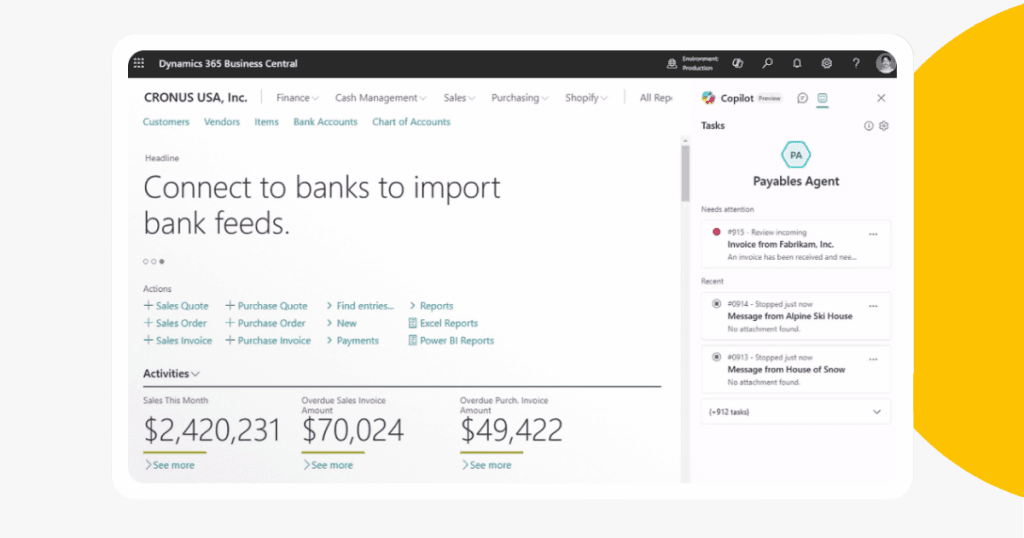
1. Your Business Has Outgrown Your Accounting Software (The Number One Sign You Need Field Service Management in Business Central)
Growth is exciting, but it quickly exposes the limits of traditional accounting systems. Most were never designed to manage technicians, schedule service work, track inventory usage on jobs, or provide real-time visibility into field operations. As job volume increases and your service team expands, the system begins to strain.
Read more about the benefits of field service software that integrates into accounting.
Common signs your software is holding you back:
- Slow performance, freezing, or system crashes as work order volume increases
- Limits on users, transactions, or storage that create growth barriers
- Multi-branch workflows that rely on complicated workarounds
- Scheduling and dispatching that becomes disorganized as more technicians are added
- Reporting that loses accuracy and becomes harder to maintain
- Excessive manual work such as billing, job costing, and data entry
These limitations directly affect service quality and make it difficult to operate efficiently.
How Business Central solves the problem
A true field service management Business Central implementation is designed to scale with your business. It supports unlimited work orders, multi-entity operations, advanced scheduling, and real-time insights across your entire service team. As your company grows, Business Central field service capabilities continue to provide stable performance without slowdowns, limits, or manual workarounds.
If growth is exposing the weaknesses in your current software, field service Business Central is not just a replacement. It becomes the foundation that supports your next stage of operational efficiency and service excellence.
2. You’re Missing Features Modern Field Service Teams Expect
As your service organization grows, the limitations of basic tools become more noticeable. What once supported your workflow now falls behind the needs of a larger technician team, more complex scheduling, and customers who expect real-time updates.
The most common feature gaps include:
- No intelligent routing or scheduling optimization
- Limited reporting tools and static dashboards
- Manual work order creation, assignment, and tracking
- Invoicing processes that require hours or days of cleanup
- No mobile application for technicians in the field
- No customer portal that provides visibility into job status or technician ETA
When these features are missing, technicians lack information, administrators waste time on manual tasks, and customers receive a lower-quality experience.
How Business Central closes the gap
Business Central paired with ExpandIT delivers the tools today’s field teams rely on—mobile apps for technicians, drag-and-drop scheduling, automated work order creation, flexible reporting, and self-service portals for customers. Together, they give you modern field service functionality inside a unified ERP platform.
This is where Business Central provides real value. It eliminates outdated processes and equips your team with the capabilities needed to operate efficiently at scale.

3. Your Systems Do Not Integrate, Creating Data Silos and Constant Errors
When your accounting system, job management tool, CRM, and scheduling software cannot communicate with one another, your team spends more time correcting data than completing work orders. Disconnected systems create blind spots that slow down your operations and make it harder to provide accurate, timely service.
The most common integration problems include:
- Duplicate entry of invoices, customer records, and job information
- Work order history that is scattered across multiple platforms
- Inventory usage that is not automatically updated or reflected on service jobs
- No link between service data and CRM or marketing systems
- Difficulty reconciling financials, job costs, and technician activity
These gaps lead to inconsistent data and prevent leadership from trusting the reports needed to run the business effectively.
Why Business Central solves these integration challenges
With Business Central field service, accounting, scheduling, job costing, inventory, CRM, and reporting live in one unified environment. Data flows automatically across teams, eliminating duplicate entry, reducing errors, and ensuring everyone works from the same real-time information.
A connected Business Central platform aligns finance, operations, dispatch, and technicians. The result is cleaner data, faster workflows, and accurate reporting that supports better decision-making at every level.
4. Your Current Software Has Stopped Evolving
Field service operations change quickly. If your software is not keeping pace with new capabilities, security standards, or industry expectations, your organization is forced to work around limitations rather than benefit from innovation. Outdated tools slow progress and introduce unnecessary risk.
Signs your software is no longer evolving:
- No release of new features or functional enhancements
- Missing or infrequent security updates
- Limited or unresponsive customer support
- No published roadmap that shows future development
When your system becomes stagnant, your business carries the burden. This is especially true for organizations still running legacy platforms like Dynamics GP, where field service functionality is no longer evolving to meet modern operational demands. Teams are left with workarounds and manual processes that should have been automated long ago.
Why Business Central is different
Business Central follows a predictable and continuous update cycle. Microsoft delivers major feature updates twice per year, ongoing performance improvements, and monthly service optimizations. Your system stays modern, secure, and aligned with industry best practices without requiring costly upgrades.
Choosing Business Central field service means investing in a platform built for long-term evolution. Your technology stays current, your team stays productive, and your organization can adapt without replacing systems every few years.
5. Your Team Struggles With Usability and the System Slows Them Down
Field service software should make work easier. When technicians, dispatchers, or administrators find the system confusing or inefficient, productivity declines and mistakes become more common. Poor usability is a clear sign your tools were not designed for the needs of a growing service organization.
Common usability issues include:
- Interfaces that are difficult to navigate or feel outdated
- Too many steps required to access job details or customer information
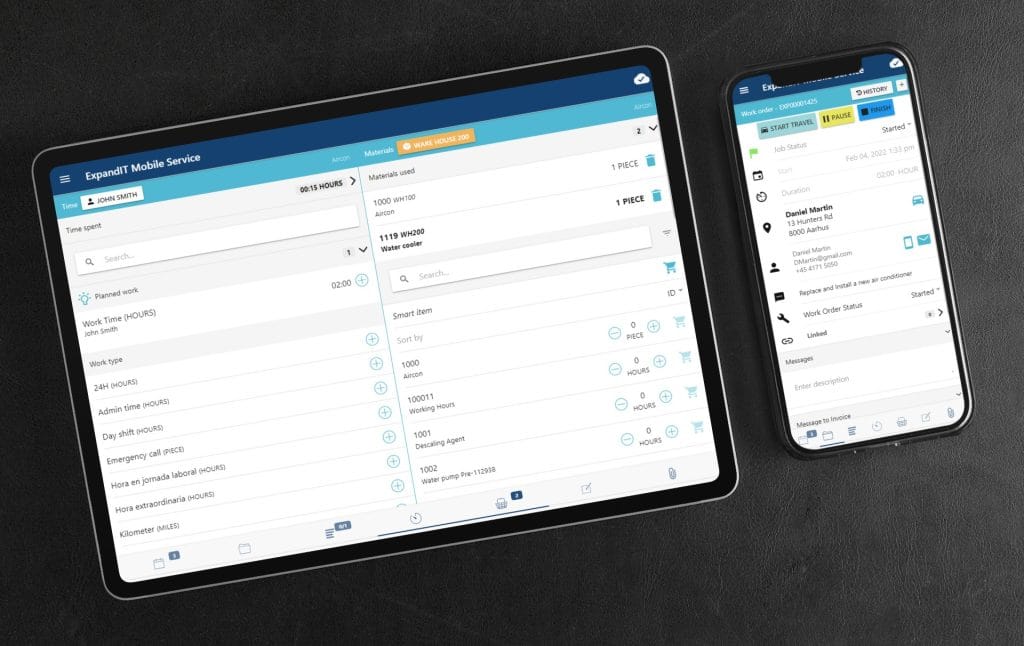
- Limited mobile functionality that slows technicians in the field
- No guided workflows to ensure consistent job execution
- Reporting tools that are hard to use or do not answer real operational questions
- No drag-and-drop scheduling to simplify dispatching
These challenges lead to slow adoption, inconsistent data, and wasted time. When your software becomes something employees try to avoid, your entire operation feels the impact.
How Business Central improves usability
Business Central field service solutions offer a clean, intuitive interface that is easy for technicians, dispatchers, and administrators to learn. Paired with ExpandIT, the mobile experience becomes even more powerful. Technicians can access real-time job details, update work orders from the field, and eliminate reliance on paper or manual workflows.
Dispatchers gain drag-and-drop scheduling, real-time visibility into technician capacity, and guided workflows that reduce decision fatigue. Administrators can access accurate data quickly without relying on spreadsheets or complicated workarounds.
With a modern field service Business Central environment, your team works more confidently and efficiently, leading to better outcomes and happier customers.
6. Your Customers Expect Real-Time Visibility and Your System Cannot Deliver
Customer expectations in field service have changed. People want immediate updates, technician tracking, and clear communication throughout the service process. When your system cannot provide this visibility, customers feel uninformed and uncertain about what to expect.
Common visibility gaps include:
- No customer portal showing job status or technician arrival time
- No automated notifications when a technician is en route
- No access to job notes, photos, or completed service details
- No real-time tracking of work in progress
- No automated customer satisfaction surveys or feedback tools
- Limited reporting on service performance or response times
These gaps increase inbound calls, reduce customer confidence, and make it harder to demonstrate service quality.
How Business Central improves customer visibility
A modern Business Central field service implementation provides customers with real-time insight into every stage of the service process. With ExpandIT, customers can log into a secure portal to track technician arrival times, view job progress, and receive automated updates.
This transparency builds trust, reduces call volume, and creates a smoother service experience from start to finish. With Business Central powering your field service operations, customers stay informed and your team stays aligned.
7. You Cannot Get Accurate Job Costing or Profitability Insights
Accurate job costing is essential for a successful field service operation. When your software cannot show true labor, material, and equipment costs, it becomes difficult to understand which jobs, customers, or contracts are profitable. These gaps often become more apparent as your business grows.
Common signs of limited job costing visibility:
- Job costs stored across multiple systems or spreadsheets
- Inability to calculate real-time profitability on jobs, contracts, or customers
- Inventory usage not linked to work orders or billing
- Delayed or inaccurate reporting that requires manual consolidation
- No visibility into technician utilization or efficiency
- Difficulty forecasting labor, inventory, and workload needs
Without this information, pricing becomes guesswork, margins become unpredictable, and leadership cannot confidently plan for growth.
Why Business Central solves the job costing problem
Business Central connects all financial and operational data in one place. Labor, materials, inventory usage, and billing flow into a single costing model, eliminating spreadsheets and duplicate entry.
With Business Central field service, you gain real-time visibility into:
- Job profitability
- Contract performance
- Technician productivity
- Inventory consumption
- Service margins
- Forecasted labor and material needs
This clarity helps you price more accurately, identify issues early, and improve profitability across your entire service operation.

8. Scheduling and Dispatching Are Becoming a Major Bottleneck
As your field service operation grows, scheduling becomes far more complex. A process that worked for a small technician team quickly becomes unmanageable when job volume increases, skills vary, and customers expect quick response times. If your current tools cannot support this complexity, scheduling and dispatching can become one of your biggest operational challenges.
Common scheduling and dispatching problems include:
- No way to assign technicians based on skills, certifications, or job complexity
- Limited visibility into technician availability and workloads
- Routing that does not optimize travel time or reduce mileage
- Dispatchers relying on spreadsheets, whiteboards, or phone calls
- Technicians arriving unprepared because they lack real-time job information
- Missed or delayed appointments due to poor planning tools
When scheduling begins to break down, productivity drops, travel costs increase, and first-time fix rates suffer.
How Business Central improves scheduling and dispatching
A modern field service management Business Central implementation gives your dispatchers the tools they need to plan and execute work efficiently. When combined with ExpandIT, scheduling becomes simpler, faster, and significantly more accurate.
Key benefits include:
- Drag-and-drop scheduling with real-time visibility
- Automated assignment based on skills, proximity, and availability
- Optimized routing that reduces travel time and fuel costs
- Instant mobile updates so technicians always know where to go next
- Better first-time fix rates due to improved job preparation
- Fewer missed or late appointments
With Business Central field service, scheduling transforms from a daily struggle into a strategic advantage. Your dispatchers gain more control, your technicians stay informed, and your customers receive faster, more reliable service.
9. Scaling Your Business Requires Hiring More Administrators Instead of More Technicians
One of the clearest signs your software is limiting growth is when increased demand forces you to hire more administrative staff instead of more revenue-producing technicians. When workflows are manual, disconnected, or difficult to manage, your back office absorbs the extra workload — creating unnecessary overhead and slowing your ability to scale.
Common signs you are over-reliant on administrative staff include:
- Manual data entry becomes a daily necessity
- Billing requires hours or days of reconciliation before invoices can be sent
- Work order updates are inconsistent or missing
- Reporting requires manual spreadsheets or exports
- Processes vary widely across teams because workflows cannot be standardized
- Technicians depend on office staff for information that should be available in the field
These inefficiencies reduce profitability and make growth more expensive than it needs to be.
How Business Central removes these administrative bottlenecks
A modern field service management Business Central environment eliminates repetitive tasks and centralizes your data. Automated workflows guide processes, reduce errors, and ensure consistent execution across your entire organization.
With Business Central field service, your team gains:
- Automated billing tied directly to completed work orders
- Standardized workflows that prevent process variation
- Real-time updates accessible to technicians, dispatchers, and finance
- A unified data structure that removes duplicate entry
- Faster reporting with accurate information available on demand
Instead of adding more administrative staff, you can scale your revenue-generating team. Business Central gives you the operational efficiency needed to grow without increasing overhead.
10. You Are Missing the Strategic Insights Needed to Grow
Strong field service organizations depend on accurate, real-time data to make informed decisions. When your software cannot provide visibility into technician performance, job profitability, service levels, or operational trends, your ability to plan for growth becomes limited. Without reliable insight, you are forced to make decisions based on incomplete information.
Common signs you lack strategic visibility:
- No clear view of technician utilization or capacity
- Limited reporting on first-time fix rates or service-level performance
- Difficulty identifying profitable and unprofitable customers or contracts
- No forecasting tools for labor, inventory, or workload planning
- Data spread across multiple systems that cannot be easily combined
- Reports that take days to produce and are outdated by the time they are complete
These visibility gaps make it difficult to identify opportunities, address inefficiencies, or optimize your service operation. As a result, your long-term strategy is built on guesswork rather than reliable data.
How Business Central provides the insight you need
A unified field service management Business Central solution consolidates all financial, operational, and service data into a single platform. Leaders gain access to real-time dashboards, configurable reports, and performance metrics that reveal exactly how the business is performing.
With Business Central field service, you can instantly see:
- Technician productivity and utilization
- Profitability by customer, contract, or service type
- First-time fix rates and SLA performance
- Inventory consumption and replenishment needs
- Forecasted workloads and staffing requirements
These insights allow you to make faster and more confident decisions. Most importantly, they help you identify where your service operation can improve and where your next growth opportunity lies.
A connected field service Business Central environment transforms your data into a strategic asset, giving you the clarity needed to scale with confidence.
Is It Time for Business Central Field Service?
If several of the signs above sound familiar, your organization has likely reached the point where basic accounting tools and disconnected systems can no longer support your field service operation. When workflows rely on manual steps, data lives in multiple places, and scheduling becomes difficult to manage, it’s time to move to a platform built for service-driven businesses.
Business Central paired with ExpandIT brings together the core capabilities field service organizations rely on, including:
- Scheduling and dispatching
- Work orders
- Job costing
- Inventory management
- Mobile technician tools
- Customer portals
- Invoicing and billing
- Reporting and forecasting
- CRM and financials
All within one fully integrated system.
If you’re ready to streamline operations, improve visibility, and support growth without adding complexity, Business Central field service provides the foundation to get you there.
Ready to Modernize Your Field Service Operation?
If you’re unsure whether Business Central field service is the right move, we can walk you through a full assessment and demo tailored to your organization. You’ll see how a unified platform simplifies scheduling, improves job costing, enhances technician productivity, and gives you the real-time visibility needed to scale confidently.
Our team can help you evaluate your current processes, identify gaps, and map out what a modern field service environment would look like in Business Central. Contact us for a free consultation and to have any of your questions answered by our experts in Business Central for field service.
Frequently Asked Questions (FAQs)
What is Business Central Field Service?
Business Central Field Service refers to the field service capabilities available within Microsoft Dynamics 365 Business Central, often enhanced with solutions like ExpandIT. It combines scheduling, dispatching, job costing, work orders, inventory, billing, and mobile technician tools into one integrated ERP system.
How do I know when my field service business has outgrown basic software?
You have likely outgrown basic tools when you experience slow performance, manual data entry, disconnected systems, inaccurate job costing, scheduling challenges, limited reporting, or difficulty supporting multiple locations or technicians.
What are the biggest benefits of using Business Central for field service management?
Key benefits include improved scheduling and dispatching, real-time mobile access for technicians, accurate job costing, integrated inventory management, automated billing, customer portals, and unified financial and operational reporting.
Does Business Central Field Service help with scheduling and dispatching?
Yes. Business Central paired with ExpandIT provides drag-and-drop scheduling, automated technician assignment, optimized routing, workload visibility, and real-time mobile updates that improve first-time fix rates and reduce travel time.
Can Business Central improve job costing and profitability tracking?
Absolutely. Business Central connects labor, materials, inventory, and billing into a single costing model. You gain real-time visibility into job profitability, contract performance, technician productivity, and service margins.
How does Business Central help reduce administrative workload?
It automates billing, standardizes workflows, eliminates duplicate data entry, and consolidates information into one database. This allows administrators to focus on higher-value tasks instead of manual data correction or reporting.
Is Business Central Field Service scalable for growing companies?
Yes. Business Central is a cloud-based ERP that scales to support additional technicians, customers, locations, and work order volume without performance issues or system limitations.