
Key Points: Dynamics GP Field Service vs Business Central + ExpandIT
- Field service management in GP is no longer evolving. Dynamics GP is in maintenance mode, with no new features planned and full support scheduled to end in the coming years.
- Dynamics GP Field Service still operates, but at a rising cost. Legacy architecture, manual upgrades, limited mobility, and reliance on scarce GP developers increase long-term risk.
- Business Central + ExpandIT provides a modern replacement. Cloud-native architecture, native mobile apps, automated upgrades, and deep Microsoft 365 integration support today’s service teams.
- Business Central alone may not be enough for technician-heavy organizations. ExpandIT fills critical gaps in scheduling, dispatching, and mobile field execution.
In short: Field service management in GP can still run today, but Dynamics GP Field Service is no longer designed for mobile-first, cloud-driven service organizations—making Business Central + ExpandIT the clearer long-term path.
Field Service Management in GP: Why Companies Are Re-Evaluating Dynamics GP Field Service
For many years, field service management in GP was the standard setup for contractors, installers, and maintenance-driven organizations. When paired with WennSoft (Key2Act), Dynamics GP Field Service provided service companies with job costing, dispatching, scheduling, and work order management tightly integrated with GP financials. For HVAC firms, equipment service providers, and multi-location maintenance teams, it was a reliable and familiar system.
But the landscape has changed.
Microsoft has officially placed Dynamics GP into maintenance mode, signaling the beginning of the end for ongoing innovation. While Dynamics GP Field Service will continue to run for now, it is no longer evolving to meet the demands of modern service operations. Mobile-first technicians, real-time scheduling, cloud access, and seamless Microsoft 365 integration are now baseline expectations—areas where legacy GP environments increasingly struggle.
As a result, many organizations using field service management in GP are reassessing their long-term strategy. The question is no longer whether GP still works, but whether it can support the next phase of growth without rising costs, operational friction, or increased risk.
This shift has driven growing interest in Microsoft Dynamics 365 Business Central + ExpandIT, a cloud-based ERP and field service platform designed to replace legacy GP environments. Business Central offers a modern ERP foundation, while ExpandIT adds purpose-built field service capabilities such as mobile apps, automated scheduling, and technician-friendly workflows.
That said, not every Business Central deployment looks the same. Some organizations explore Business Central’s native Service Management module on its own—but as real-world evaluations show, it often falls short for technician-heavy service teams.
“We did a follow-up with a company that just wanted to see the Service Management piece without ExpandIT, and there were definitely limitations—let’s put it that way.”
— Tom Shooter, ERP Consultant
In this guide, we compare Dynamics GP Field Service and field service management in GP against Business Central + ExpandIT, focusing on the factors that matter most: mobility, scheduling, job costing, reporting, implementation timelines, scalability, and long-term viability—so you can decide which path best supports your service operation today and into the future.

Why Field Service Management in GP Is Falling Behind Modern Service Operations
For a long time, field service management in GP met the needs of contractors and service-based organizations. When paired with WennSoft, Dynamics GP Field Service delivered structured job costing, dispatching, and service order tracking that aligned well with on-premise financials.
However, industry expectations have shifted faster than GP’s architecture can support.
Today’s field service organizations face pressures that legacy ERP systems were never designed to handle:
- Increasing technician shortages and higher labor costs
- Customers expecting faster response times and real-time updates
- Mobile technicians who need intuitive, app-based workflows
- Growing reliance on automation, reporting, and data visibility
These changes are exposing the limitations of Dynamics GP Field Service, even for companies that once considered WennSoft the gold standard.
The Industry Is Moving Away from Legacy GP Systems
Across the field service sector, several trends are driving companies away from on-premise systems like GP:
Cloud-first ERP adoption: More than 70% of service organizations now prioritize cloud-based ERP platforms to reduce infrastructure costs, eliminate server maintenance, and avoid disruptive upgrades. This is an area where field service management in GP struggles due to its reliance on legacy architecture.
Mobile-first field operations: Modern technicians expect mobile apps that support dispatching, time entry, parts usage, photos, and signatures with minimal training. GP’s MobileTech solution, while functional, often feels dated and disconnected from how field teams actually work today.
Automation and operational efficiency: Automated scheduling, route optimization, and real-time job status updates are becoming baseline expectations—not premium features. Legacy Dynamics GP Field Service environments require workarounds, custom reporting, or manual processes to achieve similar results.
Tighter Microsoft ecosystem integration: Outlook, Teams, Excel, and Power BI are now central to daily operations. While GP integrates with Microsoft tools at a basic level, it lacks the native, cloud-based integration model that modern service organizations increasingly rely on.
Why This Matters for GP Users
For companies still running field service management in GP, these trends create a widening gap between what the business needs and what the system can deliver efficiently.
As Tom Shooter explains from firsthand experience:
“What worked ten or fifteen years ago isn’t necessarily wrong—but it’s no longer enough when technicians are mobile, customers expect instant updates, and reporting needs to happen in real time.”
This isn’t just about keeping up with technology trends. It’s about maintaining competitiveness, reducing operational friction, and ensuring your service platform can support growth instead of limiting it.
What Field Service Management in GP Looked Like
Dynamics GP offered field service functionality primarily through WennSoft (Key2Act). For years, this was considered the gold standard for contractors and service organizations. Typical capabilities included:
- Job costing tied to GP financials
- Dispatching and scheduling through MobileTech
- Equipment maintenance tracking
- Work order management
For its time, these features gave service companies more control. But today, Dynamics GP field service has critical limitations: outdated UI, difficult upgrades, limited mobility, and reliance on legacy Dexterity code.
Dynamics GP Support is Ending – What Does That Mean for WennSoft Customers?
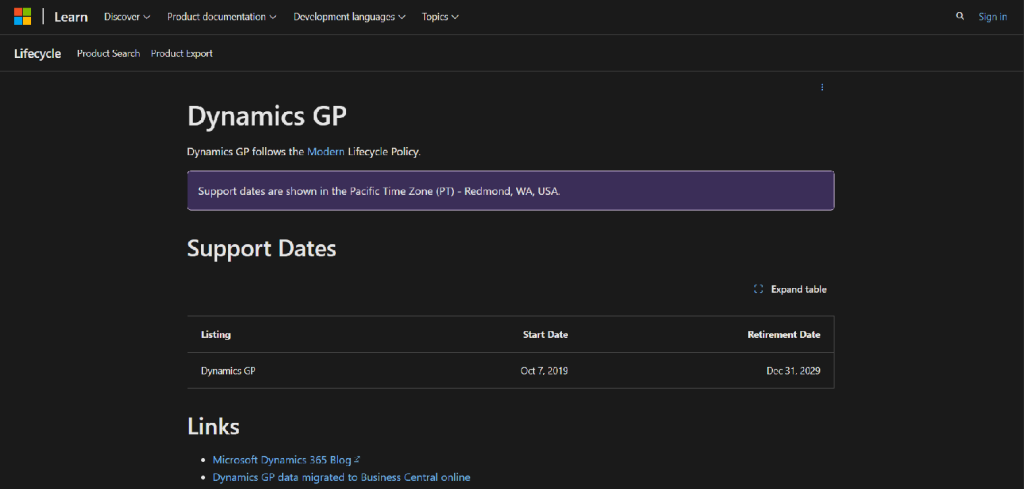
Microsoft has confirmed that Dynamics GP is officially in maintenance mode. Here’s what that really means:
- Through December 31, 2029: You’ll still receive product fixes, tax/regulatory updates, and limited enhancements.
- After January 1, 2030: Only critical security patches will be provided until April 30, 2031. No more feature updates, tax changes, or compliance improvements.
On paper, that may feel like plenty of time. But in practice, it puts every GP + WennSoft customer on borrowed time. The longer you wait, the greater the risks:
- Security exposure: Once updates stop, your system becomes a bigger target for vulnerabilities.
- Compliance issues: No tax or regulatory updates means you could fall out of compliance.
- Shrinking talent pool: Developers skilled in GP’s Dexterity and VBA are retiring, making support harder and more expensive to secure.
- Cost of delay: Migration gets more complicated (and costly) the longer you hold off. Data conversions, integrations, and retraining stack up quickly.
The bottom line? GP will still run for a while, but it’s no longer evolving. Every dollar spent keeping it alive is a dollar not invested in modernizing your business.
“I went into a company in Florida that handled maintenance for Walmarts across the U.S. They had two full-time employees whose only job was pulling information out of WennSoft and putting it into Excel every day.” — Tom Shooter
Dynamics GP Field Service (WennSoft) vs Business Central + ExpandIT
When organizations begin evaluating alternatives to Dynamics GP Field Service, the comparison is rarely just about features. It’s about architecture, scalability, mobility, and whether the platform can realistically support service operations five or ten years from now. At this stage, many teams realize they’re not just replacing FSM software — they’re evaluating a full field service ERP.
Field service management in GP (powered by WennSoft) was built for an on-premise world. Business Central field service, when paired with ExpandIT, is designed for cloud-first service organizations that rely on mobile technicians, real-time visibility, and tight integration with Microsoft 365.
Below is a side-by-side comparison that highlights the most meaningful differences.
| Feature | WennSoft (GP) | ExpandIT (BC) |
|---|---|---|
| Platform | On-premise, legacy (Dexterity) | Cloud-native (AL, SaaS) |
| Customization | Rigid, expensive | Modular, AppSource-based |
| Mobile | MobileTech (middleware, dated) | Native mobile apps (field-friendly) |
| UI/UX | Complex forms | Streamlined, modern UX |
| Usability | Complex forms, steep learning curve | Streamlined UX for techs & dispatchers |
| Upgrade Path | Manual, expensive, risky | Automatic with subscription |
Business Central + ExpandIT offers:
- Faster deployment and lower upfront costs
- Built-in scalability for growing teams
- Modern mobile tools that increase technician productivity
- A clear, future-proof upgrade path
While Dynamics GP Field Service can still function today, it requires increasing effort to maintain and support. Business Central + ExpandIT offers a modern alternative built for mobile teams, cloud scalability, and long-term growth.
For organizations evaluating field service management in GP, the decision is no longer about whether GP still works—it’s whether it can continue to support the business without holding it back. For many organizations, this evaluation includes comparing modern field service platforms across the market.
Pros and Cons: Dynamics GP + WennSoft
Pros:
- Mature product with decades of refinement
- Purpose-built for field service contractors
- Robust job costing and dispatching features
Cons:
- Built on Dexterity (rigid, outdated, and expensive to maintain)
- Customizations break easily and require rare legacy developers
- MobileTech is clunky, middleware-heavy, and frustrating for techs
- Upgrades are costly, risky, and often postponed indefinitely
- Innovation has slowed to a halt—no meaningful new features
Pros and Cons: Business Central + ExpandIT
Pros:
- Cloud-native, subscription-based architecture—no servers, no manual upgrades
- Rapid deployments (6–8 weeks possible vs. 3–6 months with GP)
- Seamless integration with Microsoft 365 (Outlook, Teams, Excel)
- Modern, intuitive mobile apps that reduce technician paperwork time
- Customizations handled through modular apps that survive upgrades
Cons:
- Some missing out-of-the-box service functionality compared to Wennsoft
- Shifts some processes toward modern workflows, which may require user retraining
Implementation Timeline: Dynamics GP Field Service vs BC + ExpandIT
| Solution | Timeline | Challenges | Architecture |
|---|---|---|---|
| Dynamics GP + Wennsoft | 3 to 6+ months | Payroll setup, MobileTech config, complex job costing | Built on Dexterity & VBA |
| Business Central + ExpandIT | 6 to 8 weeks (typical) | May require custom apps for niche workflows | AL-based, extensible via AppSource |
Implementing GP + WennSoft has always been a heavy lift. The legacy architecture, complex interdependencies between modules, and manual setup of components like MobileTech mean projects often drag on for 3–6 months (or longer). Payroll, job costing, and dispatching setups require deep customization, which only adds to delays and costs.
By contrast, Business Central + ExpandIT is designed for speed. Because it’s cloud-native and built with modern extensibility in mind, implementations can often be completed in 6–8 weeks—sometimes faster for small and mid-sized service teams.
What makes it faster?
- Pre-built templates streamline job costing, service orders, and dispatch setup.
- ExpandIT apps layer on top of Business Central without the need for complex middleware.
- Microsoft 365 integration (Outlook, Teams, Excel) reduces the learning curve and accelerates user adoption.
- Automatic upgrades mean you implement once, then stay current without repeat disruption.
Support, Customization, and Upgrade Path
WennSoft + GP: Customizations are often deeply embedded, requiring legacy developers and expensive support hours. Upgrades are manual and risky, with many companies postponing them indefinitely.
ExpandIT + Business Central: Customizations are done via apps, allowing upgrades to continue seamlessly. Updates and new features are included with SaaS licensing, ensuring long-term viability.
“Every minute a GP developer spends retrofitting old VBA code is a minute a BC user spends innovating with low-code apps.” – Tom Shooter, ERP Consultant
Mobile Experience: Where Field Service Management in GP Falls Furthest Behind
For most service organizations today, the field is where the work actually happens. Technicians spend their days scheduling jobs, traveling between sites, capturing labor and materials, documenting work, and closing service calls. This makes mobile capability one of the most critical weaknesses in field service management in GP.
While Dynamics GP Field Service does offer mobile functionality through WennSoft MobileTech, the experience reflects the era in which it was built.
Mobile Reality With Dynamics GP Field Service
In a typical GP + WennSoft environment, mobile access depends on middleware that syncs data back to the core GP system. This introduces friction at nearly every step of a technician’s day.
Common issues include:
- Slow or unreliable data synchronization
- Clunky user interfaces not designed for touch
- Limited offline functionality in basements, rural areas, or job sites
- Extra steps to log time, materials, photos, and signatures
These inefficiencies add up quickly. When basic tasks take longer than they should, technicians either delay data entry or rely on paper notes—both of which reduce data accuracy and billing speed.
“Something as simple as logging time or closing a ticket can take far longer than it should. When technicians are fighting the system, productivity drops—and data quality goes with it.”
— Tom Shooter, Business Central Consultant
How Business Central + ExpandIT Changes the Mobile Equation
By contrast, Business Central + ExpandIT was designed with mobile-first execution in mind.
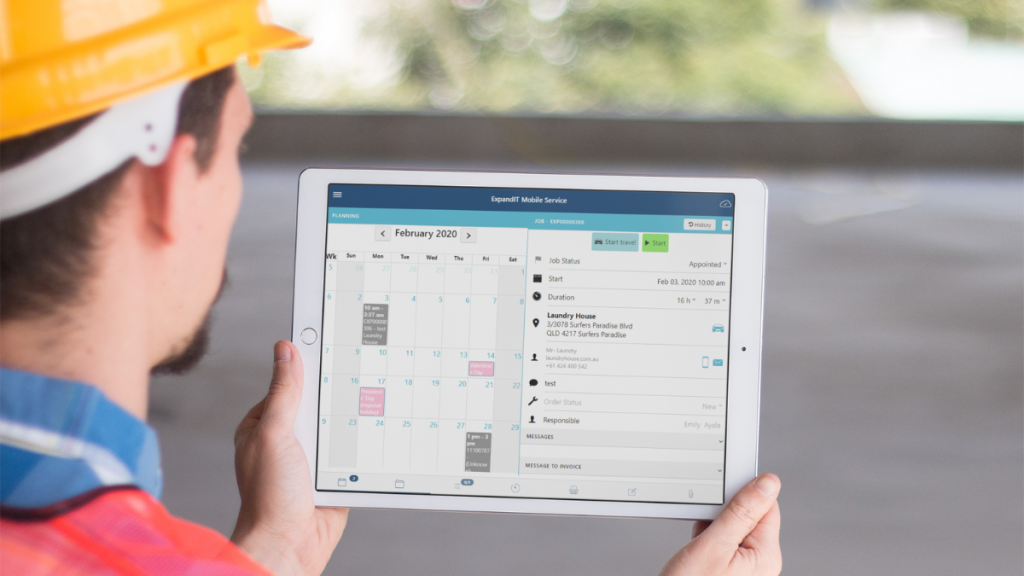
ExpandIT provides native mobile applications that run on iOS, Android, and Windows devices, giving technicians a modern, intuitive experience without middleware complexity.
Key mobile capabilities include:
- Touch-friendly service order management
- Time, material, photo, and signature capture in real time
- Offline access for low-connectivity environments
- GPS-enabled dispatch and route visibility
- Real-time synchronization with Business Central
Instead of forcing technicians to adapt to back-office software, ExpandIT adapts the software to how technicians actually work in the field.
The Operational Impact of Better Mobility
The difference between legacy and modern mobile tools shows up in measurable ways:
- Faster job completion and fewer errors
- Improved first-time fix rates
- Shorter billing cycles
- Higher technician adoption and satisfaction
For organizations still relying on Dynamics GP Field Service, mobility often becomes the breaking point—the moment when spreadsheets, workarounds, and manual follow-ups become unavoidable.
In contrast, Business Central + ExpandIT turns mobile execution into a competitive advantage rather than a constraint.
Recommendation Summary
If you’re a current GP + WennSoft customer, here’s what you need to know:
- Support for GP ends in 2029. No new features or meaningful innovation is planned.
- WennSoft’s future is uncertain. Limited updates, aging tech, and complex upgrades.
- ExpandIT + BC is modern, scalable, and field-ready. Deploy in weeks, not months.
Best Fit For:
- Field service teams with 5–25+ technicians
- HVAC, mechanical, installation, and maintenance firms
- Companies looking for a modern, cloud-first ERP strategy
Conclusion
Dynamics GP and WennSoft had their time, but that time is ending. With GP support winding down and WennSoft offering little innovation, staying on the old system is less about stability and more about delaying the inevitable.
On the other hand, Business Central + ExpandIT offers:
- Faster, more affordable implementations
- A modern, cloud-first platform that scales with your business
- Intuitive mobile tools that boost technician productivity
- Seamless upgrades and continuous innovation from Microsoft
The choice is clear: you can continue pouring money into a legacy system that’s running out of road—or you can transition now and build on a platform designed for the future.
Don’t wait until migration becomes urgent and costly. Contact Service Dynamics today for a personalized walkthrough of Business Central + ExpandIT and see how your field service operations can thrive in the cloud.
Frequently Asked Questions (FAQ)
Is Dynamics GP Field Service still supported?
Yes, Dynamics GP is still supported, but only in maintenance mode. Microsoft has confirmed there will be no new feature development. Support gradually winds down through 2029, with only critical security patches available until 2031. This means GP will continue to run, but it will not evolve to meet modern field service requirements.
What does “maintenance mode” actually mean for GP users?
Maintenance mode means Microsoft will provide bug fixes and limited regulatory updates, but no innovation. There are no roadmap features planned, no modernization of mobile tools, and no cloud-native improvements. Over time, this increases security risk, compliance risk, and operational cost.
Can Dynamics GP Field Service still work for my business today?
Yes, GP Field Service can still function today, especially for organizations with stable processes and limited mobility needs. However, it increasingly relies on workarounds, manual reporting, and legacy development. For growing or technician-heavy service teams, these limitations often become operational bottlenecks.
What are the biggest limitations of GP Field Service today?
The most common challenges include:
– Outdated mobile experience (MobileTech middleware)
– Manual, risky upgrades
– Limited real-time visibility
– Reliance on scarce GP developers
– Poor alignment with Microsoft 365 and cloud workflows
These issues tend to worsen as service teams scale.
Why are companies moving from GP Field Service to Business Central?
Companies move to Business Central because it provides a cloud-native ERP foundation, automatic upgrades, modern security, and tight Microsoft 365 integration. When paired with ExpandIT, it also delivers the mobile, scheduling, and dispatch capabilities that GP struggles to support.
Is Business Central alone enough for field service?
For light service or back-office–focused teams, Business Central’s native Service Management module may be sufficient. However, technician-heavy organizations typically need ExpandIT to support mobile apps, advanced scheduling, dispatch boards, offline access, and field execution workflows.
What does ExpandIT add to Business Central for field service?
ExpandIT adds:
– Native mobile apps (iOS, Android, Windows)
– Drag-and-drop dispatch and scheduling
– Offline field access
– GPS-enabled routing and visibility
– Real-time sync with Business Central
It fills the operational gaps that Business Central alone does not address.
Is migrating sooner better than waiting until GP support ends?
Yes. Waiting increases risk and cost. Over time, GP talent becomes harder to find, integrations age, and data cleanup becomes more complex. Organizations that migrate earlier typically experience lower project risk, smoother adoption, and faster ROI.
What happens if we do nothing and stay on GP?
GP will continue running for a time, but costs and risk rise steadily. Organizations often see increasing manual work, declining technician adoption, slower reporting, and growing dependence on spreadsheets. In many cases, staying on GP delays (but does not avoid) the eventual migration.